At Enterprise Connect 2024, Tim Albright from AVNation caught up with Dan Root from Barco to unveil the latest innovation: the ClickShare Bar. This revolutionary product integrates the ClickShare Conference core capabilities, allowing users to seamlessly control microphones, cameras, and speakers from their devices.
The ClickShare Bar comes in two variations: Core and Pro, with the latter supporting features like dual displays and wired room fallback. What’s more, each unit is equipped with a QR code for easy registration and a 5-year warranty.
Dan explained how Barco has evolved from traditional ClickShare to ClickShare Conference, catering to the demands of modern meeting spaces. With interoperability across various platforms and codecs, Barco ensures seamless integration for all users.
Curious to learn more about Barco and their innovative solutions? Visit Barco. Stay tuned for more insights from Enterprise Connect 2024!
In recent years, the audiovisual (AV) industry has witnessed a growing trend that is blurring the lines between residential and commercial solutions. I’ve written about it and argued with various industry pundits. Including industry associations. Resimercial is for real. But that term has sparked both enthusiasm and controversy among professionals. Resimercial, a combination of residential and commercial, refers to the convergence of AV technologies and design elements typically associated with homes and light commercial spaces such as bars, restaurants, and small offices. A
Home and away
Colin Clark, VP of Product at Russound, defines resimercial as an industry technical term used to describe products that could be deployed in both residential and light commercial applications. While the term may not be familiar to homeowners, it serves as a valuable tool for dealers and installers, indicating that a product’s capabilities extend beyond the residential realm.
“Resimercial can be a helpful education term for dealers, especially new dealers,” Clark explains. “When they see a product labeled as ‘resimercial,’ it helps them identify that it isn’t a product that is purely residential in scope and could be used for a commercial job. It opens up job opportunities when used with the dealer/installer audience.”
WFA with Resimercial
One of the most significant opportunities in light commercial is in conferencing. Video conferencing, UC, whatever you call it, is being installed in homes as well as offices. For those of you who work at home and in an office, don’t you want the same quality in both places? Having it be obvious you are WFH isn’t ideal. Whether that is audio or video, both should be high-quality regardless where you’re working that day. Commercial AV gear can be, and is being, installed in homes and the office.
On the other hand, using residential products in commercial settings is less common but not unheard of. Installers often rely on their relationships with clients and their familiarity with specific products when deploying them in light commercial projects.
Pro AV in Residential
Small Video Confernece
Tim Stevens, Territory Sales Manager at the Nutech Group, views resimercial as the blending of technologies typically used in residential installations with those used in light commercial installations. He points out that small businesses are enhancing their services and defining spaces with AV solutions such as video walls, videoconferencing, and improved audio systems.
“Homes boast an array of displays, cameras, and audio zones, all supported by a secure and robust networking infrastructure akin to what’s found in commercial projects,” Stevens says. “This crossover of residential and commercial technologies has created a rapidly growing resimercial market where residential installers can use their AV expertise.”
DIY or Resimercial
Entering the light commercial market comes with its own set of challenges. Installers must consider factors such as access, network administration, and the varying needs of unknown users in commercial environments.
Taft Stricklin, Sales Team Manager at Just Add Power, suggests that some in the industry view the term resimercial as describing basic commercial projects done by residential installers with mostly residential products. “I recently saw a retail store install and the products the integrator installed were mostly DIY products for networking and music. My first thought was the word, ‘resimercial,’” Stricklin shares.
Despite the debates surrounding the term, the resimercial trend continues to gain momentum. Integrators are increasingly taking on light commercial projects, leveraging their expertise in residential AV to create inviting and functional spaces in businesses.
Performance Considerations
Restaurant AV
Seth Johnson, Software Development Manager at Blackwire Designs, highlights the opportunities for both residential and commercial integrators in the resimercial space. “We’ve seen countless residential companies bring on board enterprise-grade networking and video products into homes. While these products may cost more and provide fewer cutting-edge features, their reliability and performance over time saves the integrator and homeowner,” Johnson explains.
Bill Hensley from RTI emphasizes that the focus should be on specifying a system that addresses the customer’s needs, regardless of whether a product is typically used in residential or commercial settings. “Whatever the project, whatever the vertical, the successful integrator is specifying products that best fit the need, not saying ‘this one should work anywhere,’” Hensley advises.
Aesthetics of AV
Joe Whitaker from Origin Acoustics proposes a redefinition of resimercial, focusing on blending the lifestyle and styling of residential technologies into commercial settings. “Turning a boring waiting room into a residential-style lounge is an example. Making spaces more about the people than the purpose should be what resimercial is all about,” Whitaker suggests.
As the AV industry continues to evolve, the resimercial trend is poised for growth. Integrators who can successfully navigate the challenges and opportunities presented by this blurring of lines will be well-positioned to thrive in an increasingly diverse market. By understanding the unique requirements of both residential and commercial environments and selecting products that best fit the needs of each project, integrators can deliver innovative and impactful AV solutions that enhance the user experience, whether at home or in a light commercial setting.
Resimercial or Light Commercial
The light commercial revolution is not just about the convergence of technologies; it’s about creating spaces that prioritize the well-being and comfort of the people who inhabit them. As the industry continues to embrace this trend, we can expect to see a more seamless integration of residential and commercial AV solutions, ultimately leading to more engaging, functional, and inviting environments in both homes and businesses alike.
In the presentations I’ve given to people over the last two decades, I usually referred to Unified Communications (UC) as the only technology that has been “launching” for over twenty years. It took just about that long for the promises of UC&C to actually come close to being delivered – and I’m using that word ‘close’ intentionally because even as far as we’ve come, we still have much more to do.
The promise of UC, in a nutshell, is to be able to communicate with anyone we’d want to from any device and from any location where we happen to be, with full access to our files and documents, and with the ability to use any modality of communications (an email, an instant message, a group message, an audio call, a video call) and with it allowing for any desired escalation between each modality.
UC Interrupted
Just yesterday I (a pretty fluent UC expert) was on my personal PC messaging with one of the leading industry analysts, and as we tried to exchange a file (something we’ve done hundreds of times before) we received this message:
File Blocked
Figure 1: Actual Collaboration Platform Error Message
Neither one of us could figure out why that happened or what the message (or the link to explain it) meant, so we simply sent the (thoroughly scanned and malware-free) file via a different UC platform and just shrugged off the error.
That’s actually a representation of the last frontier of UC&C – making it work across enterprises, platforms, and brands – regardless of any security restrictions – so that people who are not experts in the field like us won’t get frustrated and stop using it. As more of our UC&C activities take place on general compute platforms and utilize BYOD solutions, the variability of experiences tends to grow exponentially. The users’ experience of a lack of consistency and reliability are definitely two of the biggest issues facing the UC&C space today. However, they are not the only issues.
Where We Are And How We Got Here
Those of us who work in the industry often refer back to the horrific pandemic as the reason people can now understand what we do for a living. Having worked in and around videoconferencing for decades, I can attest to the fact that the change in perception of videoconferencing during the pandemic was nothing short of phenomenal. Our industry used to have to go to great lengths to get people to turn on their cameras and/or make calls, as the general public had either a disdain for using the technology or a fear that it would not work. The prevailing perception today, however, is essentially the complete opposite. While that is an extremely positive development for the use of UC&C in everyday use, this flipping of the script now carries with it significant risk for usage that did not exist before.
Before the pandemic, when a call with any organization didn’t work, it was filed in the users’ minds as a quirk of the unreliable technology. Now that we are much more familiar with the technology and use it for many parts of our at-home, personal lives, we expect it to work correctly everytime in the enterprise. When it doesn’t work, we are far quicker to blame the chosen technology as the reason for the failure.
At the same time, the room-based collaboration device market itself has changed. High-quality videobars were new in 2019, drastically reducing the entry point cost for this application. In five short years, they have gone from game-changing innovation to industry commodity. Seemingly now every manufacturer has their own version of this form factor, with some boasting differentiating features like vertical mounting or wireless sharing, but most simply being an inexpensive option for equipping a room. Pioneers in the collaboration space have been snapped up by larger equipment companies, also commoditizing the products that are meant for the market. In addition, multiple new, smaller entrants into the collaboration market have further commoditized the low end of the space.
The larger integrated rooms are also evolving in many cases. Features like microphone pick-up automatically selecting the correct camera zone – something that would have required an expensive and complex to program control system in the past – are now built into some of the microphone arrays and cameras. AI and Machine Learning are also driving capabilities that would have been unheard-of five years ago without an AV or production ‘crew.’
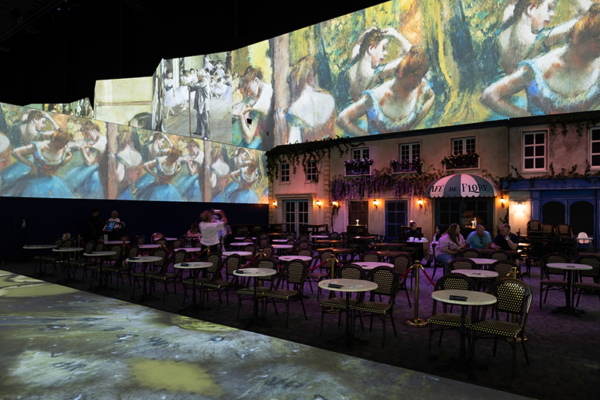
Not every entry into the space is completely new. Some of us who have been around for a while nearly fell off our chairs when the ‘latest immersive rooms’ hit the market.
History Lesson
Figure 2: “Those Who Cannot Remember The Past…”
The Age Of AI in UC
We have clearly entered the age of Artificial Intelligence (AI), and UC is hardly immune from its advances and effects. While it has been around for a while, “hiding in plain sight” supporting machine learning as some analysts like to point out, AI assistants and Large Language Models (LLMs) are exploding across UC&C platforms. These tools can help you summarize meetings, send out notes, interpret emotions, schedule follow-ups, complete documents and emails, and do any number of additional amazing and productivity-enhancing activities. If you expect to be working in a professional capacity for at least the next few years you had better familiarize yourself with how these tools work and what they can do. Using them ranges in cost from free to thirty dollars per month per user, depending on which ones you select. It costs the platforms that provide them quite a bit to maintain and operate the large computing engines and data centers that support them, so each platform is monetizing it differently per their individual go-to-market strategies.
While becoming fluent in what these AI assistants can do is wise, having your business depend upon them at this point probably is not. There is a large cloud of litigation hanging over how these LLMs were trained, with a huge number of authors and news organizations putting forth easily provable claims of copyright infringement that will need to be settled via negotiations or in court. In the last report, all sides are very far apart.
Future of UC
While the concept of unified communications was started in the late 1990s, its completion will likely never be achieved. The evolution of hardware, platforms, and in fact society will force it to keep adapting and improving. The challenge will always be that all end-users ‘just want it to work,’ yet each individual likely has a different definition of what ‘work’ means to them. Additionally, user expectations and market forces sadly tend to work in opposite directions.
Still, even with all of the hiccups, we are now far more capable of communicating with colleagues and customers from any device and location than we ever were before.
Crestron’s Modern Work Summit brought together industry leaders and experts to discuss the latest trends and innovations shaping the future of the workplace. Among the key topics explored was the increasing role of artificial intelligence (AI) in transforming how we work and interact with technology. The summit provided valuable insights into how AI in AV is being integrated into various aspects of the modern workplace, from video and audio to natural language processing and productivity.
Modern Work AI
One of the standout presentations was delivered by Nicole England from Intel, who emphasized that we are at the dawn of an age where AI is everywhere. She highlighted the convergence of AI in our work and homes, with the PC becoming our digital meeting space, connecting us to content and colleagues. England also discussed the three pillars of AI: reactive, predictive, and generative, and how AI is moving from being a personal assistant to a personal agent.
The summit also featured a thought-provoking discussion from Andy Ellis on the challenges and benefits of setting up a modern workplace. Ellis emphasized the importance of giving employees choices and using AI to enhance their experience without being intrusive. They also highlighted the potential of AI in AV to detect trends in working habits, consumption data, and preferences over time, allowing for continuous improvement of the workplace.
Leveraging AI in AV
Dave Hatz, Kelby Green, and Dan Noulett sat down for a discussion about reinventing the modern office. The panel talked about the importance of focusing on outcomes rather than just technology. Organizations need to identify their unacceptable losses and work towards mitigating them. The panel also discussed three key opportunities for AI in the workplace: providing technical power to non-technical users, enabling personalization, and leveraging sensors everywhere. To succeed in implementing AI in AV, the panelists stressed the importance of clarifying outcomes, engaging specialists, and not waiting for perfection.
Crestron Modern Work Summit Craig Durr
Craig Durr from Futurum emphasized that people go to the office for collaboration, concentration, socialization, and learning. He argued that AI in AV will work best in the workspace when it’s not seen, seamlessly integrating into the background to support these activities. Durr also shared insights on how to make hybrid work effective, including recognizing the limitations of a “set and forget” approach, teaming up with HR, facilities, and corporate real estate, and utilizing hybrid work as a tool to support corporate goals rather than making it a goal in itself.
Meryn Corrigan from Microsoft highlighted the aspects of her company’s innovations. Term AI is not just a theory for the software giant. With Copilot, they are introducing tools to take notes, make meeting equity a reality, and leverage some AI in AV tools to make meetings better. Corrigan said Microsoft has released over 100 advancements and updates leveraging AI and looks to add more to the capabilities.
AI in AV work
Throughout the summit, it became clear that AI is not just a buzzword but a transformative force that is already reshaping the modern workplace. As organizations navigate the challenges and opportunities presented by hybrid work and the ever-evolving technology landscape, embracing AI will be crucial to creating a more efficient, personalized, and engaging work environment.
Crestron’s Modern Work Summit provided a platform for industry leaders to share their experiences, insights, and strategies for harnessing the power of AI in the workplace. As we move forward, it’s evident that the successful integration of AI will be a key differentiator for organizations looking to thrive in the future of work. By staying at the forefront of these developments and collaborating with partners like Crestron, companies can create workspaces that not only support their employees’ needs but also drive innovation and growth in the years to come.
Extron’s AV solutions elevate experiences through cutting-edge technologies, enhancing image clarity, sound quality, and system reliability, while also providing robust asset management tools for efficient oversight of large-scale AV systems.
ConferenceShare is a solution that seamlessly integrates local room cameras and microphones into Unified Communications (UC) meetings by sharing video and audio captured by in-room USB devices with Windows or macOS laptops during Teams or Zoom meetings. It works in conjunction with Extron‘s ShareLink Pro Wireless Presentation Systems and software to enhance collaboration and engagement in hybrid environments.
ConferenceShare addresses the growing need for incorporating in-room resources, such as cameras and microphones, into remote meetings in hybrid environments. By leveraging existing USB devices and ShareLink Pro systems, it simplifies the process of sharing content and enhances the overall meeting experience for both on-site and remote participants, leading to more engaging and productive meetings.
As hybrid environments become more common, seamlessly integrating local room cameras and microphones into Unified Communications meetings has become imperative. ConferenceShare offers a solution by effortlessly sharing video and audio captured by in-room USB devices with Windows or macOS laptops during Teams or Zoom meetings. With ConferenceShare enabled on their laptop, users gain access to USB devices connected to the ShareLink Pro Wired and Wireless Presentation System, simplifying the process of incorporating in-room resources in remote meetings. Experience the convenience of wireless integration with ConferenceShare and ShareLink Pro, making in-room USB devices readily available for enhanced collaboration.
“We’re excited to introduce ConferenceShare, the latest innovation to our renowned ShareLink Pro Wireless Presentation Systems,” says Casey Hall, Chief Marketing Officer for Extron. “Empowering your ShareLink Pro systems, ConferenceShare seamlessly integrates local room cameras and microphones, bridging the gap between on-site and remote participants and fostering more engaging and productive meetings.”
ConferenceShare works in conjunction with ShareLink Pro software and ShareLink Pro 1100 and ShareLink Pro 500 units to not only share content from a user’s local computer, laptop, or mobile device to the room display, but also share video and audio from a local USB camera or microphone with remote participants using Teams or Zoom. It also supports integration with Microsoft 365 Calendar to streamline UC meeting connections. Adding ConferenceShare features to a ShareLink Pro system expands wireless sharing capabilities beyond the local room to any location via Teams or Zoom. ConferenceShare requires an Extron LinkLicense on the ShareLink Pro unit connected to the USB room devices.
Atlona, a Panduit company, is a manufacturer of AV distribution, AV over IP, collaboration, and control solutions, focusing on improving technology for idea sharing through innovative products used in commercial and educational applications.
Atlona has introduced two new 3×1 switchers, the AT-OME-CS31-SA and AT-OME-CS31-SA-HDBT, as part of its Omega Series of AV presentation and collaboration products. These switchers are specifically designed for learning and meeting spaces, offering features such as AV switching, USB routing, audio mixing, amplification, and control integration into a compact enclosure.
The switchers are tailored to meet the specific needs of different environments within learning and meeting spaces. The OME-CS31-SA is ideal for local switching applications, while the OME-CS31-SA-HDBT accommodates remote and local AV switching, extending HDMI, Ethernet, power, control, and USB 2.0 data up to 100 meters. Special capabilities for education applications include audio ducking, automatic muting for school public address announcements, and USB routing capabilities suited for corporate and education environments. These switchers aim to provide comprehensive AV solutions for modern classrooms and workspaces.
Atlona continues to grow its Omega Series of AV presentation and collaboration products with two new 3×1 switchers ideally suited for learning and meeting spaces. Available immediately, the AT-OME-CS31-SA (three HDMI® inputs) and AT-OME-CS31-SA-HDBT(one HDBaseT™ input and two HDMI inputs) both consolidate AV switching, USB routing, audio mixing, amplification, and control into a low-profile enclosure.
The OME-CS31-SA and OME-CS31-SA-HDBT primarily share the same feature set, with key variances in AV switching and USB capabilities to meet specific requirements. The OME-CS1-SA is built for local switching applications that place its inputs close to the switcher and display, such as a classroom where the instructor’s desk is positioned near the front wall. The OME-CS31-SA-HDBT accommodates remote and local AV switching and is therefore most effective when an input is further from the switcher, such as at an instructor’s lectern in the room or if the switcher is mounted by a projector. The remote input of the OME-CS31-SA-HDBT supports extension of HDMI, Ethernet, power, control, and USB 2.0 data up to 100 meters (330 feet).
The two switchers add special capabilities for education applications that ensure important lesson material and announcements are heard clearly. This includes audio ducking which lowers program audio levels when the instructor speaks into a microphone system connected to the balanced input. Additionally, the system can be muted by contact closure or automatically when a school public address announcement is detected. Other audio capabilities include an on-board mixer for combining three line inputs, de-embedded HDMI, and USB audio as well as 2 x 25 watt amplifier and line level outputs.
USB routing capabilities are well suited for corporate and education applications. Both OME-CS31 models support switching between two host devices and include a four-port hub for connecting cameras, speakerphones, interactive displays or other peripherals. Automatic display control and auto-switching allow the OME-CS31-SA and OME-CS31-SA-HDBT to automate system operation over their various Ethernet, serial, and trigger ports, or they can be integrated into environments with an Atlona Velocity™ control system.
“The Omega Series has evolved into our broadest product line, with an increasingly diverse range of switching and extension solutions to address the AV needs of any modern classroom or workspace,” said Tommy Gay, Product Manager, Atlona. “The OME-CS31-SA and OME-CS31-SA-HDBT bring together several key engineering strengths from Atlona across switching, audio, USB, and control to offer our customers all-in-one room solutions.”
Yamaha, a company dedicated to sound and music, offers unified communications solutions that enhance communication and help organizations achieve business goals. Their audio and video conferencing solutions, designed with quality-driven manufacturing, are available both wired and wirelessly, ensuring clear, natural conversations in any meeting room.
Yamaha Unified Communications has announced a firmware update (V2.5.0) for its ADECIA conferencing solutions, introducing new features such as a Combine/Divide Room Wizard, preset recall function, improved external device control, easy RADIUS security configuration, and optimized Dante settings.
The firmware update enhances user experience, simplifies room configuration with features like Combine/Divide Room Wizard and preset recall, improves control over external devices, offers easy RADIUS security configuration for network safety, and optimizes Dante settings for better audio performance, showcasing Yamaha’s commitment to innovation and quality in conferencing solutions.
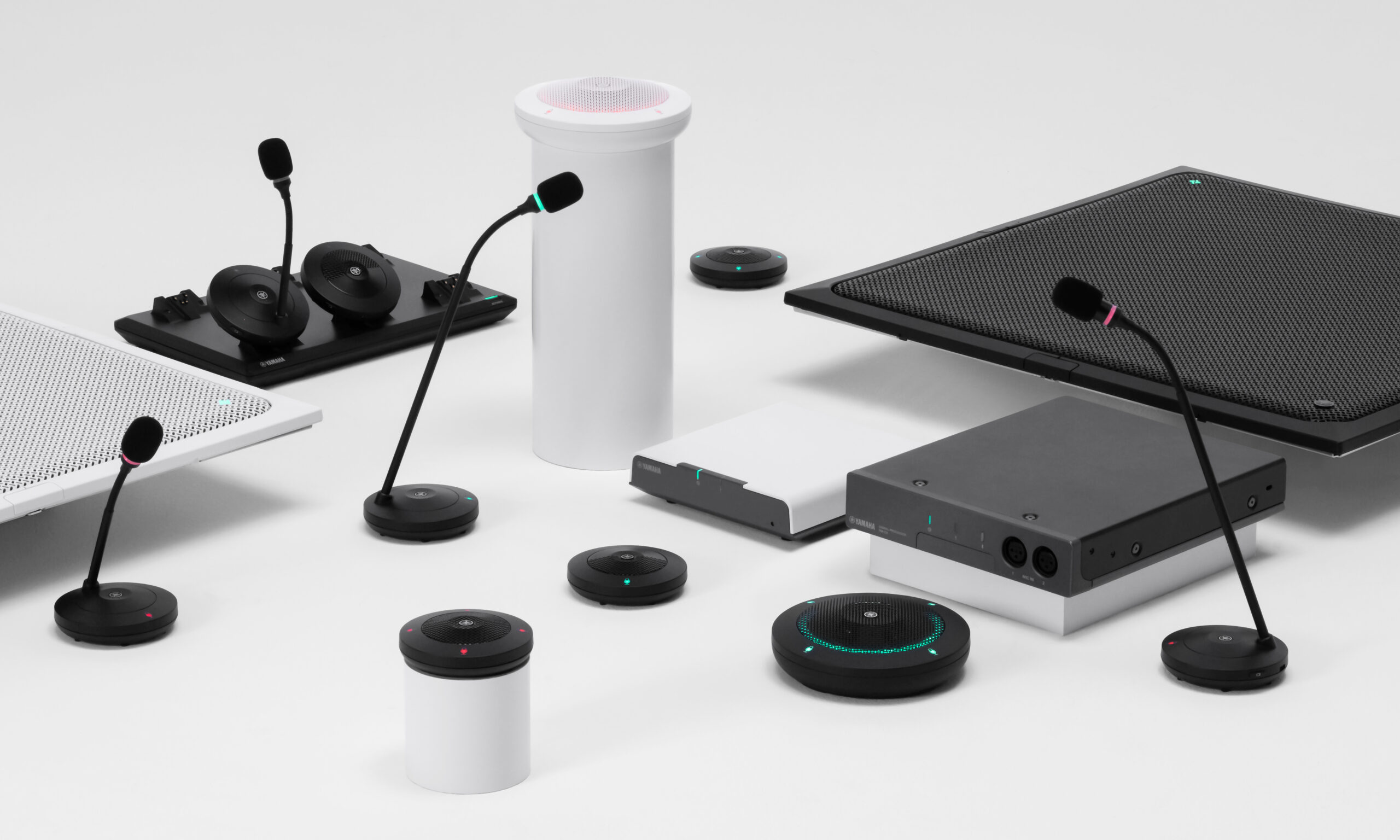
Yamaha Unified Communications has announced a new firmware update to its ADECIA conferencing solutions, consisting of the RM-CG Ceiling Microphone, RM-CR Audio Processor, RM-TT Tabletop Array Microphones and RM-W Wireless Microphones. The V2.5.0 update delivers several exciting new features and improvements, including a Combine/Divide Room Wizard, a preset recall function, improved external device control, easy Remote Authentication Dial-In User Service (RADIUS) security configuration and optimized Dante settings.
“The enhancements and additional features of ADECIA serve to underscore its distinctiveness in comparison to the competition,” said Laura Madaio, Director of Marketing at Yamaha Unified Communications. “These products were designed to elevate user experience and redefine industry standards, while still maintaining the highest-quality, worry-free audio. Innovation meets functionality in every upgrade within this V2.5.0 firmware, setting a new benchmark for Yamaha excellence.”
Included in firmware V2.5.0 of the ADECIA RM Device Finder is a Divide/Combine Room Wizard, which enables users to create presets for Divide/Combine Rooms easily. This update gives users the ability to set up multiple RM-CRs and other connected devices at once.
Additionally, the new firmware allows for multiple RM-CRs to be recalled at the same time, eliminating the need for individual recalls. External device control has also been improved, allowing commands to be sent from the RM-CR to external devices to control them. This means that cameras, displays or similar devices can be controlled directly from the RM-CR.
RADIUS Server security easy configuration functionality has been added to ADECIA, providing a simple and secure way to implement the highest level of network security. with just a few clicks the RADIUS server can be set up and configured, even for those without in-depth network knowledge.
Lastly, Dante optimization settings have been improved, allowing users to easily check settings from the ADECIA side. This feature is supported by the ADECIA RM-CR, RM-CG, and RM-TT.
Yamaha’s ADECIA conferencing solution provides complete and customizable audio for any meeting or learning space. The system comprises the RM-CG Ceiling Array Microphone, RM-TT Tabletop Microphones or RM-W Wireless Microphones, RM-CR processor, Yamaha’s long-trusted PoE switches, and VXL Series line array speakers. The system immediately detects all components and optimizes its configuration for the room environment, accounting for the location of speakers and microphones, reverberation, and echo behavior. Setting up a room is done through the system’s configurator in four effortless steps. With USB, Bluetooth®, Dante, and analog connections, this flexible system can fit a variety of meeting and learning spaces.
RTI offers intuitive control and automation solutions for smart homes and businesses, programmed and customized using RTI Integration Designer® software, available worldwide through authorized dealers and distributors.
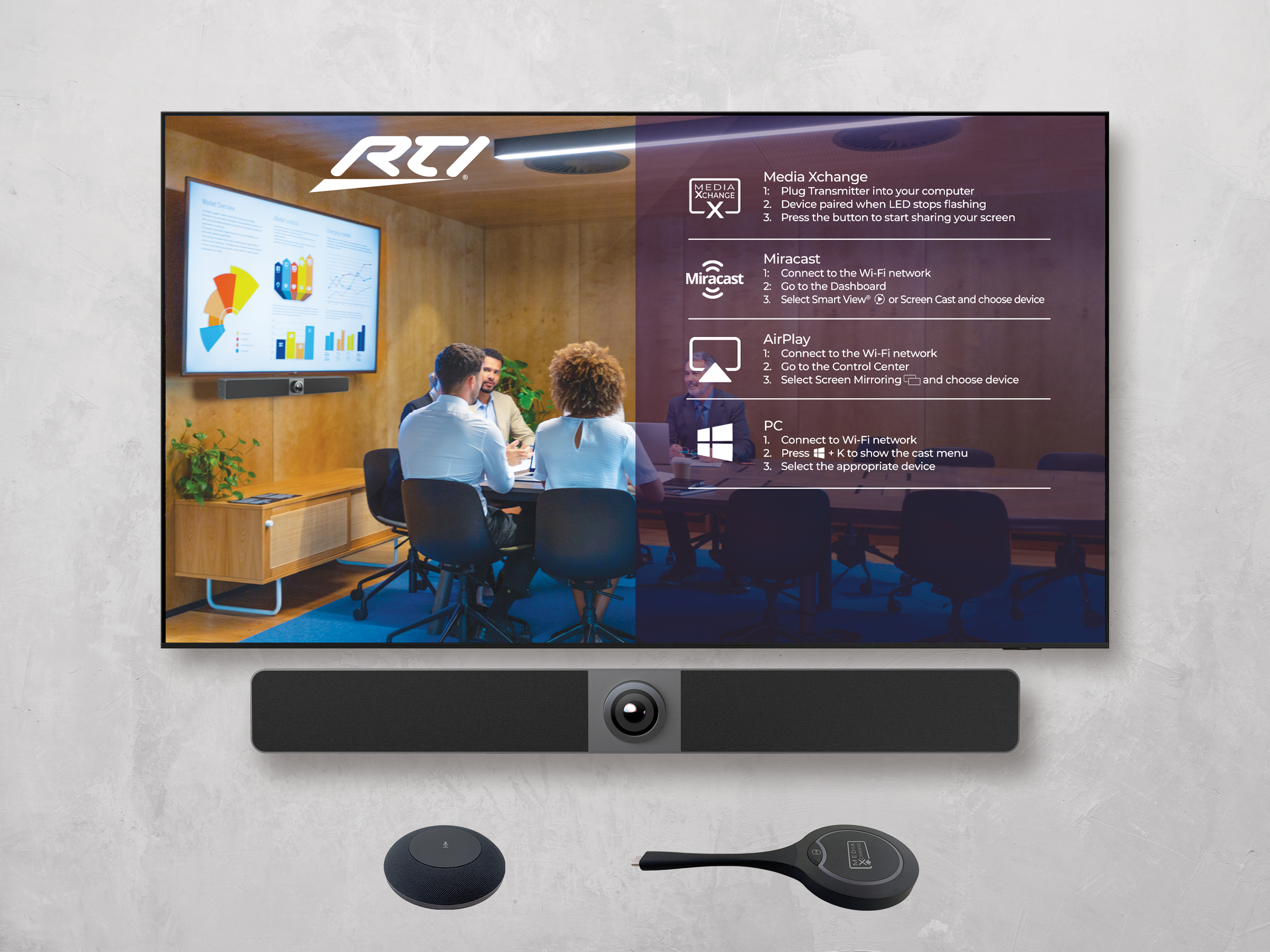
RTI is now shipping its new collaboration solution called Intelligent Meetings, designed for various meeting spaces from huddle rooms to large conference rooms. The system includes the UC-IVB-50 4K Intelligent Video Bar, UC-MXT Media Xchange Transmitter, UC-IVB-EXM Expansion Microphone, and UC-IVB-TM Display Mount, offering features like AI-enabled camera, autoframing, presenter tracking, speaker tracking, audio pickup, full-range speakers, and compatibility with leading video conferencing platforms.
Intelligent Meetings aims to provide an intuitive and seamless meeting experience in today’s hybrid work environment, enhancing collaboration through clear audio, high-quality video, and easy connectivity for both in-room and remote participants. The system integrates with RTI control systems and other control systems, offering a comprehensive solution for effective and efficient meetings.
Leading control and automation manufacturer RTI is now shipping its new collaboration solution — Intelligent Meetings. From huddle spaces to large conference rooms, Intelligent Meetings enables the audio, video, and easy collaboration needed in today’s hybrid work environment. Compatible with leading video conferencing platforms, Intelligent Meetings makes every meeting an in-person meeting. The ecosystem integrates natively into RTI systems and operates as a stand-alone solution, as well as with other control systems.
It starts with an intuitive meeting room experience to get the meeting started on time, with clear instructions on the customizable welcome screen for all presenters and guests, including Wi-Fi connectivity information and the multiple connection options that ensure seamless transitions between collaborators. The ecosystem is anchored by the UC-IVB-50 4K Intelligent Video Bar and includes the UC-MXT Media Xchange™ Transmitter, UC-IVB-EXM Expansion Microphone, and UC-IVB-TM Display Mount.
Built for 4K collaboration, the Intelligent Video Bar displays up to two sources simultaneously, while its AI-enabled, 120-degree field-of-view camera enables autoframing, presenter tracking, and speaker tracking. The four-MEMS linear microphone array directs audio pickup wherever needed, while full-range speakers deliver room-filling sound. The result is that remote attendees enjoy a more in-the-room experience — seeing who is talking and hearing them clearly. For those in the room, the stereo speakers with bass radiators elevate the audio experience.
“The Intelligent Meetings ecosystem is designed to work seamlessly with the customer’s collaboration platform of choice, including Zoom and Teams,” said RTI Director of Product Management Neal Ellsworth. “It integrates seamlessly into RTI control systems, combining essential room control with an exceptional meeting room experience in a single-brand solution.”
For wired BYOM connectivity, the UC-IVB-50 boasts a 4K UHD HDMI input and USB 3.0 or USB-C. For wireless BYOD connectivity, it supports AirPlay and Miracast with soft AP for internet sharing, while the UC- MXT Media Xchange Transmitter enables plug-and-present content sharing. Up to two UC-MXT transmitters can be connected concurrently, delivering ultralow-latency 1080p 30Hz video transmission. Users simply connect their compatible laptops or mobile devices to the system via USB-C — all without the need for any additional software or configuration. A privacy button allows for quick access to screen pausing.
For larger spaces, the UC-IVB-EXM Expansion Microphone elevates the audio experience. Like the main UC-IVB-50 unit, each UC-IVB-EXM features four-MEMS linear microphones, enabling a 360-degree pickup pattern to reach everyone within its 5-meter range. Up to five expansion microphones can be connected to the UC-IVB-50, greatly extending participant audio pickup in large meeting spaces. The microphone’s integrated DSP features advanced capabilities, including Acoustic Echo Cancellation and background noise reduction, providing the clearest audio to remote attendees. A clearly indicated microphone muting button is available for privacy, with all connected devices synchronized to provide a singular unified experience.
Barco, headquartered in Kortrijk, Belgium, is a company with over 3,300 visioners, leveraging visualization and collaboration technology across healthcare, enterprise, and entertainment sectors. Barco has entered an agreement with Microsoft for Teams devices, allowing integration of ClickShare devices with Teams Rooms Pro Management Portal. This enables data access for IT managers, leveraging ClickShare’s extensive deployment for insights.
The collaboration enhances Teams Rooms management, providing valuable insights to IT decision-makers without disrupting user experience. ClickShare’s integration streamlines data transmission during Teams calls, optimizing meeting space management within organizations.
Barco has officially entered into an agreement with Microsoft regarding Teams devices. One of the initial outcomes of this collaboration is the integration of Barco’s ClickShare devices with Microsoft’s Teams Rooms Pro Management Portal. This integration will allow ClickShare devices to provide data that can be accessed through Microsoft’s platform, offering IT managers valuable insights into room and device utilization.
With over 240,000 ClickShare Conference devices deployed, ClickShare will serve as a significant data source for enhancing Microsoft Teams Rooms management capabilities and supporting future initiatives.
This collaboration aims to provide IT decision-makers with valuable insights without disrupting the user experience. When initiating a Teams call, the user’s Teams desktop client will identify the connected microphone, speaker, and camera through the ClickShare Base Unit and Button, transmitting the data to the Teams Pro Portal.
Moreover, when multiple users connect to the same ClickShare Base Unit, this information will be aggregated and made available for IT managers within the Pro Management portal. This functionality enables the registration and efficient management of meeting spaces within organizations.
BenQ, is the projector brand, uses TI DLP technology to enhance productivity, aesthetics, and user experience. BenQ offers professional installation solutions for enterprise, education, and entertainment markets. BenQ introduced the InstaShow VS10 Wireless Presentation System, enhancing ease and security for hybrid collaboration in huddle rooms. It features plug-and-play screen sharing, fast wireless integration, interactive collaboration capabilities, and robust security.
The VS10 prioritizes information, network, and device security, ensuring secure collaboration while enabling users to set up meeting rooms quickly and easily. It offers touchback control, two-way split-screen sharing, multi-device compatibility, and fast Wi-Fi streaming for seamless presentations.
BenQ, an internationally renowned provider of visual display solutions, announced the latest addition to its InstaShow® Wireless Presentation System (WPS) family, the InstaShow VS10. The VS10 builds on the ease and security first introduced in InstaShow but adapted for hybrid collaboration in huddle rooms. The VS10 features plug-and-play screen sharing, fast wireless integration to conferencing platforms, interactive collaboration capabilities, and a router-level chipset for robust security.
“InstaShow is the first and only WPS of its kind to prioritize information, network, and device security,” said Bob Wudeck, senior director of business development at BenQ. “InstaShow VS10 adds new features to ensure secure collaboration while allowing users to set up the meeting room to fit their needs. Whether they’re meeting in person or need to integrate with the room’s conferencing system, they can get started in seconds.”
InstaShow VS10 Starts All Meetings Quickly and Easily
The BenQ InstaShow VS10 WPS gets meetings started quickly and easily. Users simply click the button to cast directly on the meeting room screen without downloading drivers or external internet. It features touchback control, allowing presenters to control content directly from the room’s interactive display, and two-way split screen for two presenters to share content simultaneously on one screen. With multi-device compatibility, users can connect and present from their laptop, smartphone, or tablet. For hybrid meetings, the InstaShow VS Assist app seamlessly integrates an all-in-one video conferencing device and display within the same secure network, synchronizing video and display for remote participants. Fast Wi-Fi 5 (802.11ac) lets the InstaShow VS10 smoothly stream 1080p full HD video such as high-definition slides or streamed content without any lag.
InstaShow VS10 Layers on Security
InstaShow is the only WPS certified as having no critical and high-risk security vulnerabilities. The system passes CVSS 3.0 standards as tested by an ISO27001 and ISO17025 certified security lab, demonstrating its steadfast information security. InstaShow VS10 boasts a self-contained, isolated wireless network fortified with an embedded firewall, guaranteeing secure over-the-air data transmission and averting potential breaches or inadvertent leaks of sensitive information. Utilizing WPA2-Enterprise, including guest SSIDs, it establishes separate networks for employees and guests. This segregation of access privileges offers robust protection against unauthorized data access and sharing while ensuring guests can still present at a touch of the button. Powered by MTK Technologies’ router-level chipset, the InstaShow family creates ideal high-speed secure Wi-Fi zones to handle multiband and fast media traffic with internal isolation of wireless data channels. In addition, it’s fully compatible with HDCP-encrypted content via HDMI, which allows seamless playback of most audiovisual content protected by digital rights management.