Category: Platform

  • Microsoft Teams Rooms Gets Digital Signage Upgrade

    Microsoft Teams Rooms Gets Digital Signage Upgrade

    In a move that signals Microsoft’s growing ambition in the workplace visualization space, the tech giant has rolled out Digital Signage capabilities for Teams Rooms – potentially reshaping how enterprises leverage their AV infrastructure for internal communications.

    Digital Signage vs Digital Advertising

    If you’re sitting here wondering what exactly is “digital signage” stay tuned. Or, if you know what digital signage is but wondering why we’re putting this here next to “digital advertising” also stay tuned.

    Just like every industry, the world of AV has terms and acronyms we use. Sometimes, those terms aren’t used by anyone else. Ok? Digital signage is one of those. The advertising world refers to direct view LED screens with hi-res content as OOH or DOOH which stands for Out of Home or Digital Out of Home respectively.

    It really doesn’t matter what the term is. The bottom line is some form of TV screen (I know, “display”) with messaging on it. For the purposes of this article we’re going to refer to that as digital signage. On with the show.

    The Integration Play

    At its heart, the new Digital Signage feature transforms dormant Teams Rooms displays into dynamic content delivery points, marking a significant shift from traditional meeting room functionality. While competing solutions have offered similar capabilities, Microsoft’s integration into the Teams ecosystem could prove to be a game-changer for AV managers looking to consolidate their technology stack.

    What we’re seeing here is the natural evolution of unified communications. Microsoft isn’t just adding features – they’re redefining the ROI proposition for meeting room displays by essentially doubling their utility. That means if you want to put a bigger, better screen in the conference room, go ahead. We have financial reasons for doing so now.

    Technical Specifications and Implementation

    The solution operates through the Teams Admin Center, offering:

    • Content playlist management
    • Location-specific messaging
    • Scheduling capabilities
    • Remote administration
    • Weather integration
    • Corporate communications tools

    The implementation process appears straightforward, requiring minimal additional hardware investment for existing Teams Rooms setups. This could prove particularly attractive for enterprises already invested in the Microsoft ecosystem.

    Market Impact and Industry Implications

    This move positions Microsoft more directly against dedicated digital signage solutions providers, potentially disrupting the traditional AV market segmentation. This while Amazon has also gotten into the digital signage market. For facilities running mixed environments, the ability to manage signage through the same interface as their meeting rooms could simplify workflows and reduce training overhead.

    The Enterprise Perspective

    From an enterprise standpoint, the value proposition is compelling:

    • Maximized display utilization
    • Reduced communication channel fragmentation
    • Centralized content management
    • Simplified administrative overhead
    • Future integration potential with Power BI and emergency systems

    AV Manager’s Toolkit

    The system offers several key features that AV managers should note:

    • Remote management capabilities
    • Customizable content scheduling
    • Room-specific targeting
    • Integration with existing Teams Room management tools

    Future Roadmap

    Microsoft’s hints at future Power BI integration suggest a broader vision for enterprise visual communications. The potential for real-time data dashboards and emergency alert system integration could make this platform particularly valuable for corporate environments where information display needs extend beyond basic signage.

    What you need to know today

    This development represents a significant step forward in the convergence of UC and digital signage technologies. While dedicated signage solutions may offer more sophisticated features, the seamless integration with Teams Rooms provides a compelling proposition for organizations looking to maximize their AV investment and streamline their technology stack.

    For AV managers and integrators, this update deserves serious consideration, particularly in environments where Teams already forms the backbone of collaboration infrastructure. The ability to leverage existing hardware and management tools could provide significant cost advantages over standalone signage solutions.

    The integration possibilities with Power BI and emergency systems suggest this is just the beginning of Microsoft’s ambitions in the enterprise display space. AV professionals would do well to keep an eye on future developments in this area.

  • Biamp Expands Zoom Rooms Offerings with Certification of 8 Conferencing Bundles and 5 Audio Processors

    Biamp Expands Zoom Rooms Offerings with Certification of 8 Conferencing Bundles and 5 Audio Processors

    Biamp® is a provider of innovative networked media solutions, offering high-quality products and exceptional customer service for various applications, including conference rooms, public spaces, and healthcare facilities.

    Biamp announced that its complete line of medium and large room conferencing bundles, featuring TesiraFORTÉ™ and Devio™ audio processors, has received certification for Zoom Rooms. This includes standalone models of the TesiraFORTÉ X and Devio SCX audio processors, which can be used with Parlé™ Beamtracking™ microphones for enhanced audio quality in conferencing spaces.

    This certification allows Biamp to offer customers a comprehensive and seamless solution for high-quality audio in Zoom Rooms. The bundles are designed to enhance audio performance during meetings, provide easy installation for integrators, and ensure a consistent user experience across various conferencing spaces, ultimately improving the effectiveness of remote communication.

    Biamp, a leading supplier of professional audiovisual solutions, today announced that its complete line of medium and large room conferencing bundles has received Zoom Rooms certification. Featuring the advanced TesiraFORTÉ™ and Devio™ audio processors, these bundles offer businesses a comprehensive solution for high-quality audio in their Zoom Rooms.

    In addition, all five models of Biamp TesiraFORTÉ X and Devio SCX audio processors—the TesiraFORTÉ X 400, 800, or 1600 and the Devio SCX 400 and 800—are now certified for Zoom Rooms as standalone processors when used with Parlé™ Beamtracking™ ceiling or tabletop microphones, offering multiple channels of AEC for further flexibility and customization in medium and large conference spaces.

    “We are thrilled to be able to offer our customers eight certified Zoom Room bundles, which we believe is the most comprehensive range in the market,” said Joe Andrulis, Executive Vice President of Corporate Development at Biamp. “Our TesiraFORTÉ X and Devio SCX audio processors are at the core of these solutions, providing excellent performance and high-quality video meetings for participants in the room or on the far end, along with full confidence that they will integrate seamlessly with Zoom Rooms of all sizes.”

    Medium and large room conferencing bundles from Biamp contain either a TesiraFORTÉ X 400 or a Devio SCX 400 processor, as well as Parlé Beamtracking microphones, which track conversations from around the room—enabling remote participants to feel just as present as those in person—and are available in tabletop or ceiling models. They also include Desono™ C-IC6 ceiling loudspeakers, Biamp’s PoE-powered amplifiers, and all necessary mounting accessories and category cabling to complete the installation in medium or large meeting spaces.

    The newly certified Zoom Rooms bundles offer customers the advantages of a complete Biamp solution, including integrated Acoustic Echo Cancellation and cutting-edge AI noise reduction to suppress distracting sounds, as well as Biamp Launch automated system deployment and configuration. Biamp Launch identifies and configures every device in the system, performs a tuning cycle, measures acoustic characteristics of the room, applies recommended signal processing, echo cancellation, speaker tuning, noise reduction, and Zoom Rooms settings, then generates a dashboard highlighting performance settings before-and-after optimization.

    Installers also benefit from Biamp innovation that extends far beyond superior audio, including minimal cable requirements with zero termination, zero network setup, automated EQ, and more. Biamp bundles are thoughtfully designed for plug-and-play installation, resulting in significant time savings for integrators, and an exceptionally consistent, high-quality audio experience for users across all conferencing spaces within a building.

  • How to Keep Microsoft Teams Status Green

    How to Keep Microsoft Teams Status Green

    People search for ways to keep their Microsoft Teams status green for one simple reason: that small presence indicator shapes how available they appear to coworkers, managers, and clients. In remote and hybrid work, even a minor status change can feel bigger than it should.

    The short answer is that Microsoft Teams does not let you permanently lock your status to green without ongoing activity. If your device goes idle, your screen locks, or Teams stops detecting activity after a short period, your status can shift to Away. Still, there are a few legitimate ways to reduce unwanted status changes, along with a few workarounds people commonly try.

    Here is what to know about how Teams status works, how long it typically stays green, and what your best options are if you want to appear available more consistently.

    Why Teams status matters

    Your Teams status is meant to give other people a quick read on your availability. A green dot suggests you are active and available. Yellow or Away suggests you have stepped away from your device or have been inactive for a short period.

    That does not always reflect reality. You might be reading, taking notes on another screen, or doing focused work away from the keyboard. Even so, people often use that indicator as a shortcut when deciding whether to message you, call you, or assume you are reachable.

    How Teams decides your status

    Microsoft Teams uses presence signals from your app and device activity to estimate whether you are available. In general, Teams keeps your status green while you are actively using your computer or the Teams app. After a short period of inactivity, it may switch your status to Away.

    Other factors can affect that status too. Locking your computer, letting the device go to sleep, or leaving the mobile app in the background for too long can all influence whether Teams still sees you as active. You can manually change your status to options like Busy or Do Not Disturb, but Active is not something you can permanently force if the app stops seeing activity.

    Read: Teams Location Tracking Explained

    How long does Teams stay green?

    Teams typically stays green only while it detects recent activity on your device or within the app. After a few minutes of inactivity, it may change your status to Away. The exact timing is not always consistent across every device and setup, which is why some users notice it change faster than expected.

    That is the part many people are really asking about. They are not just trying to keep Teams green. They want to know how quickly Teams decides they are no longer present and what might trigger that change.

    Why Teams turns yellow or Away

    There are a few common reasons your Teams status changes from green to yellow or Away:

    • your computer goes idle
    • your screen locks
    • your device goes to sleep
    • you step away from the app for too long
    • the mobile app is pushed into the background

    Sometimes the issue is less about Teams itself and more about your system settings. If your laptop sleeps quickly or your phone locks aggressively, your status may change even if you are still nearby.

    Ways to keep Teams status active longer

    If your goal is to reduce unnecessary Away status changes, start with the most practical options.

    • Keep your device awake

    One of the simplest fixes is adjusting your computer’s sleep and screen timeout settings. If your screen locks or your system sleeps too quickly, Teams may assume you are away. Extending those settings can help your status stay active longer during reading, reviewing, or other low-movement work.

    • Keep Teams open on your main device

    Teams is more likely to reflect active status accurately when it is open on the device you are actually using. If you tend to work across multiple screens, tablets, or browser tabs, it helps to make sure Teams remains open and active on your primary machine.

    • Be careful with mobile-only assumptions

    The mobile app is convenient, but it is not always the most reliable way to stay visibly active. If your phone screen locks or the app runs in the background for too long, your status may still change.

    • Use a status message when availability matters more than the dot

    Sometimes the best solution is not trying to force the green indicator at all. If you are working but may not be constantly touching your keyboard, a clear status message can do more than a presence icon. A note like “Working heads down but available by chat” can set expectations more effectively than trying to keep Teams green all day.

    • Workarounds people try

    Some users look for ways to simulate activity so Teams continues showing them as active. Common examples include running a solo meeting, moving the mouse periodically, or using utilities designed to keep a device awake.

    These methods may work in a technical sense, but they come with tradeoffs. Some can consume system resources, some may conflict with company policy, and some can create trust issues if they are clearly being used to imitate activity rather than reflect real availability.

    • Running a solo meeting

    A one-person meeting is a workaround some users try because Teams often shows them as engaged while a meeting is active. It may help temporarily, but it is not an ideal long-term solution and can be more cumbersome than simply adjusting your settings or setting expectations with your team.

    • Mouse jigglers and activity simulators

    Tools that simulate movement or prevent inactivity are widely discussed online, but they are also the riskiest option. Even if they keep a device active, they are not always appropriate for workplace use. The smarter approach is to understand your company’s expectations before relying on anything designed to imitate activity.

    • Can your employer tell if you are gaming Teams status?

    Teams presence is only one signal, and different organizations handle employee monitoring very differently. In some workplaces, nobody is paying much attention to the green dot. In others, presence indicators may be watched more closely than they should be.

    The bigger issue is not whether someone can prove you used a workaround. It is whether the behavior creates unnecessary policy, security, or trust concerns. If staying visibly available matters in your role, a better long-term solution is clear communication, realistic expectations, and device settings that support how you actually work.

    A better long-term approach

    If Microsoft Teams keeps marking you Away when you are still working, the best fix is usually not a trick. It is a combination of better device settings, better understanding of how Teams presence works, and better communication with the people you work with.

    Yes, there are ways to reduce how often Teams flips from green to yellow. But the strongest approach is to make your status more accurate, not just more flattering.

    FAQ

    Can I permanently keep Microsoft Teams status green?
    No. Teams does not offer a reliable built-in way to permanently lock your status to Active without ongoing device or app activity.

    How long does Teams stay green?
    Usually only while Teams continues detecting recent activity. After a short period of inactivity, it may switch to Away.

    Why does Teams show me as Away when I am still working?
    This often happens when you are reading in another app, on another screen, or your device has started locking or sleeping.

    Does locking my computer change my Teams status?
    Yes, it often can. A locked or sleeping device commonly causes Teams to stop showing Active status.

    Is using a mouse jiggler a good idea?
    It may keep your device active, but it can create policy or trust issues depending on your workplace.

  • Vaddio Announces Venture VideoBAR All-in-One Video Conferencing Bar and Venture TableMIC Expansion Microphones

    Vaddio Announces Venture VideoBAR All-in-One Video Conferencing Bar and Venture TableMIC Expansion Microphones

    Vaddio produces high-quality PTZ cameras, Pro AV solutions, and unified communication systems for audiovisual, collaboration, and production markets, offering easy installation and use, enhancing communication and collaboration.

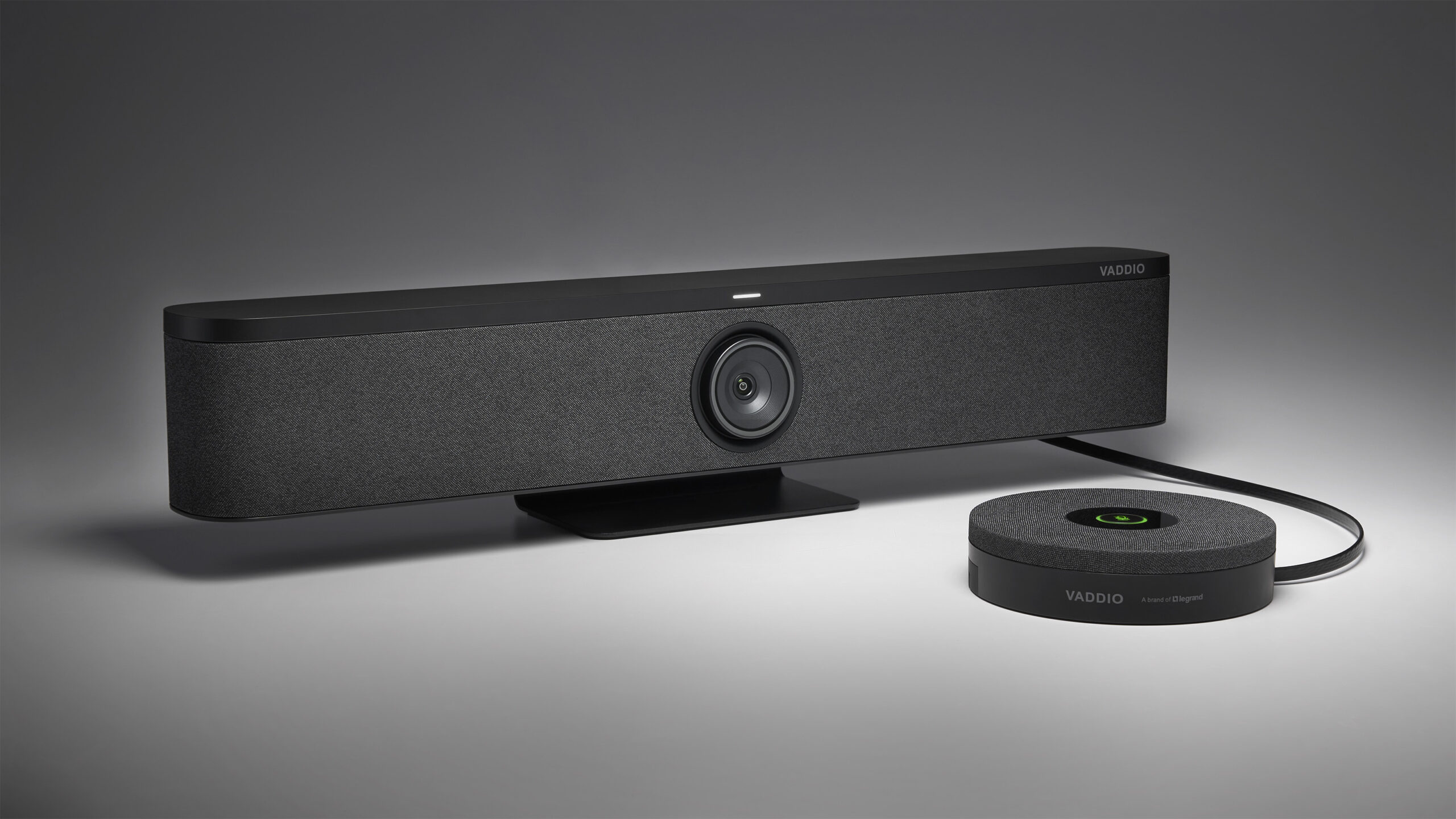
    Vaddio introduces Venture VideoBAR and Venture TableMIC Expansion Microphones, an all-in-one video conferencing system with 4K video quality, wide-angle views, digital zoom, and beamforming microphones for superior audio.

    Venture VideoBAR and TableMIC are launched to improve remote collaboration by offering high-quality audio and video for various meeting room sizes, offering flexibility and ease of deployment for integrators and system designers.

    Vaddio, a brand of Legrand | AV, is pleased to introduce its new Venture® VideoBAR and Venture TableMIC Expansion Microphones. With its debut at InfoComm 2024, this all-in-one video conferencing system enhances remote collaboration by providing lifelike audio and exceptional video quality for standout video conferencing and is available today for shipping. The Venture VideoBAR features an ultrahigh-definition 8.51-megapixel, 1/2.5-type CMOS image sensor; a 110-degree wide-angle horizontal field of view; 5x digital zoom; a six-element beamforming microphone array; and a high-fidelity speaker system with built-in digital signal processing. With a microphone pickup range of up to 20 feet, the Venture VideoBAR is ideal for small to medium spaces. Optional Venture TableMIC expansion microphones increase flexibility by offering an additional 20 feet of pickup range for various meeting room scenarios, including larger boardrooms.

    “The new Venture VideoBAR delivers striking 4K video signals on par with Vaddio’s legendary RoboSHOT® cameras,” said Connor Petit, Product Marketing Manager, Vaddio, Legrand | AV. “Coupled with the new Venture TableMICs, integrators and system designers can equip spaces for a great collaboration experience in any size meeting room. Venture products are discoverable by the Vaddio Deployment Tool and will serve up a familiar Vaddio web interface. As always, our products are backed by our renowned Vaddio support for total peace of mind.”

    The Vaddio Venture VideoBAR features manual PTZ/ePTZ control and tracking technology that offers three modes: Speaker Framing, Participant Framing, and SmartGallery. Utilizing advanced facial- and speaker-tracking algorithms, the Venture VideoBAR can focus on and frame a single presenter in the space. It leverages the beamforming microphone array to precisely pinpoint the speaker’s position without adding distracting video motion. It can also accurately frame a group of coworkers, eliminating wasted space and bringing people front and center. Additionally, the articulating camera lens with dual motors provides smooth pan and tilt adjustments of up to ±15 degrees, enabling the camera to frame the action in the room without relying on ePTZ cropping abilities.

    The plug-and-play device also offers simultaneous USB and HDMI outputs for greater versatility. Users can seamlessly connect a PC via the USB 3.0 connection, providing clear audio and 4K video for effortless video conferencing. The device can boost confidence during presentations or video conferences with the 4K 2160p/60 HDMI output and a confidence monitor, allowing presenters to see what the audience will see on the far end. Additionally, the Venture VideoBAR can be used as a speakerphone for voice calls or to listen to music via a Bluetooth connection.

    Venture TableMIC enhances the audio experience by offering extended microphone coverage and an easy-to-reach mute button, perfect for larger and irregularly shaped spaces. Its three-element array head provides 360-degree coverage with a pickup radius of up to 20 feet, ensuring every participant is heard clearly. Setting up the Venture TableMIC is straightforward; it connects to the Venture VideoBAR with a single category cable. For full microphone coverage in expansive boardrooms or U-shaped conference tables, up to three TableMICs can be daisy-chained.

  • Nureva HDL410 audio conferencing system triumphs at 2024 UC Awards

    Nureva HDL410 audio conferencing system triumphs at 2024 UC Awards

    Nureva Inc. offers patented Microphone Mist technology for improved audio in IT spaces, including HDL310 and HDL410 audio conferencing systems. Its technology ensures clear, reliable listening experiences for remote participants.

    Nureva Inc.’s HDL410 audio conferencing system won the UC Today Award for Best Large Meeting Room Product, recognized for its innovative approach and effectiveness in large spaces.

    The HDL410 system excels due to its unique Microphone Mist™ technology, which provides comprehensive and clear audio coverage in extra-large rooms, making it a cost-effective and high-performance solution for pro AV needs.

    Nureva Inc., an innovator in advanced audio conferencing solutions, announces that its HDL410 audio conferencing system has won a prestigious UC Today Award. Receiving top honors over four other products shortlisted in the Best Large Meeting Room Product category, the Nureva® HDL410 system stood out for its value in making it easy and cost-effective for customers to get pro AV performance in extra-large spaces. The UC Awards represent the gold standard of excellence in the pro AV industry, attracting participation from technology manufacturers, distributors, consultants, AV integrators and end users. The expert judging panel lauded the HDL410 system for its innovative approach to delivering performance and simplicity in larger rooms.

    At the heart of the HDL410 system is Nureva’s multi-patented Microphone Mist™ technology. This groundbreaking innovation fills a space with thousands of virtual microphones, ensuring full-room audio pickup in larger meeting rooms and classrooms. The system’s unique unified coverage map for extra-large spaces, a first in the industry, enables the physical mics from two microphone and speaker bars to be processed together instead of separately, creating a single, giant microphone array that spans the entire room. Each virtual microphone is targeted with greater precision, resulting in clearer, more consistent audio. Nureva’s customers continue to highlight the HDL410’s full-room pickup, cross-talk handling, voice intelligibility and audio quality, along with the system’s ease of installation and deployment, as the key reasons for choosing it for their extra-large spaces.

    “We are profoundly honored that the HDL410 system has received this UC Award for its unique approach to microphone pickup in extra-large spaces,” said Nancy Knowlton, Nureva’s CEO. “This recognition is a strong testament to our success in solving the difficult challenges IT professionals face in equipping larger spaces without straining their staff or budget.”

  • MDEP Sparks Debate in Video Conferencing Hardware Market

    MDEP Sparks Debate in Video Conferencing Hardware Market

    Microsoft’s recent introduction of its Device Ecosystem Platform (MDEP) has sent ripples through the video conferencing hardware market, prompting discussions about integration, vendor diversity, and the potential for ecosystem lock-in. This new platform, based on Android, offers manufacturers a streamlined path to Teams certification, complete with enhanced security features. While this move could accelerate device development and deployment, it has also raised concerns among industry professionals about its long-term implications for both manufacturers and end-users.

    Listen to the entire conversation on AVWeek episode 673

    The Promise of Streamlined Integration

    MDEP’s primary appeal lies in its potential to simplify the integration process for Teams rooms. By providing a common platform, Microsoft aims to reduce the time and resources required for manufacturers to achieve Teams certification. This could lead to a more rapid proliferation of Teams-compatible devices in the market, potentially benefiting end-users with a wider array of options and faster access to new technologies.

    Tom Oliver from Vanco notes the importance of considering the end-user when evaluating new technologies: “Whenever we create a product or do anything internally, the first question we ask is: Is it good for our customer? And if the answer is no, then we don’t even look at that path.”

    The Dilemma for Established Manufacturers

    For industry giants like Logitech and HP Poly, known for their proprietary operating systems, MDEP presents a challenging dilemma. These companies must weigh the benefits of faster certification against the potential loss of differentiation in an increasingly commoditized landscape. The decision to adopt MDEP or maintain their proprietary systems could have significant implications for their market positioning and product offerings.

    Oliver explains the potential downside for manufacturers: “If everything’s the same the only thing it does is going to force down the cost. You have to compete on price only. There’s nothing that’s really going to differentiate you.”

    The Risk of Ecosystem Lock-in

    One of the most significant concerns raised by industry professionals is the potential for MDEP to lead to ecosystem lock-in. As more manufacturers adopt the platform to streamline their certification process, there’s a risk that the market could become increasingly homogenized, particularly for smaller meeting spaces.

    Brad Terry from Pace University emphasizes the importance of maintaining flexibility: “We’re a Zoom shop, but if I was locked into Zoom on a hardware level, that would be a big deal for us. The competition between these organizations is good for me. It’s good for the end user and being locked in on an infrastructure level would be a big commitment.”

    Terry further explains the advantages of platform agnosticism: “I like that if Zoom starts failing and Teams is kicking butt, I can just go reboot all of my meeting rooms and all of a sudden I’m a Teams organization. So that is a huge advantage for me, and I think that it keeps Zoom and Microsoft on their toes on their development process and keeps me winning no matter who wins.”

    The Value of Vendor Diversity

    The potential homogenization of the market raises concerns about the long-term impact on innovation and customer choice. A diverse ecosystem of vendors and solutions has historically driven innovation and competitive pricing in the AV industry. The fear is that MDEP could inadvertently stifle this diversity, leading to a more uniform and potentially less innovative market.

    Bill O’Donnell from Rutgers University highlights the importance of maintaining options: “At Rutgers, it’s almost flavors of soda. And we can’t tell folks, ‘Oh yeah, here, you’re just going to be a Pepsi house.’ No, folks want Sprite. Folks want Dr. Pepper. We try to go as platform agnostic as possible.”

    O’Donnell further illustrates this point with an example: “Poly does their own blend… so they can tailor it up and specifically we came at them with, ‘Hey, we’ve been using Lightware’s Taurus switchers.’ And for the longest time, Poly said, ‘Oh yeah, sure. You can control that via third-party control.’ … They said, ‘You know what, let’s work with Lightware.’”

    This level of customization and flexibility could be at risk if manufacturers are constrained by a single ecosystem platform.

    The Regulatory Landscape

    As major players like Barco and Yealink adopt MDEP, questions arise about potential regulatory scrutiny. The consolidation of a significant portion of the market around a single platform controlled by a major tech company like Microsoft could attract the attention of regulators concerned about market competition and consumer choice. This wouldn’t be the first case of Microsoft getting in trouble with regulators.

    Balancing Innovation and Openness

    The introduction of MDEP presents both opportunities and challenges for the AV industry. While it promises to streamline development and certification processes, it also risks creating a more homogeneous market with less room for differentiation and innovation.

    Tom Oliver suggests a balanced approach for manufacturers: “From a manufacturer perspective, I would almost say you have the Teams certified branded one and then here’s the one for Zoom and everyone else. At that point, just watch the market make its decision.”

    This approach would allow manufacturers to benefit from the streamlined certification process while still maintaining the flexibility to cater to diverse customer needs and preferences.

    Future of MDEP

    As the AV industry grapples with the implications of Microsoft’s Device Ecosystem Platform, it’s clear that there are no easy answers. The platform offers tangible benefits in terms of streamlined development and certification, but these come with potential long-term costs to market diversity and innovation.

    For end-users, the key will be to remain vigilant about maintaining flexibility and choice in their AV solutions. As Brad Terry notes, “The competition between these organizations is good for me. It’s good for the end user.”

    For manufacturers, the challenge will be to find ways to differentiate their offerings and add value beyond mere Teams certification. This may involve developing dual product lines or focusing on unique features and capabilities that set their products apart.

    Ultimately, the success or failure of MDEP will depend on how well it balances the needs of manufacturers, end-users, and the broader AV ecosystem. As the industry continues to evolve, maintaining a diverse and innovative marketplace will be crucial to meeting the ever-changing needs of organizations in an increasingly digital world.

  • Meet Insta360 Connect at InfoComm 2024 – Dual-Camera AI Video Bar

    Meet Insta360 Connect at InfoComm 2024 – Dual-Camera AI Video Bar

    Insta360 is unveiling and starting pre-orders for its latest product, the Insta360 Connect, at InfoComm 2024. This dual-camera AI video bar is designed for small and medium-sized meeting rooms, offering advanced audio and video quality, AI-enhanced imaging, and versatile modes for different conferencing needs.

    Insta360 is expanding into the professional video conferencing market with the Insta360 Connect, aiming to revolutionize meetings with its cutting-edge hardware and AI technology. This product targets businesses and professionals seeking high-quality, immersive video conferencing solutions.

    Insta360 is set to unveil and start pre-orders for its latest video bar, Insta360 Connect, at this year’s InfoComm, held between June 12–14, 2024. The groundbreaking dual-camera AI video bar marks the company’s official expansion into the professional video conferencing market.

    Insta360 Connect is an all-in-one, dual-camera video bar designed for small and medium-sized meeting rooms, delivering exceptional audio and video quality that will transform your meetings. Insta360’s first-ever video bar blends cutting-edge hardware and AI algorithms to provide both in-room and remote participants with an immersive and realistic experience.

    Connect boasts a dual 4K camera setup consisting of a wide-angle camera and a telephoto gimbal camera. The two work seamlessly together, capturing 4K group views and individual close-ups for unparalleled meeting visuals.

    This first-class imaging hardware is made even better by AI Resolution+, a machine-learning algorithm that transforms image quality and detail. It shows whoever is speaking in double resolution for remote interactions that feel like the real thing.

    A key area where Connect excels over its competitors is audio. With a 14-microphone array and a cutting-edge 3A audio algorithm, it offers better-quality audio capture and picks up voices from a much greater distance (up to 33 feet away), with balanced volume, supreme clarity, and a natural, immersive sound.

    An adaptive audio system takes the audio output up a level by truly eliminating unwanted sounds and effects. Intelligent noise reduction technology analyzes the real-time acoustic environment in the room to eliminate unwanted noise and reverb, ensuring interruption-free meetings.

    Another key advantage of Connect is its tracking capabilities. Connect tracks the speaker and keeps them center stage throughout, but it does this with much greater accuracy–using multi-modal recognition technology. What’s more, it monitors all participants simultaneously, enabling quick and accurate transitions between speakers.

    In addition, Connect boasts a series of versatile modes. Whiteboard Mode makes it easy to present from a whiteboard by squaring off and focusing on the whiteboard area so anyone watching can follow along. The whiteboard even remains visible if a participant blocks the camera’s view! Speakerphone Mode enables the classic conference call setup but with pro-level audio. There’s even a Privacy Mode for any time a bit of discretion is needed, concealing the wide-angle lens, facing the gimbal camera down, and muting the microphone.

    Insta360 Connect is the perfect solution for businesses and professionals demanding uncompromised video conferencing quality. It works seamlessly as a USB device for laptops and desktops and supports all major platforms—simply connect a device and revolutionize your meetings. This isn’t the first time Insta360 has proved its excellence in the audiovisual market. Back in August 2022, the company launched its AI-powered 4K webcam, Insta360 Link, which was an instant success in bringing intuitive AI features and accurate tracking to the blooming hybrid work solutions.

    Attendees at InfoComm 2024 will be the first to experience this game-changing technology. Insta360 Connect is available to pre-order from June 12, 2024, via Insta360’s official online store. There is an early bird downpayment of US$100, which will deduct $200 from the final price. The official product launch and shipping time are scheduled for the fourth quarter of 2024. For more information about pre-ordering, please visit insta360.com.


  • Crestron Control Features Are Now Accessible Natively from Microsoft Teams Rooms, Zoom Rooms, Cisco Webex, and Google Meet Unified Communications Platforms

    Crestron Control Features Are Now Accessible Natively from Microsoft Teams Rooms, Zoom Rooms, Cisco Webex, and Google Meet Unified Communications Platforms

    Crestron develops technology for various work environments, enhancing communication and collaboration through cloud-based platforms, devices, and systems. Their solutions aim to improve productivity, speed, and efficiency, ensuring better work experiences worldwide.

    Crestron Electronics has announced the expansion of its Crestron Control capabilities to more unified communications (UC) platforms. This integration allows users to manage room controls and meeting controls from a single interface, simplifying the user experience and making it more seamless across different hardware and software environments.

    This expansion responds to customer demand for more flexible and integrated control solutions in meeting spaces. By providing native control across a wider range of UC platforms, Crestron aims to enhance meeting management, improve user experience, and streamline operations for organizations using various UC systems.

    Crestron Electronics, a leader in workplace technology and automation, today announces it has added new points of control for unified communications systems, making it easier than ever to take advantage of in-room automation for every meeting or presentation. Crestron Control has long been available on Crestron Flex solutions, and this latest expansion brings native control to more UC platforms. What was historically handled with two separate devices has been simplified into a singular interface, cleaning up the table and removing barriers to grant more users access to leading room controls from Crestron.

    “Customers have been clamoring for this added flexibility from Crestron Control. Now, organizations can experience the power and versatility of Crestron Control across a wider range of UC solutions, simplifying meeting management and enhancing the overall user experience,” said Frost & Sullivan’s Vice President of Research, Roopam Jain.

    UC Platform Versatility

    Through direct integration with the UC platform providers to streamline the meeting experience, users can reach their Crestron Control solutions from any hardware vendor. Previously introduced with Zoom Rooms® software, Cisco Webex® meetings, and the Google Meet® platform, Crestron Control is now available on Microsoft Teams® Rooms on Windows® OS with page flip integration. The control page fits seamlessly with each UC platform, creating an effortless transition for users to go from meeting controls to room controls. With Crestron Construct™ configuration software, the control GUI can match the standard platform interface, creating a familiar user experience and keeping control at their fingertips from one device.

    “Control is where Crestron got started, and we pride ourselves on the strength of that legacy,” said Brad Hintze, EVP of global marketing at Crestron. “This expansion is an impactful move that grants more choices for our customers to deliver a better experience in these spaces by leveraging the strength of Crestron Control for today’s meetings.”

    Crestron Control from any UC Hardware Solution Even if an organization has selected another provider for UC hardware, control is now only a tap away, and users can access the most seamless control experience from Crestron. Crestron Control brings meetings to life while simplifying the experience for any user.

    Crestron Control has a legacy of managing small huddle rooms to the most complex, mission-critical spaces. Now, that flexibility expands beyond room size and complexity to bring added versatility and choice to the interfaces where these controls are selected. With this latest expansion, users can leverage the reliability and expansive features of Crestron Control, regardless of the UC platform and hardware provider.

    To learn more about the possibilities with Crestron Control and the platform’s expanded offerings, InfoComm® 2024 trade show attendees can visit the Crestron Booth #C8100 in Central Hall.


  • Extron Introduces ShareLink Pro ConferenceShare for Wireless Teams or Zoom Meetings

    Extron Introduces ShareLink Pro ConferenceShare for Wireless Teams or Zoom Meetings

    Extron’s AV solutions elevate experiences through cutting-edge technologies, enhancing image clarity, sound quality, and system reliability, while also providing robust asset management tools for efficient oversight of large-scale AV systems.

    ConferenceShare is a solution that seamlessly integrates local room cameras and microphones into Unified Communications (UC) meetings by sharing video and audio captured by in-room USB devices with Windows or macOS laptops during Teams or Zoom meetings. It works in conjunction with Extron‘s ShareLink Pro Wireless Presentation Systems and software to enhance collaboration and engagement in hybrid environments.

    ConferenceShare addresses the growing need for incorporating in-room resources, such as cameras and microphones, into remote meetings in hybrid environments. By leveraging existing USB devices and ShareLink Pro systems, it simplifies the process of sharing content and enhances the overall meeting experience for both on-site and remote participants, leading to more engaging and productive meetings.

    As hybrid environments become more common, seamlessly integrating local room cameras and microphones into Unified Communications meetings has become imperative. ConferenceShare offers a solution by effortlessly sharing video and audio captured by in-room USB devices with Windows or macOS laptops during Teams or Zoom meetings. With ConferenceShare enabled on their laptop, users gain access to USB devices connected to the ShareLink Pro Wired and Wireless Presentation System, simplifying the process of incorporating in-room resources in remote meetings. Experience the convenience of wireless integration with ConferenceShare and ShareLink Pro, making in-room USB devices readily available for enhanced collaboration.

    “We’re excited to introduce ConferenceShare, the latest innovation to our renowned ShareLink Pro Wireless Presentation Systems,” says Casey Hall, Chief Marketing Officer for Extron. “Empowering your ShareLink Pro systems, ConferenceShare seamlessly integrates local room cameras and microphones, bridging the gap between on-site and remote participants and fostering more engaging and productive meetings.”

    ConferenceShare works in conjunction with ShareLink Pro software and ShareLink Pro 1100 and ShareLink Pro 500 units to not only share content from a user’s local computer, laptop, or mobile device to the room display, but also share video and audio from a local USB camera or microphone with remote participants using Teams or Zoom. It also supports integration with Microsoft 365 Calendar to streamline UC meeting connections. Adding ConferenceShare features to a ShareLink Pro system expands wireless sharing capabilities beyond the local room to any location via Teams or Zoom. ConferenceShare requires an Extron LinkLicense on the ShareLink Pro unit connected to the USB room devices.


  • Atlona Boosts Presentation and Collaboration Capabilities with New Switchers

    Atlona Boosts Presentation and Collaboration Capabilities with New Switchers

    Atlona, a Panduit company, is a manufacturer of AV distribution, AV over IP, collaboration, and control solutions, focusing on improving technology for idea sharing through innovative products used in commercial and educational applications.

    Atlona has introduced two new 3×1 switchers, the AT-OME-CS31-SA and AT-OME-CS31-SA-HDBT, as part of its Omega Series of AV presentation and collaboration products. These switchers are specifically designed for learning and meeting spaces, offering features such as AV switching, USB routing, audio mixing, amplification, and control integration into a compact enclosure.

    The switchers are tailored to meet the specific needs of different environments within learning and meeting spaces. The OME-CS31-SA is ideal for local switching applications, while the OME-CS31-SA-HDBT accommodates remote and local AV switching, extending HDMI, Ethernet, power, control, and USB 2.0 data up to 100 meters. Special capabilities for education applications include audio ducking, automatic muting for school public address announcements, and USB routing capabilities suited for corporate and education environments. These switchers aim to provide comprehensive AV solutions for modern classrooms and workspaces.

    Atlona continues to grow its Omega Series of AV presentation and collaboration products with two new 3×1 switchers ideally suited for learning and meeting spaces. Available immediately, the AT-OME-CS31-SA (three HDMI® inputs) and AT-OME-CS31-SA-HDBT(one HDBaseT™ input and two HDMI inputs) both consolidate AV switching, USB routing, audio mixing, amplification, and control into a low-profile enclosure.

    The OME-CS31-SA and OME-CS31-SA-HDBT primarily share the same feature set, with key variances in AV switching and USB capabilities to meet specific requirements. The OME-CS1-SA is built for local switching applications that place its inputs close to the switcher and display, such as a classroom where the instructor’s desk is positioned near the front wall. The OME-CS31-SA-HDBT accommodates remote and local AV switching and is therefore most effective when an input is further from the switcher, such as at an instructor’s lectern in the room or if the switcher is mounted by a projector. The remote input of the OME-CS31-SA-HDBT supports extension of HDMI, Ethernet, power, control, and USB 2.0 data up to 100 meters (330 feet).

    The two switchers add special capabilities for education applications that ensure important lesson material and announcements are heard clearly. This includes audio ducking which lowers program audio levels when the instructor speaks into a microphone system connected to the balanced input. Additionally, the system can be muted by contact closure or automatically when a school public address announcement is detected. Other audio capabilities include an on-board mixer for combining three line inputs, de-embedded HDMI, and USB audio as well as 2 x 25 watt amplifier and line level outputs.

    USB routing capabilities are well suited for corporate and education applications. Both OME-CS31 models support switching between two host devices and include a four-port hub for connecting cameras, speakerphones, interactive displays or other peripherals. Automatic display control and auto-switching allow the OME-CS31-SA and OME-CS31-SA-HDBT to automate system operation over their various Ethernet, serial, and trigger ports, or they can be integrated into environments with an Atlona Velocity™ control system.

    “The Omega Series has evolved into our broadest product line, with an increasingly diverse range of switching and extension solutions to address the AV needs of any modern classroom or workspace,” said Tommy Gay, Product Manager, Atlona. “The OME-CS31-SA and OME-CS31-SA-HDBT bring together several key engineering strengths from Atlona across switching, audio, USB, and control to offer our customers all-in-one room solutions.”