BrightSign’s Misty Chalk says signage rarely fails at deployment. It fails when nobody keeps the fleet consistent.
Most organizations choose a digital signage platform based on what it costs to install. According to Misty Chalk, that is the wrong place to look.
Chalk serves as vice president of sales at BrightSign. She has watched customers buy on implementation cost for years. However, she argues the real trouble shows up later.
“That is not where you will find failure,” Chalk told AVNation. “That is not what causes you to rip it out and replace it with something else. That is not what causes you to roll trucks.”
In her view, the biggest hurdle is not deployment at all. Instead, it is keeping a fleet of screens consistent at scale. “It’s not about the hurdle of choosing a system and implementing a system,” she said. “It’s the hurdle of actually keeping that system.”
Why BrightSign Built Control Plus
That pain point drove BrightSign’s newest software release. The company launched BrightSign Control Plus in June, just ahead of InfoComm 2026. Before the launch, BrightSign also renamed its software lineup.
The lineup now runs in tiers. BrightSign Control remains free with every BrightSign player. Control Plus adds a paid layer of fleet management on top.
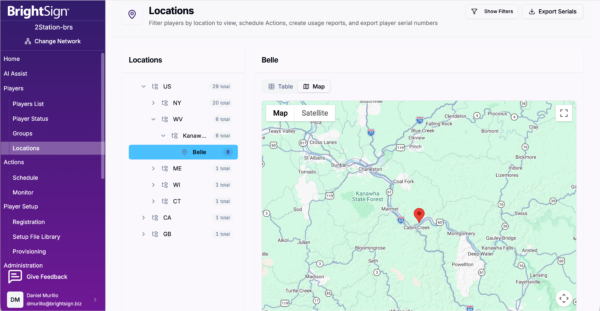
Chalk said the free tier still works well for smaller deployments. Once a network passes roughly 20 players, though, Control Plus makes more sense. It gives IT teams a single cloud-based dashboard for the entire fleet. Additionally, teams can provision players quickly and push bulk OS updates. They can also group devices by network or location and schedule updates for each group.
“That’s something that we’ve been asked for for a really long time,” Chalk said. Integrators and IT resellers wanted a better way to manage large fleets, she explained.
BrightSign prioritized the features customers requested most for the first release. Going forward, the company plans to add features based on real-world customer feedback.
Hardware Management, Separate From Content
Control Plus does not touch content. Instead, it runs alongside whatever content management system (CMS) a customer already uses. As a result, organizations gain tighter control of their hardware without changing their content workflow.
Chalk acknowledged that other platforms manage BrightSign hardware too. Still, she argued none of them reach the same depth. “No one’s going to do it at the level that we are,” she said.
For IT teams, the bigger question is visibility. Nobody wants a dozen dashboards open at once. Chalk said BrightSign has always offered open APIs for that reason. CMS partners and third-party remote management platforms can pull BrightSign device data into their own dashboards.
That approach has a history. About six years ago, BrightSign expected CMS partners to build device management into their software. Few did, and the reason was simple.
“The people that were managing the hardware were not the same people managing the content,” Chalk said. Those teams found that switching between two tools worked just fine. Since then, however, third-party platforms that manage many device types have multiplied. BrightSign’s APIs now feed those tools as well.
What Corporate Workplaces Expect Now
Chalk also sees the corporate workplace shifting in ways that put more weight on screens. The return-to-office debate continues. Meanwhile, employees who do come in expect the same experience they get at their own workstation.
BrightSign itself operates as a fully remote company. Even so, its San Jose office runs an open floor plan with unassigned desks. Every desk carries identical equipment. Employees plug in a laptop and get a screen, keyboard, and mouse. Room booking and scheduling tie into the same platforms.
According to Chalk, signage now acts as part of the building’s backbone. That shift explains why CMS partners such as Appspace and Korbyt have found success in workplace deployments. Their platforms help run smart buildings, not just lobby screens.
The Data Shows What Happens. People Explain Why.
Analytics form the other half of that picture. Occupancy data tells IT and facilities teams which spaces people actually use. BrightSign’s own office offers a clear example.
The office includes huddle spaces, boardrooms, and private phone rooms. The data showed that almost nobody used the phone rooms. Meanwhile, the company often ran short on space when it hosted partners or breakout sessions.
Analytics could flag the problem. However, the numbers could not explain it. So BrightSign simply asked employees whether they used the phone rooms, and why not.
The answers were practical. Some employees took private meetings in huddle spaces with video. Others stepped outside for calls or felt their desks offered enough privacy. “They think it’s weird,” Chalk added.
“I wouldn’t have asked the question had the data not told me no one was using it,” she said.
Now BrightSign can weigh turning those phone rooms into more huddle spaces. Chalk noted that routing the data matters, too. At BrightSign, occupancy alerts go to IT. Other organizations can send the data wherever it fits, then use AI tools to analyze it.
The Takeaway for IT
The two halves of the conversation share a thread. An empty room and a drifting screen both stay invisible until someone checks the data. For IT and AV decision-makers, Chalk’s advice comes down to one question. What will it take to keep this system running? Installation happens once. Keeping a fleet consistent happens every day.

Tim Albright is the founder of AVNation and is the driving force behind the AVNation network. He carries the InfoComm CTS, a B.S. from Greenville College and is pursuing an M.S. in Mass Communications from Southern Illinois University at Edwardsville. When not steering the AVNation ship, Tim has spent his career designing systems for churches both large and small, Fortune 500 companies, and education facilities.
- Tim Albright

- Tim Albright

- Tim Albright

- Tim Albright