Category: Perspectives

  • A guide to video conferencing etiquette

    A guide to video conferencing etiquette

    The basic rules you should follow to ensure a successful virtual face-to-face meeting

    If you are planning to work remotely, there typically is an expectation to continue communications and meetings virtually through phone or video conferencing. While many leading technology platforms like Zoom or GoToMeeting have simplified the process for getting virtual meetings set up and running, taking an extra 20 minutes to familiarize yourself with these video conferencing etiquette tips can save you from hours of lost productivity and distraction.

    1. Confirm and download the correct video conferencing app
    Having everyone start on-time is crucial to an effective video conferencing meeting. To avoid a last minute scramble because of an unexpected app download or web browser permission process, make sure you have the correct meeting link, dial-in number, and app downloaded on your phone or computer ahead of time. After download and setup, login to the app and make sure you can enter and exit the virtual meeting room without issue.

    2. Get familiar with video conferencing controls
    It’s a great idea to use your software platform’s basic settings and controls for your microphone, speaker, camera and display. controls to ensure your equipment is working prior to your virtual meeting. 

    If you are a participant in the meeting, you should know how to mute/unmute your mic, turn your camera on and off, join and leave a call, chat, and share your screen when needed. 

    If you are a moderator or host of the meeting, you should also make sure you know how to mute/unmute and remove remote participants to bring order to the call if tech issues get out of hand.

    3. Check for audio problems
    Many people fail to realize that what they hear in their own room isn’t what other participants hear. Sealing out noises with your headphones or headset does not prevent your mic from transmitting those noises across the call. While you may be able to ignore a distracting buzz, rattle, squeak or fan on your side of the call, microphones often boost those noises to other participants. It’s good practice to find a private, quiet place and close the door to keep family, neighbors and pets from creating mid-call distractions. 

    When an echo occurs, a little recognized fact is that the person who doesn’t hear the echo or audio problem is generally the culprit. The easiest start to finding the problem is by simply asking, “who doesn’t hear the echo?” For smaller meetings, you can ask half or all participants to mute their mics, and then one by one reintroduce them until the noise is heard again. Once one problem is addressed, you can add in other caller’s audio until another problem emerges. 

    4. Check for video problems
    If your face appears to have a shadow on it or you can’t clearly see yourself through your camera, first make sure your camera lens is clean and unobstructed. Secondly, look for a bright or white spot in the video image. Many computer cameras adjust their brightness levels for the brightest spot of the image. To adjust, pivot your body and/or camera away from the bright spot until it improves. 

    If there isn’t a bright-white spot, there may be too much light coming from behind you. Put a light source in front of you or turn-around and the image should adjust. Also, try to think about your surroundings and limit people, animals, TV or other moving objects that may be a distraction from your camera’s view.

    5. Test your Internet connection
    Your network or internet connection is probably not as good as you think it is. 

    Many people try to think of the quality of their streaming services like Netflix or Disney Plus as a measure of how fast their connection is at home. However, these online video platforms use powerful buffering techniques that create a smooth viewing experience. 

    Video conferencing is real-time communications, which means there is a constant flow of data, and a constant strain on your network when conversations are happening. Even enterprise networks suffer when video-conferencing call utilization increases above historical utilization. What you think is the appropriate amount of bandwidth may not be sufficient when hidden ISP adjustments (such as on MPLS) and WAN/LAN switch duplex issues unexpectedly impact your calls with jitter and latency.

    For conference participants, the quickest and easiest way to check your connection is through the conferencing app itself. Apps will often provide call-quality details including your bandwidth (the amount of data being sent and received), latency (packet-arrival-delay), and jitter (out-of-order packet arrival). You should be transmitting between 1.2 and 2Mbps with low-latency for a good quality call.

    It’s important to have a test meeting beforehand. Try getting at least one other person online with you and ask them about the audio and video quality. IT professionals can prepare for a wide range of scenarios, but in the end, running video or doing an intensive conferencing-grade network evaluation is the only way to know if and where you may run into issues. 

    6. Be courteous. We’re humans, and its technology
    Respect normal human dynamics and be patient and gracious to others. We all make mistakes, especially in situations when we’re doing something for the first time. You should adapt your communication style appropriately for the number of people attending. An easy tip to remember is however you would speak to a certain group size in-person, do the same in video conferencing. Don’t hog talk time or talk over others. If you’re having a video conference with a large group of people, plan on it being primarily a one-to-many conversation with a segment for limited Q&A.

    While there are many other challenges people may run into in video conferencing, most issues arise from poor participant etiquette and unfamiliarity. Empowering your team to remove common obstacles and distractions from your call ahead of time will make a significant difference in your remote meetings.

    Matt Slack, C-EST, CTS, is the founder and president of AV Solutions, located in Baton Rouge, LA. Since founding the company in 2005, Matt has led his team and clients through Hurricane Katrina, an economic recession, and a devastating flood in 2016. He holds a long list of professional certifications through prestigious industry organizations like AVIXA, NSCA, Audio Engineering Society, Entrepreneurs Organization, and the National Center for Construction Education and Research. In 2014, Commercial Integrator Magazine named him to their 40 Under 40 list.

     

  • The Consultant vs. The Integrator: Partnership, not Competition

    The Consultant vs. The Integrator: Partnership, not Competition

    The relationship between the AV consultant and the AV integrator can be complicated, but middle ground can be found

    If mimicry is the highest form of flattery, then pantomime is the lowest form of mockery. Herein, we will explore the complex and comical and often cynical relationship between audio/visual consultants and integrators; where they are similar, where they differ and explore just how intricate and contradictory their interplay can be. 

    Forever the on-going battle to avoid, evade and surpass one another in the arena of professional la guerre, the consultant and the integrator are often at odds with each other. Yet, in truth, they only ever overlap when in competition, as they are actually mutually exclusive. When perceived objectively they are in truth not adversarial, but rather individual and distant partners. Despite offering many of the same services, the relationship is more analogous to that of a paralegal and an attorney. While the lawyer can and may offer to do all the work from start to finish, more often than not the client is left with large bills and not the work product or results they expected. Since the attorney bills/makes most of their money in litigation and trial work, so too the integrator has the best margins on equipment and labor. Now, I admit this is a particularly obtuse and negative equivocation and numerous integrators offer pre-sale and design services as well. And, these services have incredibly high margins for them, when executed and completed on budget.

    Conversely, the analogy of the paralegal to the consultant may be far more apropos. Just as the paralegal drafts documents, reviews filings and can advise on strategy, the AV consultant functions in precisely the same manner. Providing experienced counsel and drafting scopes of work, drawings and reviewing bids, while letting the client either do the “work” themselves or hiring an experienced agent/contractor to do the labor.

    While this analogy may seem contrived or forced, it nonetheless paints a more comprehensive picture. And comprehension, especially of intentions, is critical to differentiating between the consultant and the integrator. AV consultants, for the most part, are agnostic on equipment and platforms. Making them a more honest broker when in the program or design phase of a project. Whereas, is often the case but not always, integrators may have purchasing quotas to meet, inventory to clear and more frequently now, rebate agreements. This can influence their design choices to a client’s detriment. These end-of-the-year rebates can mean millions of dollars in cashback for large integrators and drive a lot of their design decisions. Being a truly honest and impartial arbiter for your client, whether they are an architect, a government agency or all the more so, if it is the end use; is paramount to properly conducting AV design and engineering.

    To switch gears now! 

    It should not be said that I am biased against integrators, they are some of my best customers and at the core of my business. Since times of old, the integrator has been the primary systems designer and engineer. Thus, making that same firm the choice selection for purchasing products and installation services. But as I just mentioned, if their position is driven by allegiances to certain manufacturers rather than the individual client’s needs, there can be a conflict. Not that consultants cannot have similar conflicts; many have special arrangements with select manufacturers to spec only their product, which then involves some form of ‘kick-back’ and/or incentive program like that previously mentioned with integrators. 

    Consultants can equally be the bane of the integrator. A less than qualified consultant who gives poor advice, speaks without knowing or having done, or worse just provides inadequate design work can ruin a project and drive up costs. I cannot say the number of times I have seen certain AV designs from particular consultants, which no matter the job, are inevitably flawed. Or even more insidious, designed to be installed by one very specific integrator. While I cannot, nor will I ever name names, the larger point is that mistakes in design become huge cost succubae in later stages of the project. Far too often, many consultants have never worked in the field doing actual install and commissioning. Thus, they lack certain practical knowledge and application experience, which plays a critical role in properly designing and specifying equipment. 

    This leads us into the real axe to grind in this face off: Who is really to blame? Who is more the fly in the other’s ointment? In truth, it is neither. Each plays their own role in the conception, design, implementation and execution of any given audio/visual project. While it is easy for integrators to blame consultants for not knowing the practical commissioning applications of how two pieces of gear integrate; it is equally obnoxious and wrong for consultants to ignore mission critical details hoping the next person in the chain will just ‘figure it out’. And while I despise oversimplifications of complex issues, for the sake of brevity and pith I will set a nice little bow on top of this soliloquy. 

    What we need, across the industry, is greater communication and cooperation. Manufacturers need to stop making interoperability a jigsaw puzzle and certifications more difficult or expensive to obtain than a master’s degree. Installers need to be better trained and trusted to do their work without micro-management. Engineers, whether an integrator or a consultant, need to be honest, agnostic and experienced designers with an eye towards longevity and foreseeing potential pitfalls. We all need to be better! And we need to collaborate and cooperate, share information, experience and cultivate groups for sharing perspectives. We will all make more money, do better work and our clients will be serviced better. Instead of striking out our own little fiefdoms across the fruited plain of commercial contracting, we need to found collectives of talent and innovation. Then we will be doing ourselves and our industry a grander service.

    Sean Reid is a consultant and owner of Astroman AV.

  • Correcting misconceptions about the gig economy

    Debunking a few myths about gigging

    By Field Nation

    A father drives part time for Uber three days a week. Two mothers operate a small makeup business out of their home full time. A freelance writer earns $100 an hour for writing blogs as a side-hustle. An electrician spends his days servicing projects he finds on Craigslist. What do these people have in common? They participate in the fast-growing gig economy. Unlike the standard nine to five job, this contract work is typically short-term or project-based. These workers are men and women, old and young, and span across the country. It takes many forms, and influences industries throughout the United States. In fact, more than a quarter of workers participate in the gig economy.

    Using the gig economy to supplement your workforce is a popular technique, but some remain skeptical of gig workers’ ability to meet their needs. If you are weary about common gig economy misconceptions, these facts might change your mind.

    Misconception 1: Gig work includes only low-pay, low-skill projects suitable for people who can’t get a “real job.”

    Wrong. Skill level of typical “gigs” is often very high. For example, a freelance electrician requires years of specialized training and practice and earns an average of $52,911 a year. This situation is no anomaly. 93% of freelancers have skill-related education/training and 79% have a college education, and in most countries, freelancers earn higher wages than traditional workers.

    Rather than focusing on money, people choose to work as independent contractors to gain control and freedom over their career. They value the flexibility and lifestyle that comes along with gig work. Instead of sitting at a desk all day and taking direction from someone else, they get to be their own boss, travel more, and work remotely. In fact, 50% of gig workers say they would not return to their traditional job, even if the pay was higher. This could be attributed to the fact that 77% of full-time freelancers said they have a better work-life balance, and 84% said they prioritize lifestyle over pay.

    Misconception 2: The gig economy is a fad driven by millennial’s.

    Millennial’s are only 4% more likely to participate in the gig economy. According to a study conducted by PwC, 65% of workers ages 50+ strongly agree with having a “strong desire to work independently”, versus a 29% agreement from workers ages 18-24.

    The gig economy is not going anywhere, with freelance labor growing faster than the overall U.S. workforce. In fact, from 2014 to 2017, the gig economy outpaced the growth of the U.S. workforce at a rate 3x faster. Plus, businesses around the globe rely on this market.

    Misconception 3: The gig economy is primarily work related to ride-sharing apps such as Uber and Lyft.

    Ride-sharing apps like Uber and Lyft were revolutionary when they gained popular adoption and “disrupted” whole industries. In the past few years, they even became standard in the transportation industry and streamlined processes that were once clunky and complicated.

    Yes, it is true that drivers for these businesses are considered gig workers. However, did you know that this work represents less than 1% of gig jobs? It is definitely not the primary work found among independent workers. Far more is done in other industries, such as construction, healthcare, and business services.

    Many of these industries that utilize independent workers to foster organizational growth are increasing their demand for this labor. Specifically, businesses in  information technology services, accounting and finance, administrative services, and project management are depending more and more on 1099 workers. By 2027, half the working population in the U.S will participate in the gig economy, thanks to higher demand for freelancers from these markets.

    The Gig Economy is Here to Stay

    Using gig workers can be a useful tool to scale and grow your company outside its current capabilities. Whether it’s via in-house contractors, on-site workers, or consultants, there are many different ways to involve your company in the contingent workforce and embrace the evolving work economy.

  • AV Storage in a Shrinking World

    Hiding AV in plain sigh

    Sponsored post by Chief

    Seems like everything is getting smaller these days. What used to take 4RU space can now be easily stored behind a display. It’s becoming an increasing practice to have supporting equipment close to the location it is used, instead of in a rack room. To help support this movement, Chief has developed several storage accessories that keep AV equipment close, yet out of the way.

    For huddle spaces and small conference rooms with a table, the CSPH Component Storage Panel proves under-table storage. With over 350 square inches of secure attachment area, it’s perfect for ensuring efficient and consistent component placement over large rollouts because it allows installers to populate the panel easily at an on-site or off-site staging area (instead of under each desk) and, once installed, the CSPH pivots 90° to allow access in vertical position (instead of fighting gravity). There are 1/3 and 2/3 breakaways in case less space is required, and because the brackets are also sold separately, none of the product goes to waste.

    When you don’t need the amount of space in-wall storage can provide, the handy CSPR Component Storage Panel has more than 160 square inches (1032 square centimeters) of secure attachment area for AV equipment independent of display mounts. It fits nicely behind a Fusion wall mount. A handle provides easier access while securing equipment and installing. Technicians can remove the Component Storage Panel to service equipment without removing the display. Ideal for standardizing the deployment of AV component configuration across large projects. 

    Smaller options now available include the CSMP9x12 Component Storage Panel, Interface, a universal component storage panel that supports devices and components near displays in a variety of orientations depending on install preferences.

    The CSSMP15x10 Component Storage Panel, Sliding, installs either on-wall or attached to Fusion mount extrusions. A slide-out feature improves ease of access to components stored behind a display. This includes a removable Lever Lock™ panel designed by Middle Atlantic for the ability to pre-populate components off site when performing enterprise-wide deployments.

    With all these solutions from Chief, keeping today’s smaller AV equipment where it’s needed is a breeze.

  • Picking the best projection screen for areas with ambient light

    High ambient light areas require the right screen

    Sponsored post

    Maximizing image quality in two-piece projection isn’t just about selecting the best laser projector on the market. Pairing a high-quality projection screen with the projector is essential, especially in environments with strong overhead lighting, windows or other uncontrolled ambient light.

    Totally darkened rooms are hard to come by outside of a theater environment. Ambient light is almost always a part of the projection equation. Physics teaches us that ambient light comes with two variables: intensity and direction. Depending on the levels of each, the ambient light that falls on a projection screen will wash out image contrast, color saturation and dynamic range.

    This has been a major projection impediment… until recently.

    Are there different types of ambient light rejection screens?

    Gain screens, Contrast Based ALR (gray screens) and True Optical ALR screens affect image contrast and quality in different ways. It’s critical to understand one size does not fit all when rejecting ambient light in two-piece projection.

    How are True Optical Ambient Light Rejecting screens different?

    True Optical ALR screens are designed to reject higher levels of ambient light from specific angles in a room, maximizing viewer experience. Discover how the multi-layer properties of True Optical ALR screens accept projector light while rejecting light from other sources.

    What do I consider when selecting an ALR screen?

    The audience is taken into consideration with the selection of any screen, but most especially an ALR screen. Viewing angle and throw distance are important considerations during the selection process. Check out this handy guide (http://bit.ly/2XRLKjB) to understanding how design elements, audience location, viewing angles, and projector throw distance impacts the selection of ambient light rejecting (ALR) screens.

  • Vaddio gets into NDI with RoboSHOT 30E

    NewTek’s NDI gives Vaddio camera network

    Sponsored Blog

    The RoboSHOT 30E NDI PTZ Camera from Vaddio is equipped with Newtek NDI® – providing a low latency, high performance solution in the NDI ecosystem.

    Millions of devices use Network Device Interface (NDI) technology. NDI® allows multiple video systems to automatically detect and communicate with one another over IP. NDI encodes, transmits and receives many streams of high quality, low latency, frame-accurate video and audio in real time. This benefits any network-connected video device, including video mixers, graphics systems, capture cards, and many other production devices. This makes it possible to exponentially increase the number of sources available for live production switching, without directly attaching to devices, changing locations, or investing in expensive, high-bandwidth networks that simply replace SDI-based workflows.

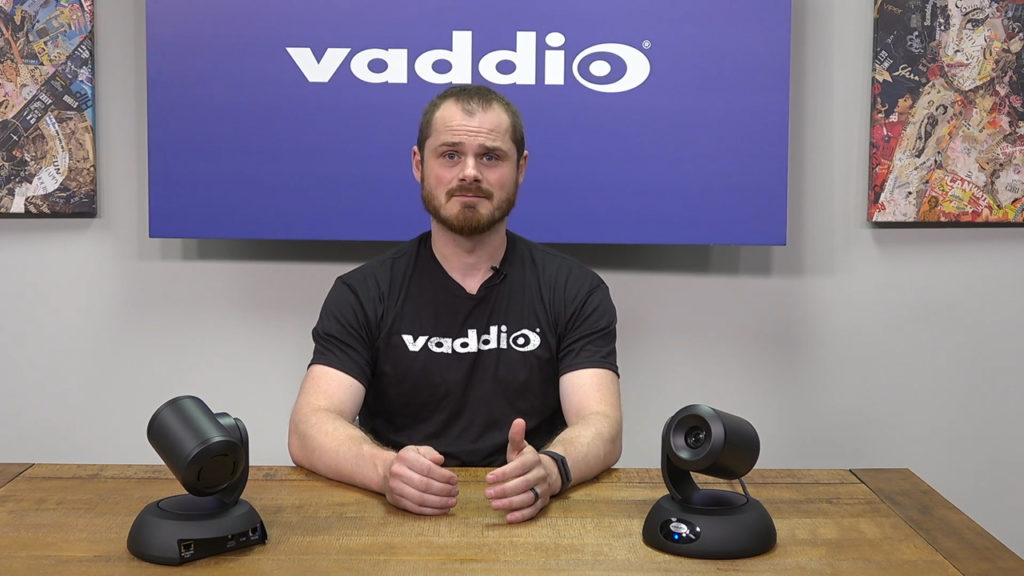
    Vaddio RoboSHOT 30E demonstration
    Vaddio RoboSHOT 30E demonstration

    With NDI technology, video and audio sources can be shared across a network. This eliminates the need for costly direct connections, expensive cable runs, and infrastructure upgrades – while turning every source into a destination instantly available anywhere on the network.

    The RoboSHOT® 30E NDI PTZ Camera from Vaddio is equipped with Newtek NDI®, providing a low latency, high performance solution in the NDI ecosystem. 

    The RoboSHOT 30E NDI Camera is a recognizable video source by other NDI-enabled applications and devices connected to a standard local area network. In addition, the camera’s pan/tilt/zoom and other controls can be accessed through NDI, creating a complete IP workflow for operator control.

    “By creating an NDI-capable camera based on our RoboSHOT Elite cameras, our customers will have the ability to create complete IP workflows for classrooms, houses of worship, medical simulation labs, and other applications requiring capture and presentation of high quality video content,” said Darrin Thurston, Vice President of Product Development at Vaddio. “NewTek’s NDI technology complements Vaddio’s product philosophy of being simple to install and operate for our customers.”

    Watch the RoboSHOT NDI Camera product overview video

    For more information on NDI, visit ndi.newtek.com. #NDIcentral

    For more information about the RoboSHOT 30E NDI Camera, visit legrandav.com

    RoboSHOT® is a registered trademark of Legrand | AV.

    NDI® is a registered trademark of NewTek, Inc.

  • Looking for low volume generators

    Getting a low dB generator for health and safety

    By Helen Bell

    Generators come in many different forms and you might be surprised at the noise even a small portable generator could give off. You can find generators in a number of different shops and websites and it will almost always have the noise level listed somewhere in the description.

    But even when you know that it doesn’t always make things very clear. Sound is something that is very difficult to measure in some respects, what is loud and annoying to one person might not be to another. However, there are certain ranges that we can use to better classify the noise level. However, even with that the noise level you see on a generator description won’t usually take pitch into account. 

    The pitch is the measurement of sound that is caused by the vibrations of the generator. This can have a dramatic effect on the tone of the noise given off by the generator so it is something you need to take into account. Ideally, if you want to find a quiet generator you need one with a low volume pitch and a sound level of less than 60 dB. 

    The average noise of most generators is 60 dB to give you a better idea of what this means 60 dB is also the average sound of a conversation between a few people or moderate rainfall. It might not sound overly loud but you might be surprised by how noisy it can actually get, 

    This isn’t helped by the vibrations the generator can give off as well. So, what do you need to look out for when buying a quiet generator? Well let’s look at the main areas you need to focus on in more detail, shall we?  

    Inverter Generators 

    Inverter generators are a more modern machine that are smaller and more lightweight than portable generators. They have a maximum power of around 3,000 watts and because of their built-in inverters, they produce more refined power. They are also much quieter when running and produce fewer vibrations. Inverter generators are some of the quietest generators around and available in most websites and shops that sell generators. 

    Quiet/ Silent Running 

    Another feature to keep a look out for is quiet/ silent running modes. This feature adjusts the speed of your generator to match the load which makes it much quieter and produces less vibrations. These features aren’t seen on every generator but if you see it highlighted and you want a quiet generator then this extra feature is very valuable. 

    So, now you know more about how to find a quiet generator with a low volume pitch one last piece of advice I have is to go and check out Best Generators.org. You can follow this link to pay a visit to the website – bestgenerators.org – quiet portable generator.

    .  

    Best Generators.org is a hub for generator news, guides, reviews and much more. So, if you want to ensure you are buying the quietest and most suitable generator for your home be sure to check them out. 

  • Crestron is very open – to Strategic Partnerships

    Catching up with Crestron at InfoComm 2019

    By: Cindy Davis

    As locked-down and buttoned-up as some Crestron critics will have you believe, the 800-pound gorilla of AV chooses to partner with behemoth IT companies such as Microsoft and Intel to leverage common platforms and standards.

    “You’ll see a proof point in the AV over IP space,” said Nic Milani, Director of Enterprise Technology at Crestron. At one end of the spectrum are completely open source architectures where it’s the wild west, and at the other end is the completely locked down ecosystem. To help ensure security Crestron will never be open source, but strategic partnerships and the ongoing development APIs (application programming interface) and SDKs (software development kit) across Crestron’s many product lines deliver interoperability and flexibility.

    On June 10 Crestron announced its OPS- (Open Pluggable Specification) based DM NVX network decoder that transforms a display into a native DM NVX endpoint. The DM-NVX-D80-IoAV is a plug-and-play solution that enables displays to deliver audio and 4K video across any network.

    “Working with top talent at Intel, we created a 1Gb, 4K/60, AV over IP solution based on Intel’s open-standard OPS slot,” said Fred Bargetzi, Crestron CTO. “The DM-NVX-D80-IoAV drops into native OPS slots in the back of professional displays, adding enterprise-grade security and Crestron XIO Cloud management and provisioning based on Microsoft Azure technology.”

    “The D80 is all about connecting display manufacturers to AV over IP and DM-NVX,” said Crestron’s DigitalMedia Technology Manager, Alex Peras. Display companies LG, NEC, Philips, Avocor, and Smart are the first to feature the native network AV solution.

    The DM-NVX-D80-IoAV box plugs into the OPS slot on the back of the display, and its small form factor allows for flush wall mounting.

    “This is a really big deal,” said Dan Jackson, Director of Enterprise Technology at Crestron. “When integrated with the display, it creates a much more simple scenario because you don’t have to figure out how to mount the box, and you don’t have another failure point or connection points.” Connected with a single network cable, the D80 is powered by and talks to the display. “It’s a pretty cool integrated solution,” adds Jackson.

    The DM-NVX-D80-IoAV also supports USB touch, which is built into some Avocor and Smart displays. “You can control eSports or a video game, and you can also do touch screen here back to a PC,” said Peras.

    “Now you have the power of both worlds,” said Milani. “You get the common interface with the displays without having to worry about every single display being uniquely connected to our ecosystem.” The DM-NVX-D80-IoAV can pass all the technology across—the audio, video, and control. “Now, all of a sudden, we’ve got a de facto standard,” concluded Milani.

  • AV dealers stop chasing SEO

    Three things more important than SEO

    Ryan Kane

    By: Ryan Kane

    Have you ever been told you need to do SEO (Search Engine Optimization) to improve your visibility on Google, and then looked into what that actually means?  It can be exhausting because:

    • It’s a moving target
    • It can be technical
    • It requires frequent content addition
    • It requires outreach to other websites to add links back to yours

    SEO can mean a million things, and can feel overwhelming. On top of that, most AV companies offer such a diversity of services that any energy spent on this gets diluted across multiple product & service categories.

    All that being said, SEO for local services businesses is getting simpler in 2019 (though that doesn’t mean it requires no effort).

    There are a few key ranking concepts you need to understand as an AV Integrator serving local homeowners and businesses:

    1. Customer Reviews are more important than ever
    2. Anything you want to rank for needs its own page
    3. Think outside the box to get others to want to link to you

    I’ll go into each of those in more detail…

    Customer Reviews

    These are important for two main reasons: not only does Google use reviews as a critical local ranking factor, but prospective clients use reviews as a key component of their buying decision. 

    With reviews giving this kind of power, needless to say, they can provide a major leg up on your competition.  Here are some ideas for generating reviews:

    • Create a direct link for customers to write reviews (here’s how to do that on Google)
    • Include a “Leave a Review” page on your website that funnels users to this link
    • Include a link to the Leave A Review page on cards that your techs can hand out while on-site
    • Email past clients, inviting them to share their experience with your company via a review

    Separate Pages For Each Product & Service

    This is one takes a bit of up-front work, but it’s key to helping Google understand what topics your business is an authority in.  Rather than having a single overview page for “Products” and another for “Services,” consider building out a separate page for each brand and service you hope to show up in Google for.

    This allows you to establish a single theme for each page, from the Title tag to the Heading to the keywords in the body.  Make sure to include your principal keyword together with your city in the Title of the page (i.e. “home automation houston”).

    Do you have multiple locations?  Create a landing page on your website for each location.  Each page should embed the Google Map for your location, and include the relevant contact information for that office.

    Getting Links
    As a business serving local customers, the more local links you can establish, the better: 

    • Are all the brands you carry linking back to you?  For example, Control4 provides their dealers with microsites.  Most other brands include a dealer locator (see Denon, for example).  If you’re not on this page, make sure you contact your rep to get added
    • Does your business support any local charity runs, or sponsor local events?  Often, the websites for these types of events will include a page for sponsors, and can link back to your website
    • Is your business already mentioned somewhere, but not linked?  Search in Google for your name, or your business name, in quotes.  If you’re coming up in the results, but it’s just text and not a link, reach out to the website in question to see if they’ll link from the article
    • Finally, make sure you have claimed your Google My Business page, and updated the contact information and photos contained within

    There you have it!  Not an exhaustive list by any means, but if you can get started with these three ranking factors, you’ll be well ahead of the game.

    Author Bio

    Ryan Kane

    I help home technology integrators get more leads through digital marketing at Uptumble.

  • Digital Wayfinding Solutions

    Benefits for Individual Industries

    Dominic Hinchliffe headshot
    Dominic Hinchliffe

    By: Domnic Hinchliffe

    There are few worse feelings than being geographically lost or unsure of how to find your desired location. Thankfully, traditional wayfinding has been helpful in abetting this issue for a long period of time. The capabilities of traditional wayfinding, however, are limited. Through a very restricted scope, wayfinding provides a map which states ‘you are here’. Suffice to say, this is challenging for users who aren’t familiar with the area in question. This becomes notably more stressful when there isn’t a friendly bystander or worker to seek directions from.

    The need for better wayfinding has led to the evolvement and popularity of digital wayfinding solutions. Digital wayfinding allows users to engage with bespoke digital maps to map out a specific route from point A to point B. Beyond this, digital wayfinding solutions can provide much more benefits to a business and its users. Here’s an industry breakdown of the benefits of digital wayfinding:

    Education

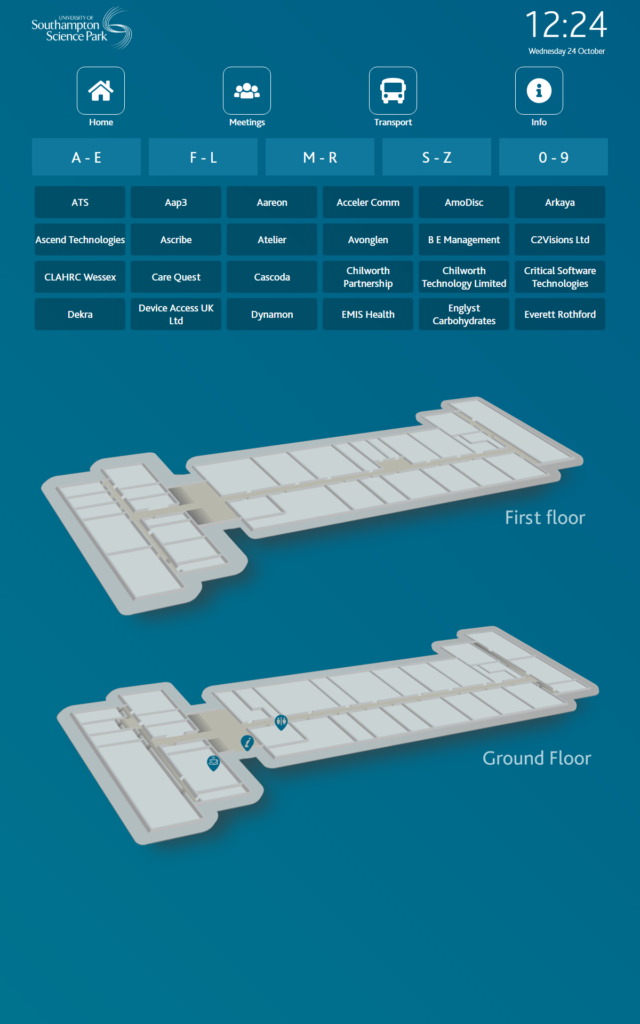
    SSP screenshot 1
    SSP Screenshot

    For many educational organizations, especially large ones spread out across multiple campuses, the flow of students can be rather disjointed. When a student or staff member enters a building that they haven’t been into it can be challenging to locate a desired room or lecture theatre, especially during the mad rush between lessons. Aiding issues around this disjointed flow are the job of digital wayfinding, which strategically guides users around campus or building to avoid high pedestrian traffic and congestion.

    For international schools and colleges, digital wayfinding solutions can be configured in multiple languages to help international students to settle in to their new country. The real-time scheduling functionality also allows important messages to be disseminated quickly, keeping students and staff in the loop with any urgent announcements that are taking place.

    Corporate

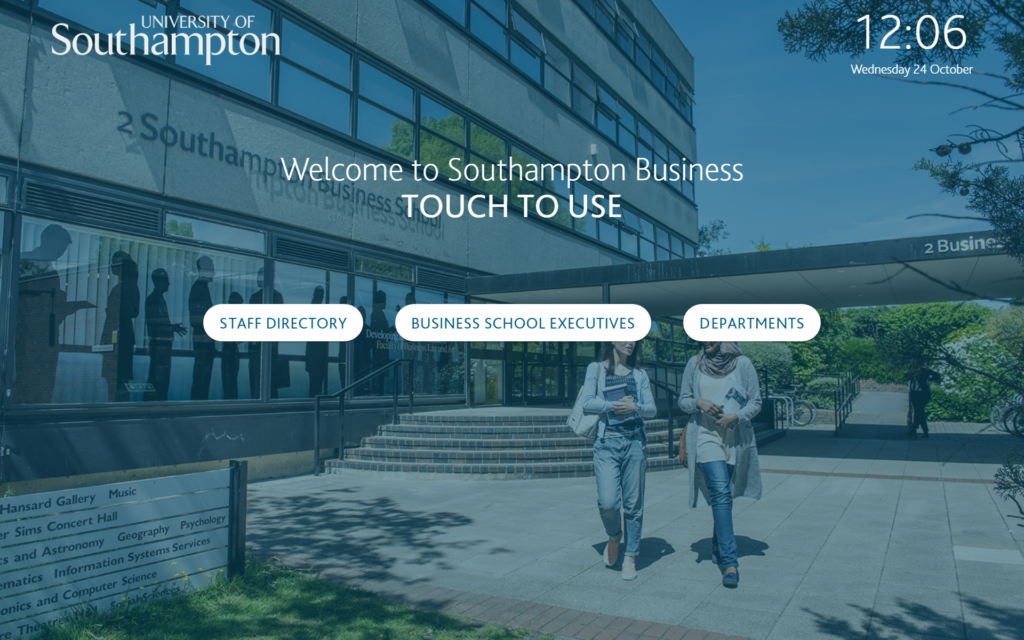
    SBS screenshot 1
    SBS Example

    To gain new business and see growth for many organisations, it is imperative to take care of employees, prospective clients, and current clients. Few things are as captivating as a personalised message on a digital screen upon arrival, as well as how the feeling of using a modernised touchscreen platform to check in and find your way around a building.

    Alongside this, integrating a touchscreen solution with meeting room and event scheduling software allows guests and users to take advantage of all the facilities that are available within a building. Integrating a solution with local public transport routes helps to lower congestion and traffic in surrounding areas and encourages the use of public transport. For extensive organizations, displaying a hierarchal staff directory will help reduce the fragmented feeling that comes with large scale companies.  

    Healthcare

    There’s no doubt that the word healthcare induces a certain level of inherent anxiety within each of us. Whether it is a routine check-up at the doctors, a trip to the vets with your favourite pet, or simply picking up a dental prescription, healthcare institutions provide a rather unnerving experience for many. This level of anxiety is significantly increased when you can’t find a treatment room or certain wing within a practice.  

    The underlying patient anxiety that comes with not being able to accurately find a specific room is not the only issue that is arisen. For a hospital in Atlanta, a recent study found that 4,500 staff hours – equivalent to two full time employees – was being used giving directions to patients. Therefore, the need to accurately facilitate the movement of patients is not only to reduce visitor stress, but also to save the capital being wasted on employees guiding patients.

    Retail & Hospitality

    The retail and hospitality sector can be characterized by being highly competitive, with each high street brand fighting to be the most competitive. To stay competitive, high street brands must go over and above what their competitors are doing.

    An instance of this could be displaying a stock directory in which customers can both check stock levels, as well as place orders through the screen itself. This eases the pressure on staff during busy periods whilst also capturing sales that may have normally been lost. A similar practice can be used within hospitality by embedding a real-time menu that updates the availability of food and drink to customers.

    A further use of the digital wayfinding kiosk within this sector is that, generally, high-street shops will receive a high amount of footfall. As such, a well-positioned kiosk will attract the gaze and interaction of the vast amount of people passing by. Because of this, digital wayfinding kiosks can be a lucrative advertising opportunity for those wanting to reach this target audience. This can help supplement or even alleviate the cost of the wayfinding kiosk. Embedding QR codes onto the wayfinding kiosk is also a great way to increase customer engagement. Offers on certain shop items or menu deals can be incorporated, encouraging shoppers to visit the advertiser’s location, with the added bonus of providing analytics of the digital marketing displayed on-screen.

    Disability use

    Last but certainly not least is the benefits – both physically and mentally – of a digital wayfinding kiosk to those less abled. Digital wayfinding maps can be used to direct wheelchair users to the closest access points or toilets within a building. Educating the general public through clever images and videos of those less abled would also be a great step towards alleviating the stigma surrounding disabilities. Even just displaying a helpline number could make a huge impact on someone’s life.

    This article was written by Dominic Hinchliffe, Sales Manager at TrouDigital who provide bespoke digital wayfinding solutions.