Google Meet is free, but free does not mean unlimited for every kind of meeting. With a personal Google account, one-on-one meetings can run up to 24 hours. Group meetings with three or more participants are limited to 60 minutes.
That is the answer most people are looking for. But for businesses, schools, nonprofits, and workplace teams, the more important question is not whether Google Meet works. It is whether the free version gives your organization enough control, reliability, and visibility for the meetings that matter.
“This meeting will end in 8 minutes.”
If you have seen that warning during a vendor review, staff meeting, board update, or client presentation, you already understand the problem. The tool may be free, but the interruption is not.
Here is what Google Meet’s time limit really means, what changes with paid Google Workspace plans, and how to decide which version makes sense for your organization.
What is the Google Meet time limit?
Google Meet’s time limit depends on the type of account and the type of meeting.
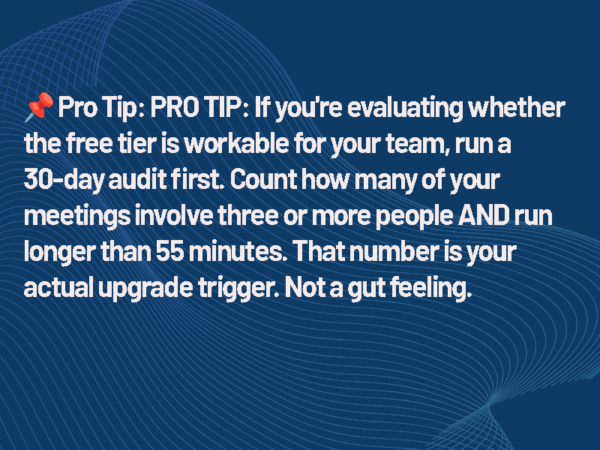
For users without a paid Google Meet or Google Workspace subscription, one-on-one meetings can last up to 24 hours. Meetings with three or more participants can last up to 60 minutes. Google says participants receive a warning at 50 minutes, and the meeting ends at 60 minutes unless the host upgrades.
That distinction matters.
A one-on-one support call may never run into the limit. A team meeting, client presentation, training session, or committee meeting can hit the cutoff quickly.
For casual use, that may be fine. Everyone clicks the link again and rejoins. In a professional setting, that disruption can break momentum, create confusion, and make the meeting platform look less reliable than it really is.
Is Google Meet free?
Yes. Google Meet is free for anyone with a Google account.
The free version includes the core features most people expect from a video meeting platform. Users can host video meetings, invite participants, share screens, and use real-time captions. For small teams, informal conversations, and short meetings, that may be enough.
But the free version has limits that matter in professional environments. The biggest one is the 60-minute cap on group meetings. The others are less visible but just as important: limited administrative control, no native meeting recording for free personal accounts, and less visibility for IT teams responsible for managing workplace technology.
That is the trade-off. Free Google Meet gives users access. Paid Google Workspace gives organizations control.
What happens when Google Meet reaches the time limit?
When a free Google Meet group call approaches the limit, participants receive a warning before the meeting ends. At the 60-minute mark, the meeting ends.
The workaround is simple. Start the meeting again or have everyone rejoin through the same link if it remains available. For a casual team check-in, that may only cost 30 seconds.
In a business meeting, it can cost more than time.
If the meeting includes executives, clients, remote employees, vendors, or training participants, the interruption becomes part of the experience. People stop focusing on the content and start focusing on the platform. That is not what you want from a meeting tool.
When the free Google Meet plan makes sense
The free version of Google Meet can be the right choice in some cases.
It works well for small teams that run short internal check-ins. A 15-minute standup, a quick one-on-one, or a casual project sync will not usually run into the 60-minute group limit.
It also works for organizations that already live inside Google’s tools. If users are already working in Gmail and Google Calendar,
Meet is easy to schedule and easy to join.
The free plan also makes sense when meetings do not need to be recorded. If your organization does not need recordings for training, compliance, documentation, or absent stakeholders, that limitation may not matter.
For personal use and small informal teams, Google Meet’s free plan is genuinely useful. The issue starts when organizations try to use a free personal-account tool as the backbone of a managed meeting environment.
When “free” starts costing more than it saves
The 60-minute limit is the most obvious restriction, but it is not the only one IT and facilities teams should consider.
The free version of Google Meet does not give an organization the same level of centralized control that comes with Google Workspace. That means fewer tools for managing users, enforcing policies, reviewing meeting activity, or standardizing how meetings are created and joined.
For a business, school, healthcare organization, or public-sector agency, that can become a governance issue.
A meeting platform is not just a piece of software anymore. It is part of the workplace experience. It touches identity, calendars, rooms, cameras, microphones, displays, security policies, and support workflows.
That is why the free version can create a mismatch. You may have professional meeting rooms, enterprise-grade displays, managed cameras, and standardized conference spaces, but the meeting itself may still be running on individual accounts with limited organizational oversight.
That gap will show up eventually.
Related: How long does Microsfoft Teams Stay “Green”?
Google Meet free vs paid plans
Here is the simplest way to think about the difference between free Google Meet and paid Google Workspace plans.
Free Google Meet is best for individual users and informal meetings. Paid Google Workspace plans are built for organizations that need longer meetings, business email, administrative controls, recording, attendance tools, and stronger governance.
| Feature | Free Plan | Paid Plans |
| Max Participants | 100 | Up to 500+ |
| Meeting Length | 60 minutes (group) | Up to 24 hours |
| Recording | Not available | Available |
| Breakout Rooms | Limited / Not included | Included |
| Admin Controls | Basic | Advanced |
| Security & Compliance | Standard | Enhanced |
| Integration (Calendar, Drive, etc.) | Basic | Full ecosystem |
This is where Google Meet pricing becomes less about features and more about workflow.
The paid plans do not just add more buttons. They remove friction for organizations that need meetings to be reliable, manageable, and supportable.
Which Google Workspace plan do you need for Google Meet?
Google Meet is included in Google Workspace. The features available to your organization depend on the Workspace edition you choose.
Business Starter is the entry-level business plan. It includes 100-participant video meetings and removes the practical 60-minute group-call limitation that affects free personal accounts. It is a good fit for small teams that need professional email and longer meetings but do not rely heavily on recording.
Business Standard is the more useful floor for many organizations. It supports 150-participant video meetings and includes meeting recording. For teams that need to record trainings, client meetings, internal updates, or stakeholder briefings, this is where Google Meet becomes a more serious business tool.
Business Plus supports larger meetings, with up to 500 participants, and adds features such as attendance tracking and stronger security and compliance tools. It is better suited for mid-size organizations, regulated environments, and teams running large internal meetings or town halls.
Enterprise plans are for larger organizations with more advanced security, compliance, and administrative requirements. At that point, the decision is usually less about Meet alone and more about how Google Workspace fits the broader IT environment.
What IT and facilities teams should pay attention to
For end users, the question is usually simple: “Will my meeting end after 60 minutes?”
For IT and facilities teams, the question is bigger: “Can we support this as part of our workplace technology environment?”
That means looking beyond the meeting timer.
Can users authenticate through the organization’s identity system? Can admins manage access when someone leaves? Can meeting policies be enforced consistently? Can meetings be recorded when documentation is required? Can the help desk support users without guessing which account created the meeting?
Those questions matter more as meeting rooms become more standardized.
A conference room is no longer just a display, a table, and a speakerphone. It is a managed collaboration space. The meeting platform connects to room scheduling, cameras, microphones, displays, network policies, and user expectations.
If the platform is unmanaged, the room experience becomes harder to support.
What about compliance?
Organizations in regulated industries should be especially careful with free personal accounts.
Google Workspace can support certain compliance needs, including HIPAA-related workflows, but organizations must use the right services, accept the appropriate Business Associate Agreement when required, and configure the environment correctly. A free personal Google account is not the same thing as a managed Workspace environment.
That does not mean every organization needs the most expensive plan. It does mean regulated organizations should not treat the free version of Google Meet as a compliance-ready meeting platform.
For healthcare, finance, education, government, and other sensitive environments, the licensing decision should involve IT, security, legal, and compliance teams before Google Meet becomes part of standard meeting-room operations.
The meeting room question
For AV and workplace teams, Google Meet’s free tier creates a practical question: what kind of room are you building?
If the room is for occasional use, short calls, or informal collaboration, the free version may be enough. If the room is used for executive meetings, client presentations, remote learning, all-hands meetings, or recorded sessions, the free version probably is not the right foundation.
The platform should match the stakes of the room.
A huddle room used for quick internal check-ins has different requirements than a boardroom. A classroom has different requirements than a small nonprofit office. A healthcare consultation space has different requirements than a casual project room.
The mistake is treating all meetings the same.
Frequently asked questions about Google Meet time limits
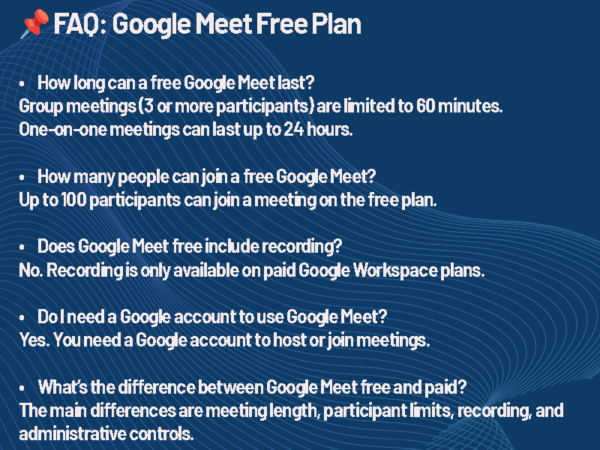
Does Google Meet have a time limit?
Yes. Free personal Google Meet accounts allow one-on-one meetings up to 24 hours, but group meetings with three or more participants are limited to 60 minutes.
How long can a free Google Meet last?
A free one-on-one Google Meet can last up to 24 hours. A free group meeting with three or more participants can last up to 60 minutes.
Does Google Meet end after 60 minutes?
For free group meetings, yes. Google Meet warns participants before the limit, and the meeting ends at 60 minutes unless the host upgrades.
Can you restart a Google Meet after the time limit?
Yes. In many cases, users can start another meeting or rejoin using the meeting link. That workaround may be fine for informal use, but it can be disruptive in professional meetings.
Is Google Meet free for business?
Google Meet can be used for free with a personal Google account, but businesses that need longer meetings, recording, admin controls, and stronger management should use Google Workspace.
Which Google Workspace plan is best for Google Meet?
For many small organizations, Business Standard is the practical starting point because it includes meeting recording and supports larger meetings than Business Starter. Business Plus is a better fit for larger meetings, attendance tracking, and stronger compliance needs.
The bottom line
Google Meet is free, and for the right use case, the free version works well.
But the Google Meet time limit matters. Free group meetings with three or more participants are limited to 60 minutes. That may be fine for casual use, but it can become a real problem in business meetings, training sessions, classrooms, and managed conference rooms.
For organizations, the decision should not be based only on price. It should be based on the role meetings play in daily work.
If Google Meet is just a convenient way to talk, the free version may be enough. If Google Meet is part of your organization’s meeting-room strategy, workplace experience, training process, or compliance environment, a paid Google Workspace plan is usually the better fit.
The question is not only, “Is Google Meet free?”
The better question is, “What do our meetings need to accomplish, and what happens if the platform gets in the way?”
The AV landscape moves fast. To get these insights delivered directly to your inbox so you never miss a beat, Subscribe to the AVWeek Podcast here.

Tim Albright is the founder of AVNation and is the driving force behind the AVNation network. He carries the InfoComm CTS, a B.S. from Greenville College and is pursuing an M.S. in Mass Communications from Southern Illinois University at Edwardsville. When not steering the AVNation ship, Tim has spent his career designing systems for churches both large and small, Fortune 500 companies, and education facilities.
- Tim Albright

- Tim Albright

- Tim Albright

- Tim Albright