Category: Article

  • From AV to Broadcast: Where Corporate Workflows Are Breaking Down

    From AV to Broadcast: Where Corporate Workflows Are Breaking Down

    Corporate AV Has a Broadcast Problem

    Corporate AV didn’t gradually evolve into broadcast. It got pushed there.

    One minute, teams were supporting meeting rooms. The next, they were expected to deliver live, polished, broadcast-quality content across the organization. Executive town halls now look like news segments. Internal updates feel like productions. Training content is expected to meet the same standards as external media.

    The demand changed overnight.

    The workflows didn’t.

    And that’s where things are starting to break.

    This Isn’t an Upgrade. It’s a Collision

    What’s happening right now isn’t a simple technology shift. It’s a collision between three worlds that were never designed to operate as one: AV, broadcast, and IT.

    Each comes with its own expectations.

    Broadcast is built on precision, uptime, and zero tolerance for failure. AV is designed for flexibility and scale. IT prioritizes security, standardization, and network performance.

    Individually, these systems work well. Together, they create friction.

    That friction is now showing up in day-to-day operations, where teams are forced to bridge gaps that technology alone can’t solve.

    The Workflow Is the Weak Link

    The industry has no shortage of tools. What it lacks is alignment.

    AV teams are being asked to think like broadcast engineers without the same training or operational background. At the same time, broadcast professionals are being dropped into IP-based, software-driven environments that behave more like IT systems than traditional control rooms.

    It creates a disconnect that slows everything down. Troubleshooting takes longer. Deployments become inconsistent. Systems work, but not the way they were intended to.

    Then there’s the issue of fragmented infrastructure. Many organizations are still running a mix of legacy broadcast gear alongside modern AV-over-IP solutions, all sitting on top of IT-managed networks. Without a unified approach, these environments become difficult to manage and even harder to scale.

    The result is predictable. Reliability starts to slip.

    Flexibility Is Breaking Reliability

    There’s a growing assumption in corporate environments that flexibility and scalability should come without trade-offs.

    Broadcast doesn’t work that way.

    In broadcast, reliability is everything. Systems are engineered to perform under pressure, every time. AV systems, by comparison, are designed to adapt. They’re built to handle changing spaces, evolving needs, and rapid deployment.

    When these two philosophies collide, something has to give.

    Right now, it’s reliability.

    And in a world where corporate communications are increasingly live and visible, that’s a problem.

    Hybrid Workflows Are Adding Pressure, Not Solving It

    Cloud production, remote contributors, and hybrid collaboration are often positioned as solutions. In reality, they’re adding another layer of complexity.

    Connecting on-prem systems with cloud platforms introduces latency, synchronization challenges, and a deeper reliance on network performance. It only takes one weak link to disrupt an entire workflow.

    For station engineers and broadcast managers, this creates an environment where failure is harder to predict and even harder to prevent.

    Downtime Has Become a Visibility Problem

    The stakes have changed.

    A technical failure is no longer confined to a room. It’s seen across the organization, sometimes beyond it. A broken stream, poor audio, or inconsistent video quality doesn’t just impact the experience. It reflects directly on the team behind it.

    At the same time, expectations continue to rise. Leadership wants broadcast-quality output. Teams are expected to deliver it with limited resources and increasing complexity.

    This isn’t just a technical challenge anymore. It’s operational pressure at scale.

    What the Industry Actually Needs (But Isn’t Talking About Enough)

    The conversation often centers around new technology. That’s not where the real solution lies.

    What’s needed is a shift in how systems are designed and deployed.

    Organizations need infrastructure that treats AV, broadcast, and IT as a single ecosystem rather than separate silos. They need workflows that prioritize reliability without sacrificing adaptability. They need systems that scale cleanly as demand grows, without introducing new points of failure.

    Most importantly, they need to think beyond equipment.

    Because adding more tools to a broken workflow doesn’t fix the problem. It amplifies it.

    Where the Smart Money Is Going

    There are early signs of progress.

    The adoption of AV over IP standards is helping create a common language between systems that previously didn’t align. Centralized control platforms are simplifying management. Cloud tools are reducing hardware dependencies in the right use cases.

    But the biggest shift is happening at the team level.

    Organizations that are investing in cross-functional knowledge between AV, IT, and broadcast are seeing fewer breakdowns and more predictable performance. They’re not just upgrading technology. They’re upgrading how their teams operate.

    Integrators Are Being Forced to Rethink Their Role

    This shift is also exposing a gap in how systems are delivered.

    The traditional model of designing and installing AV systems isn’t enough anymore. Clients don’t just need equipment that works. They need workflows that hold up under real-world pressure.

    That requires a deeper understanding of operations, not just technology.

    Integrators who can bridge that gap will become essential partners. Those who can’t will struggle to stay relevant as expectations continue to rise.

    The Future Will Punish Weak Workflows

    Corporate broadcast isn’t slowing down. It’s accelerating.

    AI-driven production, automation, and always-on content strategies are already reshaping expectations. The line between internal and external content is disappearing. Quality standards will only continue to rise.

    And here’s the reality.

    The organizations that fix their workflows will scale. The ones that don’t will keep running into the same problems, just at a larger and more visible level.

    Final Take

    This isn’t a technology gap. The tools to deliver broadcast-quality experiences in corporate environments already exist, and they’re more powerful than ever. What’s missing is alignment. AV, broadcast, and IT are still operating in silos, while expectations demand they function as one. As a result, workflows are being stretched beyond what they were designed to handle, and the cracks are becoming harder to ignore.

    The organizations that move ahead won’t be the ones chasing the latest gear. They’ll be the ones rethinking how everything connects, from people to processes to platforms. Because as corporate video continues to scale, the margin for error disappears. AV isn’t evolving into broadcast anymore. It’s already there, and broadcast has never been forgiving of broken workflows.


  • Why IT Teams are Rethinking Commercial Displays

    Why IT Teams are Rethinking Commercial Displays

    At events like ISE 2026, it becomes clear that the audiovisual industry rarely moves in small steps. Instead, the market tends to cross thresholds. One year a display is simply a screen. A few years later it becomes something much more.

    Commercial displays are approaching one of those thresholds now.

    For most of the past two decades, enterprise displays were evaluated primarily on visual performance and price. Resolution, brightness, and panel size dominated specification sheets. If the image looked good and the budget allowed for it, the conversation was largely complete.

    That approach is rapidly becoming outdated.

    Today’s commercial displays sit on enterprise networks, consume measurable amounts of power across thousands of rooms, generate heat that affects facility infrastructure, and require lifecycle management just like any other connected device in an IT environment. In other words, the display is no longer just an output device. It has become infrastructure.

    The vendors that succeed in the next phase of enterprise AV will be the ones that design displays accordingly.

    Displays Are Now Network Endpoints

    Perhaps the most significant shift in commercial display design is the recognition that these devices now live squarely inside the IT ecosystem.

    A decade ago, a display was often treated as a passive endpoint. Today, that assumption no longer holds. Displays are connected devices with operating systems, network interfaces, and in many cases direct access to collaboration platforms and content delivery systems.

    That reality changes the requirements dramatically.

    Security becomes a fundamental consideration. Enterprises now expect displays to include mechanisms for restricting inputs, controlling device behavior, and maintaining secure operating environments. Administrators increasingly want the ability to manage displays in ways like other IT endpoints. That includes firmware updates, network authentication, and configurable device policies.

    The rise of operating system–driven displays has also created a new dynamic in the industry. Many commercial displays now run platforms based on widely supported operating systems such as Android, allowing vendors to leverage ongoing security updates and ecosystem support rather than relying solely on proprietary software stacks.

    For IT leaders, this shift means displays must be evaluated not just as hardware, but as managed network devices.

    The Total Cost of Ownership Conversation Has Changed

    Another major shift taking place in the commercial display market is the growing emphasis on total cost of ownership.

    Historically, display purchasing decisions often revolved around upfront cost. While price still matters, organizations are increasingly looking at the operational implications of large-scale deployments.

    Consider the reality of a corporate environment deploying hundreds or thousands of displays across conference rooms, huddle spaces, digital signage networks, and training environments. In these scenarios, the long-term operational impact becomes significant.

    Energy consumption becomes a measurable factor. Power usage multiplied across hundreds of displays can meaningfully affect energy budgets. Reliability becomes equally important. Every service call represents lost productivity and operational disruption.

    Even heat generation can become a facilities consideration. Displays contribute to thermal loads in conference rooms and command centers, which can influence HVAC requirements over time.

    Because of this, enterprise buyers are increasingly asking different questions than they did ten years ago:

    • How reliable is the display over a five-year lifecycle?
    • How much energy does it consume compared to previous generations?
    • How easily can it be serviced or replaced if something fails?
    • What operational costs will this device create over time?

    Manufacturers are responding by designing displays with longer expected lifecycles, improved power efficiency, and warranty structures that support enterprise deployments.

    The result is a market where reliability and operational efficiency are becoming as important as image quality.

    Sustainability Is Moving From Marketing to Engineering

    Environmental considerations are also beginning to shape commercial display design in meaningful ways.

    Corporate sustainability initiatives are increasingly influencing procurement decisions. Organizations are looking beyond marketing claims to measurable improvements in efficiency and lifecycle impact.

    Display manufacturers are responding by rethinking core design elements, including panel architecture, power consumption, and materials sourcing.

    Energy efficiency has become one of the most visible indicators of this shift. Reducing display power consumption not only aligns with sustainability goals but also directly reduces operational costs for enterprises deploying large fleets of screens.

    Longer product lifecycles also contribute to sustainability objectives. Displays that last longer reduce electronic waste and minimize replacement cycles, which are particularly important for organizations operating at scale.

    In many ways, sustainability has become another dimension of the total cost of ownership discussion. Energy efficiency and durability now represent both environmental benefits and financial advantages.

    The Integrator Experience Still Matters

    While enterprise IT leaders increasingly influence AV decisions, integrators remain a critical part of the ecosystem.

    That reality means manufacturers must design displays not only for end users but also for the professionals responsible for deploying them.

    Installation efficiency is one area where vendors are investing significant attention. Lighter displays, standardized mounting patterns, and slimmer chassis designs can dramatically reduce installation complexity and labor requirements.

    These details may seem minor at first glance, but they matter when large-scale rollouts are involved. When hundreds of displays need to be installed across an enterprise campus, small improvements in installation workflow can translate into meaningful time and cost savings.

    For integrators, this shift toward usability represents an important evolution in product design. Displays are increasingly being engineered with the installation process itself in mind.

    Why Anti-Glare and Environmental Performance Still Matter

    Even as infrastructure considerations dominate the conversation, traditional display performance metrics remain relevant.

    In fact, environmental viewing conditions are becoming more important as displays replace projectors in many enterprise environments.

    Conference rooms today often feature large windows, open office layouts, and bright collaborative spaces. In these environments, glare and reflection can quickly undermine display visibility.

    Manufacturers are addressing this challenge through improved anti-glare technologies designed to reduce reflections while preserving image quality. The goal is to ensure that displays remain usable in real-world environments without requiring rooms to be darkened or reconfigured.

    For enterprise customers, this means displays must perform consistently regardless of room design or ambient lighting conditions.

    The Higher Education Factor

    Higher education institutions offer a useful preview of how these trends are playing out at scale.

    Universities operate hundreds of classrooms and lecture halls, often with tight technology budgets and limited support staff. In these environments, reliability, energy efficiency, and ease of deployment become critical factors.

    Classroom technology also operates in high-visibility environments where downtime directly affects teaching and learning. As a result, universities tend to prioritize displays that offer long lifecycles and predictable performance.

    Many of the features now appearing in commercial displays—power efficiency, centralized management, and improved durability—reflect lessons learned from deployments in education.

    As enterprise organizations continue expanding their own AV infrastructures, they are beginning to adopt similar priorities.

    Scalable Deployment

    Another factor shaping the future of enterprise displays is scalability. It is one thing to deploy a single screen in a conference room. It is something else entirely to manage dozens, hundreds, or even thousands of displays across a corporate campus, regional offices, or a global real estate footprint. That is where centralized oversight becomes critical. Tools like Sony’s Device Management Platform (DMP) reflect how the category is evolving beyond hardware and into lifecycle management. For IT and AV teams, the value is not just in the display itself, but in the ability to monitor status, manage fleets remotely, streamline updates, and maintain consistency across an entire deployment. In a modern enterprise environment, that level of visibility and control is quickly becoming part of the baseline expectation.

    The same is true of ecosystem strategy. No display manufacturer can meet every enterprise workflow or vertical requirement alone, which is why open integration is becoming more important across the market. Sony’s emphasis on an open partner ecosystem, including more than 100 technology and solution partners, speaks directly to that reality. Enterprise customers are not buying displays in isolation. They are buying into a broader environment that includes collaboration platforms, control systems, signage applications, workplace experience tools, and management software. The manufacturers that will stand out are the ones that understand the display is only one part of a much larger technology stack, and that interoperability is now just as important as panel performance.

    Sony’s Pro BRAVIA Line Reflects the Industry’s Direction

    This broader shift in commercial display design was visible throughout ISE 2026, where multiple manufacturers highlighted improvements in efficiency, usability, and lifecycle performance.

    Sony’s recently announced Pro BRAVIA updates are one example of how vendors are responding to these evolving expectations.

    The new generation focuses on three areas that align closely with current enterprise priorities: improved image quality, enhanced usability for installers and end users, and greater environmental responsibility. Features such as reduced power consumption, improved anti-glare performance, and updated processing capabilities reflect the industry’s broader push toward displays that function as long-term infrastructure rather than short-term hardware purchases.

    Security considerations are also becoming part of the design conversation. Configurable operating modes and ongoing operating system updates illustrate how display vendors are increasingly addressing the needs of IT-managed environments.

    While Sony is not alone in this approach, its latest Pro BRAVIA lineup highlights the direction the commercial display market is heading.

    The Future of the Enterprise Display

    The commercial display is no longer just a screen on the wall. It is a network endpoint. A power consumer. A facilities consideration. A managed device within the IT environment.

    For enterprise decision makers, this means display selection must now be approached with the same level of strategic thinking applied to servers, collaboration platforms, and network infrastructure.

    As organizations continue building connected workplaces and collaboration environments, displays will remain one of the most visible pieces of the technology stack.

    The difference is that behind the screen, the technology is becoming far more sophisticated than it once was.

    And increasingly, that sophistication is exactly what enterprise environments require.

  • AV Over IP at Scale: What Makes Stadium Deployments Different Than Corporate Rollouts

    AV Over IP at Scale: What Makes Stadium Deployments Different Than Corporate Rollouts

    AV over IP has become a standard architecture for modern audiovisual systems. From corporate meeting spaces to massive sports venues, organizations are replacing traditional AV distribution with network-based solutions that offer flexibility and scalability. However, deploying AV Over IP at Scale in a stadium environment is fundamentally different from rolling out AV systems across a corporate campus.

    Corporate AV projects typically focus on repeatable room designs and predictable usage patterns. Stadiums, on the other hand, operate in high-pressure environments where thousands of endpoints, live production workflows, and broadcast integrations must work together flawlessly during major events. The infrastructure supporting these experiences must be built for performance, reliability, and adaptability at a much larger scale.

    Below are some of the key ways stadium deployments differ from traditional enterprise AV rollouts.

    A Matter of Intensity, Not Just Size

    A stadium is not simply a larger version of a corporate campus. While enterprise AV rollouts focus on replicable room designs and standardized performance metrics, stadium AV deployments operate under entirely different stress conditions. Tens of thousands of fans, massive LED displays, IPTV endpoints, broadcast integrations, and real-time sponsorship activations create an environment where traffic loads spike dramatically and unpredictably.

    AV Over IP at Scale in a stadium must support dense endpoint distribution, long fiber runs, and simultaneous high-bandwidth streams without visible latency or disruption. The complexity grows quickly as systems expand across concourses, suites, production areas, and control rooms. In these environments, the difference is not simply about size, it is about the intensity of system demand during live events.

    Network Architecture Built for Game-Day Throughput

    Corporate AV typically rides on converged enterprise networks where bandwidth demand is predictable and evenly distributed. In contrast, stadium environments require purpose-built network architectures designed to support extreme peak loads during events.

    Core switching infrastructure often relies on high-capacity backbones, sometimes supporting 40Gb to 100Gb throughput. These networks use strict quality-of-service policies and carefully managed multicast traffic to ensure synchronized video distribution across hundreds or thousands of displays.

    The design philosophy shifts from efficient resource sharing to guaranteed performance under heavy load. For technical directors and IT architects, this means building networks that can absorb large bursts of traffic during replays, live highlights, or sponsored content without affecting overall system stability.

    Latency Sensitivity in Live Sports Production

    In a boardroom environment, a few milliseconds of delay rarely impact operations. In a stadium, however, latency quickly becomes visible to the audience. A noticeable delay between live action and replay boards can disrupt the fan experience and create inconsistencies with broadcast coverage.

    Large venue AV systems must therefore operate with extremely low latency and precise synchronization across multiple LED walls and displays. Seamless switching between live feeds, replay systems, and sponsored content is essential during fast-paced events.

    Performance expectations in stadiums often align with broadcast-grade standards. The goal is not simply functional performance but frame-accurate reliability that remains consistent throughout the event.

    Redundancy Is a Design Mandate, Not an Option

    Downtime in a corporate meeting space may interrupt a presentation. Downtime in a stadium during a live event can lead to financial losses, contractual issues, and reputational damage.

    For this reason, redundancy is built into nearly every layer of stadium AV infrastructure. Networks may include dual-core switching paths, redundant power supplies, and backup encoding and decoding systems. Control systems and monitoring platforms are often designed with failover capabilities to maintain operation even if a component fails.

    This level of resilience ensures that live content continues to reach displays throughout the venue, even during unexpected technical issues.

    Managing Thousands of Endpoints in a Public Venue

    One of the most noticeable differences between enterprise and stadium deployments is endpoint scale. A corporate AV rollout might involve dozens or hundreds of displays and control systems. Stadium environments often manage thousands of devices.

    These endpoints can include IPTV displays, LED processors, encoders, decoders, control panels, broadcast interfaces, and digital signage players spread throughout the venue. Managing such a large device ecosystem requires strong network orchestration, centralized monitoring, and structured device management practices.

    Effective IP address planning, firmware control, authentication systems, and system visibility tools are essential for maintaining operational stability, especially during live events when quick troubleshooting may be required.

    Labor Challenges and Operational Efficiency

    Another challenge facing sports and entertainment venues is the shortage of skilled technical labor. Modern AV systems combine networking, video distribution, and live production workflows, requiring technicians with specialized expertise.

    Unlike enterprise environments where IT departments often manage AV infrastructure, stadium operations frequently rely on dedicated technical teams with knowledge of both broadcast and network systems. Finding and retaining this talent can be difficult.

    Scalable AV over IP architectures can help reduce operational complexity. Centralized control systems, remote diagnostics, and modular system designs allow technical teams to monitor and manage large infrastructures more efficiently. Many venues also rely on managed services or long-term vendor support agreements to maintain consistent performance.

    Security in High-Profile, Public Environments

    Public venues introduce additional cybersecurity considerations that corporate environments may not face at the same scale. Stadiums are highly visible locations that host large events, making them potential targets for cyber threats.

    As AV and IT infrastructures converge, the attack surface grows larger. Protecting these networks requires strong segmentation of AV traffic, secure authentication methods, and continuous monitoring of network behavior. Role-based access control and encrypted communication channels can help protect sensitive systems from unauthorized access.

    For large venues, security planning must be integrated into the system architecture from the start rather than implemented after deployment.

    Broadcast Integration and Interoperability

    Corporate AV systems rarely interact with professional broadcast workflows. Stadium deployments, however, operate closely with production switchers, replay systems, audio consoles, and outside broadcast trucks.

    This environment requires seamless interoperability between the stadium’s AV infrastructure and professional production systems. Timing accuracy, signal integrity, and protocol compatibility are critical for ensuring that live video feeds and replays function correctly both in-venue and on broadcast platforms.

    As a result, stadium AV systems must meet higher performance standards than typical enterprise installations.

    Elastic Scalability for Multi-Use Venues

    Modern stadiums are designed to host more than just sporting events. Concerts, esports tournaments, corporate functions, and community events all take place within the same venue.

    Each type of event requires different video distribution workflows and content layouts. AV over IP makes it possible to reconfigure signal routing and display management without physically rewiring the infrastructure.

    This flexibility allows venues to adapt quickly to different event requirements while maintaining a consistent technology foundation. While enterprise AV rollouts focus on uniformity, stadium deployments prioritize adaptability.

    Financial and Strategic Decision Drivers

    In enterprise environments, AV investments are often justified through productivity improvements and collaboration benefits. In stadium environments, the financial drivers are closely tied to revenue generation.

    High-quality AV infrastructure enables digital advertising opportunities, sponsor activations, and premium fan experiences. Large displays, real-time video production, and interactive content all contribute to creating memorable experiences that attract audiences and partners.

    For venue executives and event producers, investing in scalable AV infrastructure supports both operational efficiency and long-term revenue potential.

    Key Considerations for AV Professionals Designing Large Venue Systems

    For AV integrators, consultants, and technology specialists, understanding the differences between corporate AV rollouts and stadium deployments is essential. The design principles used in office environments do not always translate well to live event spaces.

    Stadium environments demand higher levels of performance, redundancy, and scalability. Systems must handle unpredictable traffic spikes, integrate with broadcast workflows, and remain operational under intense public scrutiny.

    As sports venues continue to evolve into multi-purpose entertainment destinations, AV professionals play a critical role in building the infrastructure that supports these experiences. Designing with scale, reliability, and flexibility in mind will remain essential for delivering successful large venue AV deployments.

  • Audio Is Evidence: Why Courtroom Intelligibility Is a Governance Issue, Not a Feature

    Audio Is Evidence: Why Courtroom Intelligibility Is a Governance Issue, Not a Feature

    In many technology discussions, audio quality is framed as a user experience issue, something that improves collaboration or meeting efficiency. But inside a courtroom, audio carries a very different responsibility. It becomes part of the official legal record. Every testimony, objection, and judicial ruling must be captured clearly and preserved accurately. When speech is unclear or partially lost, the integrity of that record is compromised.

    For Facilities Directors, Security Managers, and IT Directors responsible for courtroom technology, this reality changes the conversation entirely. Courtroom audio intelligibility is not simply a feature of a modern AV system. It is a governance issue tied directly to due process, legal compliance, and institutional accountability.

    Audio as the Official Record in Judicial Proceedings

    In a corporate meeting room, poor audio may cause frustration or force participants to repeat themselves. In a courtroom, unclear audio can affect transcripts, appellate reviews, and the admissibility of evidence. Court reporters and recording systems rely on clear speech capture to produce accurate documentation of proceedings.

    Modern courtrooms increasingly depend on courtroom recording systems rather than traditional stenography alone. Digital recording platforms capture and archive proceedings, enabling playback during appeals or reviews. If speech from attorneys, witnesses, or judges is unintelligible, the official record may become incomplete or disputed.

    For justice systems, this creates operational and legal risks. Courts must ensure that their technology infrastructure supports clear and reliable speech capture across every part of the courtroom environment, from the judge’s bench to witness stands and attorney tables.

    Compliance, Risk, and Legal Accountability

    Courtrooms operate within strict procedural and accessibility requirements. Poor audio intelligibility can expose courts to compliance challenges, especially when proceedings must remain accessible to participants with hearing limitations or when accurate transcripts are legally required.

    Beyond accessibility, intelligibility issues can have broader legal consequences. If a portion of testimony cannot be clearly understood in the recording, it may lead to disputes about the accuracy of transcripts. In extreme situations, unclear records can contribute to appeals or retrials, increasing costs and administrative burden for court systems.

    This is why secure AV solutions for courts must address more than technical performance. Systems must meet regulatory standards for digital evidence capture, retention policies, and secure archival storage. Audio captured during proceedings must remain tamper-proof, encrypted, and accessible only to authorized personnel.

    For IT Directors and Security Managers, courtroom AV systems now intersect with broader data governance and cybersecurity frameworks.

    Engineering Courtroom AV Systems for Speech Clarity

    Courtrooms present unique acoustic challenges that can interfere with intelligibility. Large rooms with high ceilings, hard surfaces, and public seating areas often produce reflections and reverberation that distort speech. Multiple participants speaking from different positions further complicate audio capture.

    Achieving reliable courtroom audio intelligibility requires deliberate system design. Microphone placement must be carefully planned to capture speech clearly without amplifying background noise. Digital signal processing (DSP) systems play a crucial role by managing echo cancellation, automatic mixing, and noise suppression.

    Automatic microphone mixers can prioritize active speakers while minimizing interference from unused microphones. This ensures that speech remains clear and consistent regardless of who is speaking during proceedings.

    In addition, monitoring tools allow technical staff to verify audio levels and system health during hearings. These systems help prevent issues such as clipping, signal loss, or equipment malfunction that could disrupt recordings.

    Security and Digital Evidence Protection

    Unlike recordings from typical meeting spaces, courtroom audio files are considered legal artifacts. They must be handled with the same care as other forms of digital evidence. Secure storage, controlled access, and audit trails are essential to maintain the integrity of these recordings.

    Courtroom AV systems therefore require strong cybersecurity protections. Network segmentation helps isolate AV traffic from other courthouse systems, while encryption safeguards recordings during transmission and storage. Access permissions must be carefully managed so that only authorized personnel can retrieve or modify files.

    These security practices ensure that recordings remain trustworthy and verifiable if they are later reviewed during appeals or investigations. In high-security court environments—such as those handling criminal cases or remote testimony—these protections become even more critical.

    Integration with Modern Courtroom Technology

    Today’s courtrooms rely on a wide range of interconnected technologies. Audio systems often integrate with video conferencing tools, digital evidence presentation platforms, and case management systems. Remote testimony and hybrid hearings have become more common, especially in modern judicial workflows.

    This integration places additional demands on courtroom AV infrastructure. Network reliability, latency control, and bandwidth management can all influence audio quality. If remote participants experience delays or signal interruptions, intelligibility may suffer.

    To maintain consistent performance, justice technology infrastructure must prioritize AV traffic through network quality-of-service policies and maintain secure connectivity across endpoints. Collaboration between AV integrators and IT departments is essential to ensure that these systems operate smoothly during live proceedings.

    Operational Reliability and System Redundancy

    Court proceedings cannot pause for technical troubleshooting. If an audio system fails during a hearing, critical testimony may be lost. Because of this, redundancy and resilience have become essential components of courtroom AV design.

    Modern courtroom AV systems often incorporate backup recording servers, redundant microphones, and uninterruptible power supplies. These safeguards ensure that recordings continue even if a component fails. Monitoring software can alert technical teams to potential issues before they disrupt proceedings.

    Equally important is ease of use. Judges, clerks, and attorneys must be able to operate the system without technical expertise. Interfaces should be simple and intuitive while restricting access to configuration settings that could compromise system performance.

    For facilities teams and IT staff, systems that combine reliability with straightforward operation reduce the risk of errors and support consistent courtroom performance.

    A Governance Perspective on Courtroom Audio

    For court administrators and facilities leaders, investing in reliable AV infrastructure is about more than modernization. It reflects a commitment to transparency, fairness, and procedural integrity.

    When courtroom audio intelligibility is treated as a governance priority, courts can protect the accuracy of the official record and ensure that proceedings remain accessible and verifiable. This approach also strengthens public trust in the justice system by demonstrating that technology supports accountability rather than undermining it.

    For the AV and IT industries, this shift represents an opportunity to rethink how courtroom technology is positioned. Solutions should be framed not as convenience upgrades but as foundational systems that support legal processes.

    In the courtroom, audio does more than help people hear each other. It preserves evidence, documents decisions, and safeguards the judicial record. When that responsibility is recognized at the governance level, technology becomes a tool for protecting the integrity of justice itself.

  • How to Switch Conference Rooms from Zoom or Teams to Visio

    How to Switch Conference Rooms from Zoom or Teams to Visio

    When AP News reported that France plans to move its civil service away from platforms like Microsoft Teams and Zoom, it was easy to frame the story as a political or regulatory shift. Now IT and AV leaders need to know how to switch conference rooms from Zoom or Teams to Visio. Or another platform.

    France’s transition to a government-backed platform called Visio is part of a broader push for digital sovereignty, data control, and reduced dependence on foreign cloud providers. And while Visio is currently positioned as a national platform, the underlying trend is global.

    Organizations are increasingly asking: What happens to our conference rooms when our collaboration platform changes?

    This article outlines what you need to consider when migrating from Zoom Rooms and Microsoft Teams Rooms to a new platform like Visio, and how to do it without disrupting productivity.

    Why This Shift Matters for Enterprise IT

    France’s decision reflects pressures many organizations already face. That includes stricter data protection requirements and increased scrutiny of cloud jurisdiction. Where, exactly, is your cloud. Because we all know the “Cloud” is just someone else’s server. They are also being asked about long-term licensing, subscription costs, and infrastructure control. Figuring out how to switch conference rooms from Zoom or Teams to Visio is just the starting point.

    Collaboration platforms are no longer viewed as simple productivity tools. They are now part of an organization’s security posture, compliance framework, and risk strategy.

    For IT leaders, this means conference rooms can no longer be designed around a single vendor ecosystem. Flexibility is becoming a strategic requirement.

    The Reality: Most Rooms Are Platform-Centric

    Over the last decade, enterprises standardized around tightly integrated systems. This includes Zoom Room appliances. Microsoft Teams Certified gear. These rooms also include cloud-managed scheduling. Those environments deliver excellent user experiences, but they are optimized for one ecosystem. When the platform changes, the room often has to change with it.

    A successful migration starts with acknowledging this dependency and planning around it.

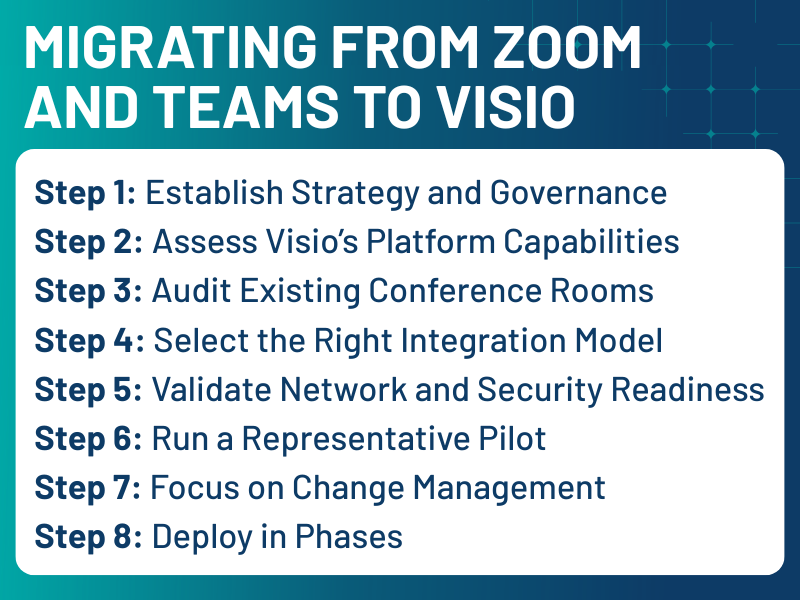
    Step 1: Establish Strategy and Governance

    Before touching hardware or software, leadership alignment is essential.

    Key questions include:

    • Is this migration driven by compliance, cost, security, or all three?
    • Will Visio replace existing platforms or operate in parallel?
    • Who owns governance: IT, security, compliance, or AV?

    Without clear answers, deployments tend to become fragmented and difficult to support. Documenting this strategy early helps prevent technical decisions from being made in isolation.

    Step 2: Assess Visio’s Platform Capabilities

    Every migration depends on what the new platform can support.

    Before committing, IT teams should validate:

    • Room participation models
    • Web versus native clients
    • Identity and SSO integration
    • Encryption and security policies
    • Recording and compliance features

    Many sovereign or government-backed platforms rely on browser-based or WebRTC technologies. This can simplify deployment, but it may also require changes to existing room workflows.

    Understanding these limitations early prevents costly redesigns later.

    Step 3: Audit Existing Conference Rooms

    Next, conduct a detailed room inventory.

    At minimum, document:

    • Cameras, codecs, and compute devices
    • Control systems and touch panels
    • Network segmentation and QoS policies
    • Authentication and directory services

    Most enterprises discover their room environments are far more diverse than expected. Some rooms may be easily adaptable, while others will require upgrades or replacement.

    This audit becomes the foundation for budgeting and scheduling.

    Step 4: Select the Right Integration Model

    There are three primary ways organizations can enable Visio in meeting rooms.

    Native Room Integration

    If Visio supports certified hardware or native room clients:

    • Deploy supported software
    • Integrate calendaring systems
    • Enable centralized monitoring

    This provides the closest experience to existing Teams Rooms and Zoom Rooms environments, but depends on vendor maturity.

    Browser-Based Room Access

    If Visio is web-centric:

    • Configure room PCs in kiosk mode
    • Optimize browsers for WebRTC
    • Validate camera and audio routing

    This model reduces vendor lock-in and often accelerates deployment, making it attractive for early adoption.

    SIP and Gateway Interoperability

    If legacy systems must be preserved:

    • Deploy SIP/H.323 gateways
    • Map meeting IDs to room endpoints
    • Maintain codec compatibility

    This approach protects existing investments but adds operational complexity. Most enterprises use a hybrid of these models during transition periods.

    Step 5: Validate Network and Security Readiness

    Video platforms are sensitive to network conditions.

    Before scaling, confirm:

    • Firewall and port configurations
    • QoS policies for real-time traffic
    • Certificate management
    • Identity federation

    Security and networking teams should be part of early testing cycles. Late-stage policy changes are one of the most common causes of rollout delays.

    Step 6: Run a Representative Pilot

    A structured pilot reduces risk.

    Select rooms that reflect real usage:

    • Huddle rooms
    • Standard conference rooms
    • Executive spaces

    During the pilot, measure:

    • Join success rates
    • Audio and video quality
    • Scheduling accuracy
    • Support ticket volume

    Use these results to refine standards before expanding.

    Step 7: Focus on Change Management

    Platform changes impact daily workflows.

    Successful organizations invest in:

    • Quick-start guides
    • Training sessions
    • Updated help desk processes
    • In-room signage

    User confidence is a critical success factor. Even technically sound systems fail when adoption is poor.

    Step 8: Deploy in Phases

    Large-scale migrations should follow staged rollouts:

    Phase 1: Early adopters
    Phase 2: Departmental deployments
    Phase 3: Enterprise-wide implementation

    Track metrics such as reliability, utilization, and support demand to guide adjustments.

    What This Means for You

    France’s move to Visio highlights three long-term trends. Collaboration is now a governance issue. Meeting platforms are increasingly tied to regulatory and risk frameworks. Open Standards are strategic assets. Rooms built on open protocols and modular designs adapt more easily to platform changes. And experience still matters. Users expect simplicity. Any alternative must meet the usability standards set by Zoom and Teams.

    Designing for Platform Independence

    Migrating from Zoom or Teams to a platform like Visio is not just a technical refresh. It is an investment in resilience, compliance, and long-term flexibility.

    For IT leaders, success depends on:

    • Clear governance
    • Accurate infrastructure audits
    • Flexible integration strategies
    • Strong user support
    • Phased execution

    Organizations that approach this transition strategically can reduce dependency on single vendors while maintaining high-quality collaboration environments.

    As digital sovereignty becomes a larger part of enterprise planning, conference room design will increasingly reflect not just technical preferences, but organizational priorities.

  • The Room You Were Blamed For

    The Room You Were Blamed For

    You’ve been in that room.

    The board is assembled. The client is on screen from overseas. And the display is cycling through a handshake loop it shouldn’t still be doing in 2026. Someone looks up. Not at the screen. At you. Because you own this.

    The troubleshooting tree runs automatically in your head: the adapter, the firmware version, the USB-C chain. You isolate it in ninety seconds. You fix it in two minutes. But the meeting has already lost its momentum, and so, quietly, have you.

    This is not a technology problem. This is what happens when the infrastructure underneath a collaboration program was never built to match the scale it was eventually asked to serve.

    For most IT and AV directors managing enterprise meeting room estates, this is deeply familiar. That’s why 2026 is shaping up to be the year the industry is meeting the reality you have been living for the better part of three years.

    A Storm That Was Always Coming

    The pressures converging on IT and AV teams right now did not appear overnight. They are the accumulated consequence of a series of decisions made quickly, under duress, in a period when ‘good enough’ was the only available standard.

    When organizations scrambled to video-enable their spaces in the immediate post-COVID period, the priority was speed. Huddle rooms got hardware. Smaller conference spaces got connected. Budgets moved fast, and the technology that shipped fast was not always the technology that was built to last. Android OS versions that were current in 2021 are now aging out of security compliance. Platforms have moved forward by two or three generations. And for many organizations, the financial write-off clock on those deployments has already expired.  Meaning the question is no longer whether to replace this hardware, but how to do it intelligently at a scale that was not part of the original plan.

    Large and extra-large spaces present the next layer of complexity. Many were deferred during the initial wave of video enablement precisely because they were harder and more expensive to get right. Now they are the next frontier.  And they carry proportionally higher stakes. A stumble in a huddle room is an inconvenience. A stumble in a boardroom or a high-stakes client space is something you answer for.

    Return-to-office mandates have added urgency to a timeline that was already tight. IT teams that had eighteen months to plan a thoughtful fleet refresh now have six. The tools and workflows that worked for deploying fifty similar huddle rooms do not scale gracefully to a program spanning hundreds of diverse spaces across multiple buildings, campuses, or geographies. And the people managing those programs are discovering this not in planning documents, but in the field. One broken meeting room at a time.

    What the Industry Got Wrong and Is Starting to Fix

    Here is something IT and AV professionals have understood for years that the product roadmaps took longer to acknowledge: general-purpose compute was never the right foundation for professional AV environments.

    The adapters were not oversights. The dongles were not temporary. The conversion layers inserted between a computing chassis and a room’s AV infrastructure were the industry’s way of papering over a fundamental mismatch between what the hardware was designed to do and what the room actually demanded. Every adapter was a potential point of failure. Every workaround was something a technician had to understand, troubleshoot, and eventually replace. At the scale of a single room, these inefficiencies are manageable. At the scale of an enterprise estate, they compound into something that consumes significant time, budget, and credibility.

    Crestron’s Collab Compute, announced in January and debuted at ISE 2026 in Barcelona, is a direct response to that mismatch. It is not a revelation so much as a correction. For the teams who have been engineering workarounds for years, that distinction matters more than any feature list.

    The hardware is built from the ground up for professional AV operating environments. DM Essentials terminals, HDMI, USB-C, and multi-network support are native to the device, not added on after the fact. The power supply is integrated. Mounting is tool-free. The front panel displays meaningful status indicators. Things like active display outputs, content ingest sync, signal status. They are color-coded for quick fault diagnosis without pulling equipment off the wall. It runs native Microsoft Teams Rooms and Zoom Rooms on Windows OS, and it supports distributed audio systems, multi-camera configurations, multi-screen setups, and room automation without external adapters.

    This is what it looks like when hardware is designed around the person who has to deploy it, manage it, and answer for it when it fails.

    Consistency Is Not a Feature. It Is the Whole Point.

    One of the most underappreciated costs of managing a large meeting room estate is not financial. It is cognitive.

    When the hardware running a collaboration platform varies from room to room, the experience varies with it. A meeting that starts flawlessly in one space stumbles in another because of a slightly different configuration, a different performance ceiling, or a missing capability. These are not technology problems to the person trying to run the meeting. They are friction. They erode confidence in the spaces. And in the teams responsible for them.

    Collab Compute is built around consistency as a first principle. The same hardware foundation scales across small huddle spaces, medium conference rooms, and high-impact boardroom environments. The deployment process, configuration steps, and management interfaces are identical regardless of room size. For IT teams monitoring and maintaining these spaces over time, that consistency translates directly into faster fault resolution, simpler technician training, and more predictable performance across the estate.

    For integrators and system designers, a standardized compute core means the design effort can shift from re-engineering the core technology for each room type to optimizing the peripherals around a known, stable foundation. Then moving efficiently to the next project.

    This matters beyond the spec sheet. Consistency reduces the cognitive load on every technician who walks into a room they have never been in before and needs to diagnose a problem in ten minutes. Or less. It reduces the training burden on teams that are already stretched thin. And it reduces the frequency of those moments where someone looks up from the conference table and finds you with their eyes.

    Security Is No Longer Optional Infrastructure

    Running in parallel to the hardware story is a development that deserves more attention than it typically gets in product launch coverage: the security architecture of the devices managing your meeting rooms.

    The 80 Series Touch Screens, also launched in January, are Crestron’s first product built on the Microsoft Device Ecosystem Platform  (MDEP). For IT professionals working in regulated industries, government, higher education, or any organization with mature security requirements, this is not a minor footnote.

    MDEP represents a shift in where security lives in the device stack. Rather than security being an application-level concern layered on top of a general-purpose operating system, MDEP builds consistent security posture and management capability directly into the platform foundation. Mobile Device Management integration becomes more predictable. Deployment tooling works more reliably. When security policies need to be enforced or updated across a fleet of devices, the underlying platform is designed to support that uniformly.

    For organizations that have struggled to bring meeting room technology into compliance with broader IT security policies the 80 Series and its MDEP foundation represent a meaningful step toward closing a gap that has required significant manual effort to manage.

    The AI Question You Will Have to Answer Soon

    No honest conversation about meeting room infrastructure in 2026 avoids the question of artificial intelligence. And the architectural decision your organization makes in the next twelve to eighteen months will have implications that extend well beyond the current product cycle.

    Collab Compute is built around Intel Core Ultra 5 and Core Ultra 7 processors, both of which include dedicated Neural Processing Units. NPUs designed for AI workloads, not CPU approximations of them. Features like auto-framing, speaker identification, and real-time transcription increasingly demand sustained local processing. The question is where that processing happens.

    The edge versus cloud decision is not theoretical. Latency is the most immediate factor: video processing that requires a round trip to the cloud introduces delays that are perceptible and disruptive. Cost is a growing concern as well. AI processing in the cloud scales in price as the number of AI-enhanced spaces in an organization scales. And that math changes meaningfully when local compute handles appropriate workloads instead.

    Privacy and regulatory compliance add another layer that IT directors in certain sectors know well. Data sovereignty requirements vary by country, by state, and by industry. Features that rely on sending video or biometric data to the cloud may be restricted or prohibited in your environment. Edge AI keeps that processing local. Keeps it inside the room. That gives your organization more control over what leaves the network and under what conditions.

    The likely model going forward is hybrid. Some workloads are well-suited to the cloud and tolerant of modest latency. Those that  involve real-time video processing  will increasingly migrate to the edge. Collab Compute is designed to participate in both models, which means organizations deploying it today are not locking themselves into a single architecture that may need to be revisited as AI capabilities continue to evolve.

    Managing at Scale: The View From the Dashboard

    Room-level hardware decisions are necessary. They are not sufficient.

    For IT teams responsible for a  system spanning multiple buildings, campuses, or geographies, the management and monitoring layer is where operational reality is made or broken. Collab Compute integrates with Crestron’s XiO Cloud platform, as well as Microsoft Teams Pro Management and Zoom Device Management. Provisioning, remote monitoring, and management of large deployments can be handled from a single centralized interface. Updates can be pushed at scale. Alerts can be configured to surface issues before they affect meeting room users. Data like uptime, performance, usage can feed into broader facilities and IT planning.

    For organizations that have historically managed meeting room technology as a distributed, site-by-site responsibility, this kind of centralized visibility is not just an operational upgrade. It is a shift in what is possible: moving from reactive problem-solving to proactive fleet management, from discovering failures after a meeting collapses to flagging them before anyone walks in the door.

    The Question Worth Sitting With

    Crestron launched the  Collab Compute, the 80 Series Touch Screens, AutoMeasure for Automate VX, the DM NAX Intelligent Audio Platform, and the 1 Beyond i12D Intelligent Camera in January. These are not designed as isolated point solutions. They are components of an ecosystem built around the operational challenges facing organizations that need to deploy, manage, and sustain collaboration technology at scale, not as a one-time project but as an ongoing program.

    Whether Crestron’s ecosystem is the right fit for your organization is a question that depends on factors specific to your environment, your existing infrastructure, and your team’s capabilities. The framework it represents is increasingly the standard against which enterprise collaboration infrastructure will be measured. Regardless of the vendor.

    But the harder question, and the one worth carrying into your next budget conversation, is this:

    When you are managing a fleet that spans four buildings and three generations of hardware, at what point does incremental upgrade become more expensive than a deliberate reset? Do you pay for that in time, in credibility, in talent? That is not a technology question. It is a leadership question. And the organizations getting it right are not necessarily the ones with the largest budgets. They are the ones who decided to stop treating their collaboration infrastructure as a collection of individual deployments and start treating it as a program.

    You have been doing the hard work of building that program under conditions that were not designed to support it. The tools are getting better. And for the first time in a while, it looks like the industry is building them with you in mind.

  • Raising the Standard for Industry Cooperation

    Raising the Standard for Industry Cooperation

    The role of standards—and open standards in particular—is becoming a more frequent topic of discussion in the AV industry. Having spent much of my career in the IT world and more recently working with companies in AV, I believe this is a very important industry topic.   While standards and the processes behind them can sometimes feel unfamiliar or even uncomfortable, they are essential tools for one important reason: the industry must work together to move forward.

    For those who have not participated in standards development, the process can appear messy or opaque. I personally remember early in my career, working on product teams and viewing standards as outside forces that negatively affected schedules, introducing product constraints for reasons that weren’t immediately clear — not to mention working with our competition! They sometimes seemed disconnected from the realities of shipping products. Over time as I became more directly involved in participating in standards efforts, I gained an appreciation of their significance as well as understanding that the sometimes chaotic nature comes with the task of an industry creating together.

    There are many types of standards, and my personal experience is primarily with open technical standards, which form the basis for the perspective shared here. It is also important to state that every technology ecosystem includes a mix of proprietary solutions and open industry standardized components and layers.

    What is essential to understand is the role that open standards can play in the industry. The most important function is facilitating a structured way for companies to work together on shared problems.  Standards orgs create processes that help set aside competitive and intellectual property concerns in pursuit of a common goal. Successful standards efforts typically begin with agreement on a real market problem by multiple companies which then committing resources to solve that problem collaboratively, outside of their day-to-day competitive relationships.

    Occasionally I hear concerns that standards operate outside normal market pressures or that they are underfunded and disconnected from commercial reality. In my experience, the opposite is true. Long-term success only occurs when there is a genuine market need and when multiple companies collectively drive development through standards bodies. This type of “coopetition’ where companies jointly fund and benefit from shared infrastructure as opposed to a single company is more complex than a single-vendor approach, but it enables greater scale and value chain confidence. The result is an ecosystem where many companies can innovate and compete, allowing market demand to be met without being constrained by the capacity or priorities of a single supplier. Conversely, when there is not an agreed need, standards simply do not gain adoption, and development naturally slows or stops.

    The related issue of interoperability is important to address. A multi-vendor ecosystem offers choice, but without a single company testing everything, how can users be confident the overall system will work?  Multi-vendor interoperability in a sufficiently, complex standard or set of standards is not a given even when the standards are very well written.  This is where industry groups, composed of cooperating companies, step in to define interoperability expectations and manage them through guidance, testing, and certification programs. Although this may take longer initially than a single-vendor solution, over time it produces a more robust and resilient ecosystem – the importance of which has been seen during recent supply chain disruptions.

    An example of this type of industry group is Wi-Fi Alliance. I am old enough to remember when Wi-Fi products from different vendors frequently failed to work together, despite being based on well written IEEE 802.11 standards. Over time, the Wi-Fi Alliance created a forum for companies to align on interoperability goals and established rigorous testing and certification programs. This type of group can be utilized more in AV and is not just for purely technical contributors – it is best driven by the business and user needs.

    Another argument heard is that AV is somehow fundamentally different from IT, and that the benefits of standards-driven collaboration does not apply. Having worked extensively in both industries, I believe this is not only be false but potentially limiting to the industry. IT did not embrace standards because of unique virtues or higher intentions; it did so in response to market pressure from increasing interdependence across the solutions. Note that the IT industry was much smaller than it is today. Standards allowed companies to focus limited resources on meaningful differentiation built on top of shared standards. This is how standards ultimately fuel market and technology innovation.

    As AV systems continue to evolve—becoming more networked, cloud-connected, software-defined and containerized—the same dynamics apply. AV companies and the broader community, including integrators and consultants, can all benefit from the same playbook. The increasing overlap with IT infrastructure, which is inherently standards-based, makes this even more important.   The driving force is the same: the need for the industry to work together more effectively, gaining a voice in technologies that are used in AV/IT products and systems

    Standards, and the organizations that support them, are one of the most powerful tools we have to enable that cooperation. As we start the new year at ISE and other industry forums, I let’s continue the discussion. I personally look forward to it.

  • FCC’s Secondary GPS Debate Could Reshape Wireless in Your Building

    FCC’s Secondary GPS Debate Could Reshape Wireless in Your Building

    A proposal working its way toward an FCC vote has broad implications for the 900 MHz spectrum that powers smart building systems and secondary GPS.


    UPCOMING DEADLINE: The FCC’s March 26th open meeting is days away. A Notice of Proposed Rulemaking (NPRM) has already been submitted to the Office of Management and Budget. Industry insiders expect some level of disclosure at the April 30th open meeting. Here is what AV and IT professionals need to understand before that happens.

    Most AV and IT professionals don’t spend much time thinking about GPS. Let alone secondary GPS.

    It lives somewhere above the atmosphere, quietly guiding airplanes, shipping containers, financial transactions, and navigation apps. The system works so reliably that it fades into the background of modern infrastructure.

    But inside Washington, D.C., a debate is underway that could affect far more than navigation satellites. The Federal Communications Commission (FCC) is exploring new technologies to serve as a backup for GPS. And one of the proposals gaining traction could have ripple effects across wireless systems used inside buildings.

    For professionals responsible for AV systems, smart buildings, and networked environments, this is one of those regulatory conversations that may feel distant at first glance but has the potential to reshape parts of the wireless ecosystem many of us rely on every day.

    Why the U.S. Wants a Backup to GPS

    GPS is foundational to modern infrastructure, but it faces increasing attacks from bad actors seeking to disrupt critical infrastructure with harmful and illegal interference

    The signals arriving from GPS satellites are incredibly weak by the time they reach Earth, making them vulnerable to interference, jamming, or deliberate spoofing. Governments worldwide have grown increasingly concerned about the resilience of what’s known as Positioning, Navigation, and Timing (PNT) infrastructure. These systems do far more than guide vehicles: GPS timing synchronizes telecommunications networks, financial markets, power grids, and logistics chains. A sustained disruption would move quickly through multiple layers of critical infrastructure.

    That concern has been bipartisan for years. President Trump issued an executive order on PNT resilience during his first term. The Biden administration’s Department of Transportation put together a detailed framework to address it. Senators on both sides of the aisle have publicly called for action. That includes Ted Cruz and Democratic counterparts on the Commerce Committee. Congress has been aware of the problem for over a decade. The frustration, as more than one industry insider has noted, is that awareness has not translated into a solution.

    At least fourteen companies are now actively developing secondary PNT technologies. Most are designed to work alongside existing infrastructure. Riding the sidebands of broadcast television towers using the ATSC 3.0 standard, leveraging eLoran networks, or using other approaches that do not require touching spectrum currently in use. One company, however, has proposed something different.

    That’s where the story gets complicated for building technology professionals.

    The NextNav Proposal and Secondary GPS

    A publicly traded company called NextNav (Nasdaq: NN) has petitioned the FCC to reconfigure portions of the 902–928 MHz band and grant the company a nationwide license for 15 MHz of that spectrum to operate a 5G-based terrestrial PNT network. But that’s spectrum that today supports a wide range of unlicensed building, industrial, and IoT technologies

    NextNav’s argument is straightforward: America needs a GPS backup, the 900 MHz band is underutilized, their technology requires this spectrum, and the solution could be deployed at no cost to taxpayers. The company also notes that it is already the largest licensee in the lower 900 MHz band through prior FCC auctions. NextNav’s technology doesn’t require this spectrum. It could be built on any 5G frequency. They want this spectrum because their proposed scheme would allow them to subsidize their PNT solution. As opposed to us paying for it directly.

    The counter-argument, filed with the FCC by a broad coalition of engineering firms, industry organizations, public safety agencies, and technology manufacturers, is equally direct: the band is not underutilized, NextNav’s interference modeling contains fundamental flaws, and the thirteen alternative PNT solutions under consideration require no spectrum reconfiguration whatsoever.

    “The alternative methods of creating a lasting backup to location and timing services that will not impact the lower 900 MHz spectrum are very viable. The FCC should continue to evaluate those solutions.”

    — Avi Rosenthal, Chairman, Z-Wave Alliance


    Alliances Come Together

    The Security Industry Association commissioned an independent engineering study through Pericle Communications that concluded NextNav’s proposed system would render a significant number of mission-critical public safety and security devices inoperable in real-world building environments. This was filed with the FCC in September 2025. Technical rebuttals from the Z-Wave Alliance, LoRa Alliance, RAIN Alliance, and Wi-SUN Alliance reached similar conclusions.

    The breadth of opposition is notable. The Connected Devices for America Coalition (CDAC), formed specifically in response to this proceeding, now includes the tolling industry, railroad operators, the Wi-Fi Alliance, the LoRa Alliance, the Z-Wave Alliance, the Wi-SUN Alliance, the RAIN Alliance, Itron, Amazon, Silicon Labs, Texas Instruments, and the Connectivity Standards Alliance (which governs the Matter smart home standard). Public safety organizations including APCO and the International Association of Fire Chiefs have filed formal objections. The Transportation and Infrastructure Committee in Congress has sent a formal inquiry to the FCC.

    In terms of comment volume, this proceeding has drawn more FCC response than any issue since net neutrality.

    Why the 900 MHz Band Is So Deeply Embedded in Building Technology

    The 902–928 MHz range has become a foundational layer for smart building wireless systems for a simple reason: physics. Lower frequencies penetrate walls, floors, and building materials that stop 2.4 GHz and 5 GHz signals cold. A Z-Wave Long Range device at 900 MHz can communicate across distances and through obstructions that Wi-Fi cannot reliably match. That’s why building management systems, wireless occupancy sensors, HVAC control nodes, security panels, and many professionally installed access control systems gravitate toward this band.

    But Z-Wave is only the headline. Inside 902–928 MHz you will also find:

    • Active RFID asset-tracking systems — used to locate AV equipment carts, medical devices, and IT hardware across large facilities.
    • Electronic shelf labels and LCD display tags — common in large corporate campuses and retail environments.
    • Railroad and freight logistics tracking — including RFID tags used by major shipping carriers.
    • Electronic tolling transponders — the technology in millions of vehicles used to wirelessly pay for tolls and road use.
    • LoRa-based IoT networks — used for smart utility metering, environmental monitoring, and industrial sensing.
    • Wi-SUN mesh networks — powering smart city infrastructure and outdoor facilities management.
    • Wireless fire and life safety sensors — including devices protecting federal buildings, schools, hospitals, and embassies, per a November 2025 FCC filing.

    Wild Wild Wireless

    The shared, unlicensed nature of this spectrum is governed by FCC Part 15 rules requiring all devices to coexist without causing harmful interference to others. This has worked reliably for over thirty years. The concern raised by opponents of the NextNav proposal is that introducing a high-power licensed transmitter operating under different rules would fundamentally alter that coexistence framework.

    The Z-Wave Alliance’s technical analysis found that retransmission caused by 5G interference would significantly reduce battery lifespan in currently installed devices: A particularly meaningful concern for facilities with thousands of battery-powered wireless sensors that cannot easily be replaced or serviced at scale.


    The AV-IT Angle: When RF Problems Become Network and Security Problems

    AV and IT teams have spent years converging their infrastructures. That includes IP-based AV distribution, unified endpoint management, and cloud-connected room systems. The assumption underpinning most of that work is that the physical wireless layer in the building is stable.

    A disruption at the 900 MHz layer doesn’t stay at the RF level. It surfaces up the stack. Consider the operational picture:

    • Occupancy sensors that fail to detect room presence will disrupt automated HVAC and lighting adjustments, leading to uncomfortable environments and wasted energy.
    • Wireless access control systems experiencing signal degradation may produce missed authentication events or dropped alerts, particularly in underground areas and building perimeters where 900 MHz penetration is doing the most work.
    • RFID asset tracking systems that go offline mean IT hardware, AV equipment, and shared devices become invisible to facility management dashboards.
    • Building management systems that feed data to workplace experience platforms will generate missing data, false occupancy states, and a cascade of helpdesk tickets that ultimately trace back to RF interference.

    The security dimension is one that IT leaders and CISOs should not overlook. Wireless motion sensors, door contacts, and glass-break detectors operating in the 900 MHz band are part of the physical security perimeter in many enterprise facilities. Engineering studies filed by multiple industry coalitions have concluded that interference from NextNav’s proposed 5G PNT operation would significantly reduce the effective range and reliability of those devices in real-world conditions.

    Physical security gaps that trace back to RF interference are not hypothetical. They are exactly the scenario the Security Industry Association commissioned its independent engineering study to quantify.

    Spectrum policy rarely feels urgent until the day it does.

    Where the Regulatory Process Stands Right Now

    The FCC’s formal Notice of Inquiry on PNT (WT Docket 25-110) closed for public comment in May 2025. Since then, the commission has formally notified the Office of Management and Budget of a pending Notice of Proposed Rulemaking. The administrative step that precedes formal rulemaking. Industry insiders expect the NPRM to surface at the April 30th 2026 FCC open meeting.

    It is important to be precise about what an NPRM is and is not. It is a formal notice of a proposed rule change. The beginning of a rulemaking process, not a final decision. Even if an NPRM is issued, a full public comment period follows before any rule can take effect. That means the record that ultimately shapes the rule will continue to be built in the weeks and months ahead.

    There are two broad scenarios industry observers are watching. In the first, the NPRM explicitly favors NextNav’s spectrum reconfiguration proposal. That would trigger an intensified lobbying and public comment response from the CDAC coalition and its constituent industries. In the second the NPRM frames secondary GPS as a system-of-systems challenge. This invites all competing solutions to compete on equal terms, and declines to restructure the 900 MHz band in any single company’s favor. In that scenario, the existing 900 MHz ecosystem would presumably remain intact. Now, there’s always the chance that, even in a system-of-systems scenario, NN’s petition is granted as part of a multi-pronged solution.

    The outcome of that NPRM, and the comment process that follows, will be shaped in part by the voices in the record. Regulators benefit from hearing directly from the end-users and facility operators who would bear the real-world consequences of these decisions. Not just from manufacturers and trade associations.

    That’s where AV and IT professionals have a role to play.

    What AV and IT Leaders Can Do Before April 30th

    Staying aware of this proceeding is the first step. Engaging with it is the more impactful one. Three concrete actions worth taking this week:

    1. File a Comment with the FCC. Any individual or organization can submit a comment on FCC dockets WT 24-240 and WT 25-110 at fcc.gov/ecfs. No legal expertise is required. A clear, factual description of the 900 MHz-dependent devices in your facility, the operational functions they support, and the business risk if those devices are disrupted is exactly the kind of real-world evidence that the FCC record benefits from.
    2. Contact Your Congressional Representatives. This proceeding sits on genuinely bipartisan ground. Regardless of who represents your district, they are likely aware of the secondary GPS issue and almost certainly have not heard from enterprise technology operators about the downstream consequences of NextNav’s specific approach. A direct, factual message from a constituent business describing real operational risk carries weight.
    3. Engage Your Industry Association. Check whether your AV, IT, or facilities association has taken a position on this proceeding or connected with the CDAC coalition. The record built in these proceedings is stronger when it includes voices from end-users and building operators. Not just product manufacturers.

    Cross Technology Collaboration

    The AV industry increasingly overlaps with broader building technology ecosystems. Control systems, occupancy sensors, environmental monitoring, and asset tracking are now common elements of integrated smart environments. Many of those devices rely on wireless connectivity in shared spectrum bands.

    Infrastructure technologies rarely exist in isolation. Decisions made for national security or telecommunications resilience can cascade into the systems running inside corporate campuses, universities, hospitals, and facilities of every kind.

    The 900 MHz band has quietly enabled smart buildings for over thirty years. The regulatory conversation underway in Washington right now is worth following. Because sometimes the most significant changes affecting the systems inside your building start with decisions being made far outside of it.


  • The Hidden Cost of Unreliable Classroom AV

    The Hidden Cost of Unreliable Classroom AV

    TYou already know the help desk ticket volume. You’ve seen the frantic emails from faculty five minutes before a lecture. You’ve done the walk of shame across campus to reboot a control panel that decided today was not going to be its day. The love/hate relationship with classroom AV is a daily experience.

    What you may not know is the dollar figure attached to all of it.

    New joint research from Logitech and AVIXA puts a human face on what you’ve been experiencing as a data point on a support queue. They surveyed 523 AV/IT professionals, 636 faculty members, and 523 students. The findings should reframe how every IT manager in higher education makes the case for AV investment in 2025 and beyond.

    The Number That Should Change Your Next Budget Conversation

    Classroom AV audit
    Classroom AV audit

    Here’s the hard truth buried in this research. 1 in 3 faculty members and 1 in 4 students have seriously considered leaving their institution because of poor technology.

    Let that land for a moment.

    Not because of tuition. Not because of faculty pay. Because the projector froze during a midterm review. he remote students couldn’t hear anything for the first eight minutes of class. The login screen ate someone’s session and nobody could fix it in time.

    The research backs up what that number implies: 50% of faculty report daily or weekly AV challenges, with hardware malfunctions (77%), video conferencing failures (66%), and software access issues (66%) leading the list. Students aren’t faring better; 61% report connectivity disruptions and 66% struggle with login failures on a regular basis.

    These aren’t nuisances. They are retention events.

    And here’s the business case kicker: 73% of IT leaders in this survey cite faculty satisfaction as their primary success metric. So the department that owns the infrastructure is also being measured on the human outcome of that infrastructure. If your AV fails at 9:03 AM on a Monday, that is your problem. Even if the projector wasn’t in your procurement order.

    The Laminated Datasheet Is Your Real Enemy

    Here’s where most AV conversations go wrong: they focus on the gear without addressing the experience.

    Walk into almost any lecture hall or mid-size classroom on a U.S. campus today. Next to the control panel on the podium, there is a laminated instruction sheet. It tells the professor which button to press for which input, how to get the screen down, who to call when it doesn’t work.

    That laminated sheet is not a feature. It is a confession.

    It’s a confession that the system was never intuitive enough to use without instructions. And for the professor who is five minutes from a 200-person lecture, it’s a gauntlet. One wrong tap and the room goes sideways.

    Gaurav Bhargava, who led much of the multi-year qualitative research behind this study, put it plainly in conversations leading up to the research publication: “Make the technology go away so I can focus on the teaching.” That sentiment wasn’t from one professor at one institution. It came up across campus visits, roundtables, and student interviews at schools ranging from community colleges to multi-site state universities.

    The problem isn’t that faculty are technophobic. The problem is that automation complexity was designed for auditoriums, not classrooms. A 400-seat lecture hall justifies a 15-button control sequence. A 30-person seminar room does not. When you deploy that same complexity at scale across 200 classrooms, you have not modernized your campus. You have distributed 200 failure points. Each one with a laminated apology attached.

    When Remote Students Become an Afterthought

    Classroom AV Pro Tip
    Classroom AV Pro Tip

    Hybrid learning isn’t going away. 51% of students in this research say the availability of hybrid courses is a factor in choosing which institution to attend. That number alone means your AV infrastructure is now a recruitment asset. Or a liability.

    The problem? Most classrooms were never truly designed for hybrid delivery.

    The research and accompanying campus observations surfaced a pattern that’s uncomfortably common: professors default to the students in the room and forget about everyone else. The remote participants get a chin shot. Or a midriff. Or an audio feed that cuts out whenever someone walks near the podium mic.

    There’s also a more sophisticated use case emerging that your classroom AV needs to support. Students at institutions that have adopted video-enabled classrooms are no longer passively watching. They’re timestamp note-taking, flagging specific moments in a recorded lecture to revisit at varying playback speeds. The in-person students are pulling up the Zoom or Teams feed on their laptops to get live transcription and translation, even when they’re physically in the room. The classroom AV experience is becoming inseparable from the software stack running on top of it.

    If your cameras can’t frame a speaker intelligently, if your microphones can’t isolate voice from room noise, if your system can’t reliably hand off to the UC platform. None of that advanced pedagogy is possible.

    Why Classroom AV Belongs in the Network Room, Too

    Here’s the angle that often gets missed when AV and IT are still operating as separate fiefdoms.

    The shift to cloud-based lecture capture, UC-platform integration, and device management at scale means AV is now a network conversation. Bandwidth, VLAN segmentation for AV devices, firmware update policies, and remote device monitoring are no longer “AV department” concerns. They’re IT infrastructure concerns.

    The research reflects this: 50% of IT leaders say that remote management capability directly reduces their support burden. That’s not a feature preference. That’s an operational necessity when you’re responsible for AV continuity across hundreds of rooms, potentially across multiple campuses, without the staffing to physically service each one on demand.

    The institutions winning at this are the ones that have stopped treating AV as a facilities line item and started treating it as a managed endpoint category. With the same monitoring, alerting, and lifecycle management rigor applied to any other networked device. Room health, utilization data, energy consumption. These are now part of the AV conversation, whether the AV team is ready for it or not.

    The ROI Case Your CFO Will Actually Understand

    The research shows 82% of colleges and universities have AV upgrade projects already planned, and 65% are choosing to modernize existing rooms rather than replace the technology wholesale. That’s a pragmatic signal. Institutions are under financial pressure, but they recognize the cost of inaction is higher.

    Here’s how to frame it for the people holding the budget:

    Unreliable AV creates a cascade. Faculty satisfaction drops. Engagement drops. When engagement drops, retention is at risk. When retention is at risk, so is tuition revenue. And when faculty start quietly exploring other options — as one-third of them have. Replacement costs enter the picture.

    The classroom AV upgrade isn’t a cost center. It’s retention infrastructure.

    What Good Looks Like in Practice

    Logitech’s Rally Bar, Rally Camera Streamline Kit, and the Sync remote management platform represent one set of answers to the problems documented in this research. Purpose-built for the smaller classroom footprint that dominates most campuses, with AI-assisted video intelligence, remote diagnostics, and enough simplicity that the laminated datasheet becomes unnecessary.

    But the specific solution matters less than the principle behind it: reliable, interoperable, and manageable at scale. Any platform you evaluate should be able to answer three questions cleanly. Can faculty use it without instructions? Can IT monitor and resolve issues remotely? And does it treat remote participants as equal to the people in the room?

    If the answer to any of those is “not quite,” you’re not done yet.

    The Bottom Line

    The data from this Logitech/AVIXA study isn’t just a vendor’s research brief. It’s a mirror held up to a problem that every IT manager in higher education already knows is real. Rinally quantified in a way that can move a budget conversation.

    One in three faculty members considering a job change because the AV doesn’t work is not an AV problem. It’s an institutional risk problem. And it lands on your desk.

    The AV landscape moves fast. New solutions for remote management, AI-assisted camera intelligence, and UC-platform integration are hitting the market at a pace that makes last year’s purchase feel dated. To get these insights delivered directly to your podcast player, subscribe to EDTech.


  • AV Over IP Moves From Experiment to Infrastructure

    AV Over IP Moves From Experiment to Infrastructure

    For years, AV over IP has been one of the most talked-about transitions in the professional AV industry. But if the conversations at ISE 2026 were any indication, the discussion is changing. The question is no longer whether AV should run on the network. The real conversation now is about what happens when AV becomes fully integrated into the IT infrastructure that already runs the organization.

    That shift was a recurring theme across the show floor and in vendor briefings, including discussions with AV over IP manufacturer Plexus. Their message echoed a broader industry reality: AV is no longer a guest on the network. It is becoming part of the network itself.

    And that change has implications not just for technology vendors, but for the IT and AV decision-makers responsible for designing and maintaining modern collaboration environments.

    The End of AV as a “Guest” System

    Historically, AV systems often operated as isolated technology stacks. Integrators deployed proprietary signal distribution platforms, control systems ran on separate networks, and IT teams were frequently asked to make exceptions for AV gear that did not behave like traditional network devices.

    That model is fading quickly. Increasingly, organizations are consolidating technology oversight under IT departments. In many enterprises, AV now reports into the same teams responsible for networking, cybersecurity, and infrastructure architecture.

    The result is a different set of expectations.

    “AV is no longer a guest on the network,” Steven Cogels from Plexus noted. “IT teams expect these systems to follow the same rules as everything else running on their infrastructure.”

    That means AV devices must support the same security models, interoperability standards, and management practices used across enterprise IT environments. For integrators and manufacturers alike, that shift forces a fundamental rethink of how AV systems are designed.

    Why Standards Are Back in the Conversation

    As AV systems move deeper into IT infrastructure, the question of interoperability becomes impossible to ignore. For decades, much of the AV industry operated within proprietary ecosystems. Walled gardens was the pretty name we gave them. Vendors built vertically integrated platforms where encoders, decoders, control systems, and software management tools all came from the same manufacturer. The approach simplified deployment but often locked customers into a single vendor’s roadmap.

    That model works poorly in an IT-driven environment.

    Enterprise IT teams expect infrastructure components to interoperate across vendors. Networking equipment, servers, and storage platforms operate on open standards that allow organizations to mix technologies while maintaining compatibility.

    AV over IP is now moving in the same direction.

    A major driver behind that transition is IPMX (Internet Protocol Media Experience), a standard developed through the AIMS Alliance that builds on the broadcast industry’s SMPTE ST 2110 standard for transporting professional media over IP networks.

    While ST 2110 has been widely adopted in broadcast environments, IPMX adapts that technology for the unique needs of the Pro AV market. That includes support for compressed and uncompressed video, compatibility with existing network infrastructure, and the ability to operate across a wide range of AV deployment scenarios.

    At ISE 2026, vendors highlighted a new milestone: the growing number of products that have completed interoperability testing and certification processes within the IPMX ecosystem.

    Those milestones may seem incremental, but they represent a meaningful shift for the AV industry. For the first time, vendors are demonstrating real-world interoperability between AV over IP products built by different manufacturers.

    Interoperability Moves From Theory to Reality

    Standards efforts in AV have historically struggled to gain traction. The industry has seen multiple attempts to create universal interoperability frameworks over the years, many of which stalled before reaching widespread adoption.

    The challenge is simple: standards only matter if products actually work together. IPMX appears to be crossing that threshold.

    Manufacturers participating in the ecosystem have spent several years testing implementations and validating interoperability through industry plugfests and certification events organized by the AIMS Alliance.

    According to vendors involved in those efforts, the certification process now includes dozens of products that have successfully completed interoperability testing.

    From a technical standpoint, that means systems built around the standard can exchange video, audio, and control signals across vendor boundaries. From a market standpoint, it represents something just as important: proof that standards-based AV infrastructure can function in real deployments.

    For IT leaders accustomed to open networking environments, that development aligns AV technology more closely with the rest of the enterprise technology stack.

    A Different Competitive Landscape

    One question often raised when standards enter the conversation is how vendors differentiate themselves in an interoperable ecosystem. If multiple manufacturers build products that speak the same protocol, what separates one platform from another?

    The answer, according to vendors building IPMX-based systems, lies above the standard itself.

    IPMX defines how media moves across the network. It does not dictate how products implement features, management tools, or operational workflows. Manufacturers still compete on performance, feature sets, ease of deployment, system flexibility, and the broader ecosystem surrounding their products.

    In practice, that competition may actually accelerate innovation.

    When vendors can no longer rely on proprietary lock-in, they must differentiate through better products and faster development cycles. Features, usability, and real-world deployment flexibility become the primary battleground.

    For end users and integrators, that dynamic can be beneficial. Standards-based ecosystems create the possibility of mixing components from multiple vendors while still allowing manufacturers to innovate on top of shared protocols.

    The Real Driver: IT Governance

    The deeper reason behind the rise of standards-based AV may not be the technology itself. It may be the organizational structure driving purchasing decisions. In many enterprises, AV decisions are increasingly made or heavily influenced by IT departments.

    That changes how systems are evaluated.

    Instead of focusing primarily on AV-specific features, buyers are asking questions about network architecture, security models, monitoring tools, and lifecycle management. Standards-based systems fit naturally into that framework.

    For organizations that already manage complex IP infrastructure, adopting AV technologies built on familiar networking principles reduces operational friction. It allows AV systems to integrate into existing monitoring platforms, follow established security policies, and scale using the same infrastructure used by other enterprise services. In other words, AV stops being a special case.

    It becomes another application running on the network.

    The Road Ahead

    None of this means the transition is complete. Proprietary AV over IP platforms remain widespread, and many organizations will continue deploying them for years. The AV industry tends to move incrementally, and the installed base of existing systems ensures that change happens gradually.

    But the direction of travel is becoming clearer.

    The combination of IT governance, network-native architectures, and emerging interoperability standards is pushing AV toward a more open and flexible future. For IT leaders responsible for collaboration infrastructure, that future looks increasingly familiar.

    AV systems are beginning to behave like the rest of the network.

    And once that happens, the conversation shifts from whether AV belongs on the network to how effectively it can operate there.