Category: Article

  • Microsoft Teams Room Strategy: Why IT Buyers Need to Decide Now | AVNation

    Microsoft Teams Room Strategy: Why IT Buyers Need to Decide Now | AVNation

    The Channel Pulse Q1 2026 data is a channel report. But buried in every finding about what resellers sell is a mirror image of what your organization should be buying.

    Microsoft Teams has won the meeting room.

    Not won as in leads the market. Won as in: 98% of channel partners cite it as a primary hardware driver. Won as in: the vendors rising in channel confidence are those most tightly aligned with Teams certification. Won as in: the vendors losing ground are losing it because they do not fit the Teams-native model cleanly enough.

    That is the headline finding from the Channel Pulse Q1 2026 Landscape Report, published by BlueTouch Paper. The report draws on face-to-face interviews with resellers across five continents. It is a channel document. However, it tells buyers something important about where the rooms they manage are headed.

    The counterargument deserves acknowledgment

    Some organizations run Zoom-first estates, and Zoom still commands meaningful reseller attention as a strong second platform. A slice of the market maintains Cisco Webex estates, typically tied to legacy Cisco hardware. Google Meet serves education and SMB niches. There are legitimate reasons to run a non-Teams-primary environment.

    Furthermore, the Blue Touch Paper methodology has a built-in bias worth naming. Resellers believe Teams will dominate partly because they have organized their businesses around selling Teams-aligned hardware. Of course they predict the ecosystem they have bet on will win.

    That is a fair critique. Yet the data reflects behavior, not just opinion. Resellers are selling what customers are buying. The consolidation trend is customer-driven. Buyers are making these choices already. The channel is following them.

    Which means you are likely living this reality in your organization right now, whether or not you have named it explicitly.

    The MDEP problem is coming whether you are ready or not

    The most quietly significant finding in the Blue Touch Paper report is not about Microsoft Teams dominance. That story is already well established. The more important finding is about MDEP.

    MDEP, or the Microsoft Device Ecosystem Platform, is Microsoft’s framework for ensuring that Teams Rooms devices meet consistent standards for security, manageability, and long-term feature access. Think of it as certification with teeth. Today’s Teams certification tells you a device works with Teams. MDEP tells you a device slots into Microsoft’s enterprise management and security stack in a standardized, future-proof way.

    The Blue Touch Paper survey found that most resellers cannot yet explain MDEP clearly. Most clients have not asked about it. Yet 47% of channel partners predict a negative sales impact for vendors who do not adopt it. The implication: vendors without MDEP compliance may face exclusion from future Teams Rooms ecosystems.

    This matters for buyers because hardware decisions made today lock in platform eligibility for three to five years. If you buy from a vendor who misses MDEP adoption, you may find your room systems fall outside Microsoft’s supported ecosystem long before your next refresh cycle.

    Add MDEP to your evaluation criteria now. Your reseller may not raise it yet. Raise it yourself.

    CVI is costing you money it no longer earns

    The report contains a quietly damning finding about CVI. Cloud video interoperability, the technology many organizations paid meaningful money to deploy, now appears in fewer than 10% of deployments. Native guest join, the built-in ability to join a cross-platform meeting directly from a Teams Room, handles most scenarios adequately for 65% of channel partners.

    Technology debt is real. Paying for solutions to problems that no longer exist is a specific kind of waste. Review your CVI spend this quarter. The default assumption should be that native guest join covers your needs. The burden of proof should fall on CVI justification, not on dropping it.

    The prescription is simple, even if the execution is not

    Name your primary platform. Align your hardware to it. Audit your certification status. Ask your vendors about MDEP. Review your CVI spend.

    None of that is complicated. However, it requires your organization to treat room technology as a strategic infrastructure decision rather than a series of isolated procurement choices. The Blue Touch Paper data shows the channel already understands this. Resellers know your rooms connect to platform strategy, licensing decisions, OS selection, and AI readiness simultaneously.

    The channel has already decided what meeting rooms look like in 2027. The question is whether your procurement process has caught up.

    Tim Albright is president at AVNation. They have held no consulting relationships with the manufacturers or vendors discussed in this article.

  • You’re Using AI to Grow. Your Buyers Are Using It to Decide.

    You’re Using AI to Grow. Your Buyers Are Using It to Decide.

    Here’s a scenario that should give you pause.

    A specifier sits down at their desk, opens ChatGPT, and types: “What’s the best conferencing solution for a hybrid law firm?” A designer asks Claude for category recommendations before they write their next spec. A facilities manager uses Gemini to build a vendor shortlist before they ever pick up the phone.

    Are you in those answers? Do you even know?

    We spend a lot of time talking about what cool, useful tools we can build with AI to grow our businesses. Take a break from vibe coding for five minutes and ask a different question: What is AI saying about your company’s reputation? Because what AI is telling others about us is a very different question. And right now, it might be the more important one.

    The Referral Network You Don’t Know You Have (Or Don’t)

    Here’s how referrals work in our world. You do a great install, the client tells their architect, the architect puts your name in a spec, and suddenly you’re in the conversation before the client even knows they need you. Relationships, reputation, visibility. That’s the game.

    AI-driven search works the same way. Except instead of your architect contact vouching for you over lunch, it’s a large language model pulling from hundreds of sources to decide who gets named and who gets passed over.

    And here’s the uncomfortable truth: the brands winning that visibility aren’t necessarily the biggest or the best. They’re the most cited. The ones whose expertise lives in the publications, forums, and platforms that AI trusts as sources. The ones who’ve been building an earned media footprint, not just a social media presence, that AI can actually read and reference.

    That changes the conversation about marketing entirely.

    It’s Not SEO. It’s Not Social. It’s Something Else.

    We’ve had the SEO conversation. Most AV integrators and manufacturers have, at some point, invested in getting their website to rank. And that work matters. But here’s what a lot of people don’t realize: early analyses of AI citation patterns suggest these platforms often pull from pages ranked well below the first page of traditional search. Your carefully optimized homepage may not be what AI pulls when a buyer asks about your category.

    AI isn’t reading your meta descriptions. It’s reading your own website, plus the articles, reviews, case studies, and editorial features that live across the publications your industry trusts, and some that might surprise you. AI pulls from a wider range of sources than most marketing plans account for.

    This isn’t a reason to panic. It’s a reason to pay attention.

    The pushback I hear is predictable: AI hallucinates, the citations are unreliable, my buyers aren’t really using ChatGPT to pick vendors. Some of that is fair. But the buyers using AI to build a shortlist aren’t waiting for the tools to be perfect, and the ones who haven’t started yet will. The question isn’t whether AI gets every answer right. It’s whether your name shows up at all when it tries.

    What AI Is Actually Saying (And How to Find Out)

    Here’s a practical exercise. Open ChatGPT or Claude right now and type the query your ideal client would ask. Something like:

    • “What AV companies should I consider for a corporate conference room redesign?”
    • “Who are the leading integrators for higher education AV?”
    • “What’s the best control system for a smart home?”

    Read what comes back, not just the names, but the framing. Who gets described as a category leader? Who gets called a reliable option? Who isn’t mentioned at all? And then run the same query in another platform. ChatGPT, Claude, Gemini, and Perplexity will each give you a different answer, because each one is pulling from a different mix of sources. The brand that dominates one may be invisible in another.

    That language didn’t materialize from nowhere. It came from the content those brands created, the publications that covered them, and the way those stories were told. The same dynamic that we talked about in terms of life-event marketing and business transition storytelling applies here: the narrative you put into the world is the narrative that gets repeated. The difference is that now, one of the entities repeating it (or not) is AI.

    The Familiar Problem in a New Format

    In the AV industry, we have a well-documented tendency to lead with specs instead of stories. We’ve talked about this in the context of residential clients who don’t want to hear about lumens, and commercial clients who don’t want to hear about wattage. But the spec-first habit shows up in our content, too.

    Press releases full of technical features. Product pages that describe the what without ever explaining the why. Thought leadership that talks to the industry instead of talking to the buyer.

    AI doesn’t just scan for brand names. It looks for context, authority, and relevance. A manufacturer who has published substantive content about the problems their category solves, written for the humans who need to solve them, is building something AI can actually work with. A manufacturer whose digital footprint is mostly product spec sheets is not.

    The good news: this is fundamentally a storytelling problem, and storytelling is something we can fix.

    Building Visibility That AI Can Find

    You don’t need a massive budget or a technical SEO overhaul to start showing up in AI answers. What you need is the same thing that’s always driven great PR and marketing in this industry: consistent, credible, editorial-quality content in places that carry authority.

    That means bylined articles in trade publications (yes, including this one). It means case studies that live somewhere with a real URL and real readership. It means being a quoted source in feature stories, not just running display ads around them. It means showing up in the conversations your buyers are having, in the language they’re actually using, before they ever reach out to you.

    The brands building that footprint right now are doing something strategically smart: they’re investing in credibility at a moment when AI is actively learning which voices to trust. By the next ISE, by the next InfoComm, by the next time a major buyer pulls together a shortlist for a project you should be on, that gap between “cited” and “invisible” is going to be harder to close.

    The Question Worth Asking

    We’ve all gotten good at asking “where does my client look when they’re ready to buy?” The honest answer now includes AI platforms. And that’s not a future trend, it’s a current reality.

    The follow-up question is the one most brands are skipping: What does AI find when it looks for me?

    A quick search of your brand name, your category, and your most common use cases across a few AI platforms will tell you a lot. You might find out you have a strong presence you didn’t know you’d built. You might find out a competitor has quietly positioned themselves as the authority in language you’ve never used. You might find out you’re not showing up at all.

    In our industry, we love data, and this is the kind you can actually act on. Armed with what you find, you can make informed, deliberate decisions about where to invest your time, your content, and your PR spend. A structured AI visibility audit, running your category, your competitors, and your most common buyer queries across the major platforms and tracking what comes back, turns that one-off search into a baseline you can actually measure against.

    Whatever you find, you’ll know more than you did. And in a market where AI-driven discovery is quietly reshaping how specifiers, designers, and buyers build their shortlists, knowing is the only place to start.

  • Why Your Mass Notification System Just Became Your Most Important IT Asset

    Why Your Mass Notification System Just Became Your Most Important IT Asset

    You know the feeling. It’s 7:32 a.m. on a Tuesday, and your inbox already has three messages from the principal asking whether the PA actually reaches the soccer field. A maintenance ticket for a flickering speaker in the gym is sitting in week four of the queue. Somewhere on a shared drive is a spreadsheet labeled “Speaker Test Log”. Last updated sometime around the previous superintendent.

    The mass notification system (more commonly referred to as the PA) that lived quietly on your network for the last decade. The one nobody really thought about, as long as the bell rang at 8:00 and the routine daily announcements were somewhat understandable. It has become the single most important piece of infrastructure on your campus. And the people writing the checks for it are starting to figure that out.

    Now AtlasIED is betting its next chapter on that shift.

    Your Loudspeakers Were Never the Problem

    The friction point isn’t audio quality. It isn’t even budget, most of the time.

    The friction point is that the people you serve from teachers, administrators, nurses, plant managers, to warehouse leads are tired. They’re tired of remembering which dashboard logs the gunshot detection sensor and which one schedules a fire drill. They’re tired of training sessions for the security platform, the environmental sensor platform, the panic-button platform, and the PA platform. All running in parallel, all maintained by different vendors or departments, all sending alerts through different apps.

    John Stembel, who leads product development at AtlasIED, was blunt about the customer feedback that drove the AIX platform. K-12 teachers, he noted, are there to teach. They’re not there to learn the cool new thing the engineers came up with last quarter. They don’t have the time, and they don’t have the bandwidth.

    That’s the design constraint that matters. Not specs. Not throughput. Time.

    It’s the constraint that explains why AtlasIED’s newest platform following the successful adoptions of its long-running IPX line, AIX, looks less like a mass communication product and more like a unified life-safety platform. With a large, bright, colored display, the IP loudspeaker is designed to support intelligibility, and visibility. The audio is the first order of business. AIX is also modular by design. These additions are based on compliance requirements and venue desires. For example, one module provides a flasher for visual cuing (for those who may have hearing impairments or who work in loud environments)

    PRO TIP for IT Managers: Before you evaluate any security technology refresh, audit the number of separate vendor logins your front-office staff is expected to maintain. If the answer is more than two, your real problem isn’t audio coverage — it’s cognitive load. That’s a procurement conversation, not an AV one.//

    Why “Edge AI” Is Suddenly an IT Conversation

    Edge AI used to be a buzzword. In school safety, it’s a network-architecture decision with consequences.

    AtlasIED made a deliberate choice to push compute out to the endpoint when they designed their weapon identification module. This is rather than centralizing it in a server closet or a cloud region.

    For your network team, this matters in three specific ways.

    First, failure isolation. A cloud-dependent weapon identification system is, by definition, only as reliable as the WAN link that connects it. AIX runs identification at the edge, which means a fiber cut on a Friday afternoon doesn’t take your entire safety platform offline. As Stembel put it: “I can have a few units go down, and I can still have the functionality of our AI up and running at the edge.” The blast radius of any single failure shrinks dramatically.

    Second, scalability that matches your budget cycle. A district that can only afford to harden its main entrance this fiscal year doesn’t need to buy a server farm to do it. They can deploy a handful of intelligent endpoints and expand outward as funding allows. The fact that the AIX system incorporates ONVIF compatibility allows audio and video (upon detection) to route through the existing VMS. This creates a true security ecosystem.

    Third, every AIX endpoint runs over a single Cat5 or Cat6 cable. If you’re upgrading from an existing IPX install, you’re often pulling the old face plate, mounting the new one, and walking away. No new drops. No new VLANs. No new security review. The system does require POE+, so consider your existing switch environment.

    PRO TIP for Network Architects: Ask your AV partner specifically how the platform behaves during a partial network outage. Edge-resident AI inference is the difference between “we lost the front lobby for an hour” and “the entire safety system is dark until the ISP calls back.”

    What the Wearable Actually Solves

    The teachers’ safety badge, called Rapid Alert, is an extension of the AIX platform that most surprised the company itself.

    At launch, AtlasIED’s team expected interest from the K-12 crowd. What they didn’t expect was the corrections officer who wanted them for staff. The HVAC contractor who saw an application for lone-worker safety. The healthcare administrator who wanted them on every floor. Cameron Javdani, who manages product strategy on the line, called the wearable “perhaps a bigger driver than the AIX hardware itself”. A striking admission for a company built on speakers and amplifiers.

    Here’s why it works.

    The badge isn’t simply a panic button. It’s a multi-mode alerting device. One press signals a medical event. Another triggers a lockdown. Another summons general security assistance. And it carries location data, so a responder running toward the alert knows whether they’re walking into a medical emergency in the science wing or a lockdown trigger in the cafeteria. And it was designed, intentionally, to minimize false or accidental notifications.

    For workplace experience leads, that’s not just a security feature. It’s a recruitment and retention feature. Staff don’t want abstract assurances about safety policies. They want a button on their lanyard that summons help to their exact location in seconds.

    It’s also the entry point for verticals AtlasIED didn’t originally target. Manufacturing leads see lone-worker protection in warehouses. Hospitals see it as a layer between nurses and the security desk. The mounted loudspeaker may anchor the system, but the badge is what’s pulling new customers into the conversation.

    The Self-Testing System (and Why Your Lawyers Will Love It)

    Want to know what most schools are doing right now to verify their PA system works? Walking around with a clipboard.

    A staff member plays audio through the system, walks the building, ticks boxes on a spreadsheet, and files it in a binder. Maybe. If anyone has the time. Which, mostly, they don’t. When a school-safety consultant described the practice to Stembel, his reaction was unprintable in polite company. But the gist was that it should be automated. So AtlasIED automated it.

    AIX endpoints run scheduled self-tests. That means loudspeaker, microphone, strobe, and (eventually) display at whatever cadence the administrator sets. Two a.m. on Sundays. Every night. Once a week. The system records pass/fail data, flags failures for remediation, and maintains an audit trail.

    That last piece is the one that matters in a post-incident environment. Litigation around school safety doesn’t ask whether you intended to maintain your system. It asks whether you can prove that you did. AIX produces that evidence by default.

    The same logic applies to environmental sensing. There are many studies that link CO2 exposure and poor air quality with reduced test scores, comprehension, fogginess, and attention span. AIX endpoints can carry CO₂ monitoring, air-quality particulate detection, temperature and humidity tracking, and ambient light sensing. Some of these feed novel features. Javdani described an automatic nightlight mode that activates when the photo sensor detects darkness, sparing teachers from stubbing a toe on a desk after the lights cut out.

    But the same data also feeds building-operations dashboards. The same endpoint that listens for gunshots can tell facilities that the science wing’s air handler is underperforming. One device. Multiple jobs. Zero new wall plates.

    PRO TIP for Compliance Leads: If your jurisdiction has passed or is considering an Alyssa’s Law statute (West Virginia and Virginia are the most recent additions, and a federal Alyssa’s Act is in motion), document your selection criteria now. Procurement audits move faster than legislatures, and the questions about silent panic alerts and integrated response are coming.

    How It Plugs Into the Stack You Already Run

    This is the section that lives or dies on whether your IT team can sign off on a Friday afternoon.

    AIX is designed to integrate with the systems schools and enterprises already operate. That includes Cisco phone infrastructure, a hotkey on a desktop phone can trigger a zoned page, and SingleWire, the InformaCast layer many districts standardized on years ago. AIX is also built on existing standards like ONVIF that aid in interoperability between the most important safety technologies on campus.

    The configuration tool, called Site Manager, auto-discovers AIX endpoints on the network. From there, an admin drags devices into logical trees: “Science Building,” “Gymnasium,” “East Parking Lot.” The configuration propagates automatically. No per-device setup. No spreadsheet of MAC addresses.

    For migrations from existing IPX deployments, the upgrade path is deliberately blunt: pull the old endpoint, mount the new one, and the existing wiring is reused. That’s not a marketing line. It’s an engineering decision that respects the realities of school IT. Which usually means one director, three buildings, and a six-week summer window to get everything done before students return.

    The detection modules from gunshot detection to AI-driven weapons detection connect to the AIX endpoint via a short Cat6 jumper and are auto-discovered on reboot. No reconfiguration. No firmware dance. And because the platform is built around modularity, when the next generation of weapons-detection AI ships in eighteen months, you swap the module. Not the entire deployment.

    That last point matters more than it sounds. Anyone who’s signed a six-figure check for a security platform only to be told two years later that it’s end-of-life knows exactly why. Being able to scale the system for increased capacity or modify functionality as requirements (or compliance) changes without pulling out core hardware or software can, quite literally, be a life saver.

    The Bigger Shift Underneath All of This

    There’s a thread running through every conversation AtlasIED has had with customers about AIX. It’s not really about audio.

    It’s about consolidation.

    The end-users your platform serves are increasingly asked to do more with less. They’re asked to comply with new state laws, deploy new sensors, integrate new emergency response protocols, and somehow keep the bells ringing on time.

    The vendor ecosystem hasn’t kept up. Most safety solutions still arrive as point products, each demanding its own training, its own login, its own renewal cycle.

    A platform that quietly absorbs those functions into infrastructure that’s already on the wall, tests itself, protects the kids in their care, and dims its own backlight isn’t a speaker upgrade.

    It’s a workload reduction.

    And for the people who have to live with this technology every day, that’s the only metric that has ever really mattered.

  • Why Harsh Environments Demand Smarter AV Design

    Why Harsh Environments Demand Smarter AV Design

    When AV Meets the Real World

    Step onto any manufacturing floor and one thing becomes clear fast, this isn’t a controlled environment. It’s loud, fast-paced, and unforgiving. Dust hangs in the air, machinery hums (or roars), and temperatures can shift dramatically.

    Now, place a traditional AV system into that setting and expect consistent performance. That’s where things fall apart.

    In today’s manufacturing landscape, AV design for harsh environments is no longer optional, it’s essential. As operations become more connected and downtime becomes more costly, AV systems must evolve from basic communication tools into resilient, intelligent infrastructure.

    Understanding the Challenges on the Production Floor

    Manufacturing environments bring conditions that directly challenge AV system reliability and performance.

    Environmental Stressors That Impact AV Systems

    Extreme heat and cold can degrade electronics over time. Dust and airborne particles infiltrate enclosures, while constant vibration from heavy machinery can loosen connections and damage components.

    Add high-decibel noise into the mix, and even well-designed audio systems struggle to deliver clear communication. In these environments, clarity isn’t guaranteed, it must be engineered.

    The Cost of AV System Failure in Manufacturing

    When AV systems fail, the consequences ripple across operations. A missed alert or unclear message can delay production or create safety risks.

    For IT Directors and Operations Managers, the cost isn’t just in repairs, it’s in lost productivity, increased downtime, and potential compliance issues. This is why industrial AV solutions must be designed with resilience at their core.

    Why Traditional AV Approaches Don’t Work

    Many AV deployments in manufacturing still rely on solutions designed for office environments. That mismatch creates ongoing challenges.

    Hidden Gaps in Legacy AV Systems

    Legacy systems often operate in isolation, lacking integration with automation platforms or monitoring tools. This creates blind spots, issues go unnoticed until they disrupt operations.

    Without remote management capabilities, troubleshooting requires on-site intervention, slowing response times and increasing operational inefficiencies.

    What Smarter AV Design Looks Like in Manufacturing

    Smarter AV design means building systems that are tailored to the realities of industrial environments.

    Durability Is the Foundation of Industrial AV

    Ruggedized displays, industrial enclosures, and IP-rated components protect against dust, moisture, and temperature fluctuations. Shock-resistant mounting and reinforced cabling ensure systems remain stable even in high-vibration zones.

    This level of durability transforms AV from a fragile asset into a reliable operational tool.

    Engineered for Clear Communication in Noisy Environments

    Clear communication requires more than just louder speakers. Directional audio systems and noise-canceling microphones help deliver targeted sound.

    At the same time, visual communication plays a critical role. Digital signage, LED indicators, and real-time dashboards ensure that critical information is seen, even when it can’t be heard.

    Real-World Case Studies: Smarter AV in Action

    To understand the impact of smarter AV design, it helps to look at how it’s being applied in real manufacturing environments.

    Case Study 1: Automotive Manufacturing Plant

    An automotive manufacturer faced ongoing communication challenges across its production floor due to high noise levels and system failures.

    Solution:
    • Deployed ruggedized AV displays with IP-rated enclosures
    • Installed directional audio systems and visual alert signage
    • Integrated AV with production monitoring systems
    Results:
    • 30% reduction in communication-related delays
    • Improved worker response times to alerts
    • Increased overall production efficiency
    Case Study 2: Food Processing Facility

    A food processing plant required AV systems that could withstand moisture, frequent washdowns, and strict compliance requirements.

    Solution:
    • Installed sealed, waterproof displays and enclosures
    • Implemented centralized AV control for remote monitoring
    • Integrated compliance messaging and safety alerts
    Results:
    • Reduced equipment failure due to environmental exposure
    • Improved compliance with safety regulations
    • Streamlined communication across multiple zones
    Case Study 3: Heavy Equipment Manufacturing

    A heavy machinery manufacturer struggled with downtime caused by AV system maintenance and lack of visibility into system health.

    Solution:
    • Deployed network-connected AV systems with remote diagnostics
    • Enabled real-time monitoring through centralized dashboards
    • Established preventive maintenance protocols
    Results:
    • 40% reduction in AV-related downtime
    • Faster issue resolution through remote access
    • Lower long-term maintenance costs

    Closing the Gap: Automation, Monitoring, and Control

    Modern manufacturing depends on connected systems, and AV technology needs to be part of that ecosystem. When integrated with automation and operational platforms, AV becomes more than a communication tool, it supports visibility, faster decision-making, and more efficient workflows across the production floor.

    Real-Time Monitoring and Data-Driven Insights

    By integrating AV with IoT and automation platforms, organizations gain real-time visibility into system performance and facility operations. This allows teams to proactively identify issues, reduce downtime, and make faster operational decisions using live production data and centralized monitoring tools.

    Remote AV Management in Industrial Environments

    Centralized control systems enable IT teams to manage AV infrastructure across multiple facilities. From firmware updates to troubleshooting, everything can be handled remotely, reducing downtime and increasing efficiency.

    Enhancing Safety and Compliance Through AV Systems

    Safety is a top priority in manufacturing, and AV systems play a vital role in maintaining it. From emergency messaging to real-time operational updates, modern AV solutions help ensure workers receive clear, consistent communication in high-risk environments.

    Emergency Communication and Alert Systems

    Real-time alerts and evacuation messaging ensure workers receive critical information immediately. In high-noise or fast-moving environments, combining audio alerts with digital signage and visual notifications improves message visibility and response times during emergencies.

    Supporting Regulatory Compliance

    AV systems help organizations meet safety and communication standards by delivering consistent, documented messaging across facilities. Centralized management also helps standardize safety protocols, training content, and emergency communications across multiple locations.

    Service, Support, and Long-Term ROI

    Even the best-designed AV systems require ongoing support to maintain peak performance. In demanding manufacturing environments, long-term reliability depends not just on the technology itself, but on the service and support structure behind it.

    The Importance of AV Service Agreements

    Preventive maintenance reduces unexpected failures, while service agreements provide access to expertise, faster troubleshooting, and rapid support when issues arise. These agreements also help manufacturers extend equipment lifespan, maintain system consistency, and minimize costly operational downtime.

    Measuring ROI of Smarter AV Design

    The benefits extend beyond hardware:

    • Reduced downtime
    • Improved communication efficiency
    • Increased worker productivity
    • Lower long-term operational costs

    Designing AV for Where Work Really Happens

    Harsh environments don’t compromise, and neither should your AV systems.

    Smarter AV design aligns technology with real-world conditions, ensuring reliability, safety, and operational efficiency. For manufacturing leaders, investing in AV design for harsh environments isn’t just a technical decision, it’s a strategic one.

    FAQs

    1. What is AV design for harsh environments?
      It refers to designing audiovisual systems specifically for challenging conditions like dust, heat, moisture, and high noise levels.
    1. Why is durability important in industrial AV systems?
      Durability ensures systems can withstand environmental stress, reducing failures and maintenance costs.
    1. How does AV improve safety in manufacturing?
      Through real-time alerts, emergency messaging, and clear communication across production floors.
    1. What role does remote management play in AV systems?
      It allows IT teams to monitor, troubleshoot, and maintain systems without being physically present.
    1. Are industrial AV systems more expensive?
      They may have higher upfront costs but deliver long-term savings through reduced downtime and maintenance.
    1. Can AV systems integrate with automation platforms?
      Yes, modern AV solutions can integrate with IoT and automation systems for enhanced monitoring and control.
  • Why Control Room AV Failures Are Not an Option

    Why Control Room AV Failures Are Not an Option

    In the energy and utilities sector, there’s no such thing as a minor disruption. When systems falter, the consequences ripple quickly, from operational downtime to safety risks and regulatory exposure. At the center of it all sits the control room: the command hub where real-time decisions keep critical infrastructure running.

    And yet, one often overlooked component can determine whether those decisions are made effectively or not, the AV system.

    In modern control rooms, AV is no longer just about displays or conferencing. It’s the backbone of visibility, communication, and coordination. When it fails, everything else is at risk.

    When Seconds Matter: Control Rooms as Mission-Critical Environments

    Energy and utility operations run 24/7, often across vast and geographically dispersed assets, power grids, substations, pipelines, and water systems. Control rooms act as the nerve center, aggregating data, monitoring conditions, and enabling rapid response.

    Operators rely on real-time video walls, dashboards, and communication tools to interpret data and act fast. Whether it’s rerouting power during a grid imbalance or responding to a pipeline anomaly, every second counts.

    In this context, AV systems are not support tools, they are operational infrastructure.

    The Real Cost of AV Failures

    When AV systems go down, the impact is immediate and multifaceted.

    Operationally, teams lose visibility. Critical data feeds may not display correctly, and collaboration between teams becomes fragmented. Decision-making slows at the exact moment speed is essential.

    From a safety standpoint, the risks escalate. Without clear monitoring and reliable communication, response times to incidents increase. In industries where hazards are inherent, even small delays can lead to serious consequences.

    Financially, downtime is expensive. Outages can trigger penalties, disrupt service delivery, and damage stakeholder trust. In regulated environments, compliance failures add another layer of risk.

    In short, AV failure is not just a technical issue, it’s a business risk.

    Challenges in Harsh and Distributed Environments

    Energy and utilities operate in some of the most demanding conditions imaginable. Remote locations, extreme temperatures, dust, vibration, and moisture all put stress on technology infrastructure.

    These environments create two major challenges:

    First, communication across distributed teams becomes difficult. Field operators, engineers, and control room staff must stay aligned despite being miles apart.

    Second, hardware reliability becomes a constant concern. Systems not designed for rugged conditions are more prone to failure, increasing maintenance demands and reducing uptime.

    Compounding this is the presence of legacy infrastructure, which often wasn’t built to integrate with modern AV or IT systems. Bridging this gap without compromising performance is a persistent challenge for many organizations.

    Why Traditional AV Systems Fall Short

    Legacy AV setups were never designed for today’s operational demands. They often lack the flexibility, scalability, and resilience required in mission-critical environments.

    Many systems operate without proper redundancy or failover mechanisms, meaning a single point of failure can bring down the entire communication chain.

    Scalability is another issue. As operations expand and data volumes grow, traditional systems struggle to keep up. Adding new sources, displays, or users becomes complex and costly.

    Integration is equally problematic. Without seamless connectivity to IT networks, monitoring platforms, and control systems, AV becomes siloed, limiting its effectiveness in real-time decision-making.

    What Defines a Resilient Control Room AV System

    To meet the demands of modern energy and utility operations, AV systems must be built with resilience at their core.

    That starts with reliability, systems that deliver consistent, always-on performance with minimal latency.

    Equally important is redundancy. Backup pathways, duplicate systems, and failover capabilities ensure that even if one component fails, operations continue uninterrupted.

    Scalability is another critical factor. Solutions should grow alongside operational needs, supporting new technologies and expanding infrastructure without requiring a complete overhaul.

    Finally, durability is non-negotiable. Hardware must be designed to withstand harsh environmental conditions, ensuring long-term performance even in extreme settings.

    Enabling Real-Time Communication and Monitoring

    Modern AV systems play a central role in enabling real-time situational awareness.

    High-resolution video walls consolidate multiple data streams into a single, coherent view. Unified communication platforms connect teams across locations, ensuring everyone has access to the same information at the same time.

    Integration with systems like IoT sensors and SCADA platforms allows operators to monitor conditions continuously and respond proactively.

    The result is faster, more informed decision-making, something that directly impacts operational efficiency and safety.

    AV’s Role in Crisis Response and Continuity

    During critical events, whether it’s a power outage, equipment failure, or environmental incident, control rooms become the coordination hub for response efforts.

    Reliable AV systems enable teams to quickly assess the situation, communicate across departments, and execute response plans with precision.

    They also support remote collaboration, allowing experts to join in from different locations without delay. This capability has become increasingly important as operations become more distributed.

    In crisis scenarios, the ability to see, share, and act on information in real time can make all the difference.

    IT and AV Convergence: A Strategic Shift

    The line between AV and IT is rapidly disappearing. Today’s control room environments require tight integration between the two.

    Network infrastructure must support high-bandwidth AV data without compromising performance or security. At the same time, AV systems need to align with IT protocols for monitoring, management, and cybersecurity.

    Centralized control platforms allow teams to manage systems remotely, perform diagnostics, and resolve issues before they escalate.

    For organizations, this convergence isn’t optional, it’s a strategic necessity.

    Long-Term ROI: Looking Beyond the Initial Investment

    Investing in resilient AV systems may require upfront capital, but the long-term benefits far outweigh the costs.

    Reduced downtime leads to significant savings. Fewer system failures mean lower maintenance expenses and less disruption to operations.

    Efficiency gains also add up. Faster decision-making, improved communication, and better data visibility contribute to overall performance improvements.

    Perhaps most importantly, future-ready systems extend the lifecycle of infrastructure, protecting investments over time.

    Designing for Zero-Failure Environments

    In energy and utilities, planning for failure is part of ensuring success.

    Proactive system design involves anticipating worst-case scenarios and building solutions that can withstand them. This includes stress-testing systems, simulating outages, and validating performance under pressure.

    Working with experienced AV integrators is key. The right partner understands the unique challenges of the industry and can design solutions that meet both current and future needs.

    The Future of Control Room AV

    Technology continues to evolve, bringing new capabilities to control room environments.

    AI-driven monitoring is enabling predictive maintenance, allowing teams to identify issues before they cause failures. Edge computing is reducing latency, ensuring faster data processing and response times.

    At the same time, the rise of remote and virtualized control rooms is changing how operations are managed, offering greater flexibility and scalability.

    Organizations that embrace these trends will be better positioned to handle the complexities of modern infrastructure.

    Is Your Control Room AV System Ready?

    For organizations evaluating their current setup, a few key questions can help identify gaps:

    • Do you have redundancy and failover mechanisms in place?
    • Can your system scale with growing operational demands?
    • Is remote monitoring and management enabled?
    • Is your infrastructure built to withstand extreme conditions?

    If the answer to any of these is no, it may be time to rethink your approach.

    Failure Is Not an Option

    In control rooms, reliability isn’t a feature, it’s a requirement.

    AV systems play a critical role in ensuring that operations run smoothly, safely, and efficiently. When they fail, the consequences extend far beyond technology.

    For energy and utility organizations, the path forward is clear: invest in resilient, scalable, and future-ready AV solutions that support real-time decision-making and operational continuity.

    Because in environments where every second counts, failure simply isn’t an option.

  • The IT Burden of Managing Campus-Wide AV Systems

    The IT Burden of Managing Campus-Wide AV Systems

    The Growing Complexity of Campus AV

    Walk into any modern classroom today, and you’ll see more than just a projector and a screen. There are collaboration tools, lecture capture systems, video conferencing platforms, and interactive displays, all working together to create a seamless learning experience. What used to be a simple AV setup has evolved into a complex, campus-wide ecosystem.

    For IT teams in education, this shift has been both exciting and overwhelming. The demand for always-on, high-performing AV systems has grown rapidly, especially with the rise of hybrid and remote learning. But behind every smooth lecture or virtual session is an IT department juggling countless devices, platforms, and user expectations. The result? A growing operational burden that’s becoming harder to ignore.

    Why AV Is Now Mission-Critical in Education

    AV is no longer a “nice-to-have” feature, it’s essential infrastructure. The classroom experience now depends heavily on technology that can support both in-person and remote learners simultaneously. When AV systems fail, learning stops. It’s that simple.

    Hybrid learning has raised the stakes. Students expect clear audio, sharp visuals, and seamless connectivity whether they’re in the room or joining remotely. Teachers, on the other hand, need tools that just work, without requiring technical troubleshooting mid-lesson.

    Beyond convenience, AV plays a direct role in engagement. Interactive displays, real-time collaboration tools, and recorded lectures help students stay connected and absorb information more effectively. In many ways, AV has become the bridge between traditional teaching and digital transformation.

    The Expanding Role of IT in AV Ecosystems

    With AV becoming central to education delivery, IT teams are no longer just support staff, they’re strategic enablers. Their responsibilities now extend far beyond maintaining networks and devices. They’re expected to ensure that AV systems integrate smoothly with learning management systems, cloud platforms, and campus-wide networks.

    This integration isn’t simple. Campuses often have a mix of old and new technologies, spread across classrooms, lecture halls, auditoriums, and common spaces. Each environment has its own requirements, and each system may come from a different vendor.

    Managing this diversity requires a level of coordination and expertise that many IT teams weren’t originally staffed or trained for. Yet, the expectation remains the same: everything should work, all the time.

    Core Challenges IT Teams Face

    The reality for most educational institutions is that resources are limited. IT teams are often small, yet they’re responsible for supporting an ever-growing list of technologies.

    One of the biggest challenges is staffing. Many IT departments simply don’t have enough people with AV-specific expertise. This leads to a reactive approach, fixing issues as they arise rather than preventing them.

    Budget constraints add another layer of complexity. Funding for AV upgrades often depends on academic cycles, grants, or district approvals. This makes it difficult to standardize systems or invest in long-term solutions.

    Then there’s the issue of compatibility. Legacy systems don’t always play well with modern AV technologies, creating integration headaches. Add in the constant need for maintenance and updates, and it’s easy to see why IT teams feel stretched thin.

    The Hidden Costs of Campus-Wide AV Management

    While the direct costs of AV systems are easy to measure, the hidden costs often go unnoticed.

    Time is one of the biggest drains. IT staff spend hours troubleshooting issues that arise during live classes, time that could be used for strategic planning or innovation. Every support ticket represents a disruption, not just for IT, but for instructors and students as well.

    Inconsistent user experiences also take a toll. When every classroom has a different setup, teachers must adapt constantly. This leads to confusion, delays, and frustration.

    Over time, these inefficiencies add up, creating a cycle where IT teams are always playing catch-up instead of moving forward.

    What Schools and Universities Actually Need

    At the heart of it all, educators don’t want complexity, they want simplicity. Teachers need systems that are intuitive and reliable, allowing them to focus on teaching rather than technology.

    Consistency is key. When AV systems are standardized across campus, it becomes easier for both users and IT teams to manage them. Training requirements decrease, and user confidence increases.

    Reliability is just as important. Systems must perform consistently, regardless of the classroom or environment. And when issues do arise, strong vendor support and clear warranty coverage can make all the difference.

    Ultimately, institutions need solutions that balance performance, ease of use, and long-term value.

    Practical Strategies to Reduce IT Burden

    Reducing the IT burden doesn’t require a complete overhaul, it starts with smarter decisions.

    Standardization is one of the most effective strategies. By deploying uniform AV solutions across campus, institutions can simplify management and reduce variability.

    Centralized management tools are another game-changer. With remote monitoring and control, IT teams can identify and resolve issues without being physically present. This not only saves time but also minimizes disruptions.

    Automation is also gaining traction. Predictive maintenance tools can detect potential failures before they happen, allowing IT teams to take proactive action.

    Finally, many institutions are exploring partnerships with AV service providers. Managed services can help fill gaps in expertise and provide additional support, especially for complex deployments.

    Aligning AV Strategy with Institutional Goals

    AV decisions shouldn’t exist in a vacuum, they should align with broader institutional goals.

    For many schools and universities, the primary objective is improving learning outcomes. Reliable, high-quality AV systems support better communication and engagement, which directly impacts student success.

    Compliance is another critical factor. Accessibility standards and regulations require institutions to provide inclusive learning environments, and AV plays a major role in meeting those requirements.

    Looking ahead, digital transformation is a top priority. Institutions that invest in scalable, future-ready AV solutions will be better positioned to adapt to changing educational needs.

    Real-World Snapshot: A Day in Campus IT

    Imagine a typical day for a campus IT manager. The morning starts with a call about a malfunctioning display in one classroom. Minutes later, another request comes in, audio issues in a lecture hall. By midday, there’s a video conferencing failure during a hybrid class.

    Each issue requires immediate attention, pulling resources away from long-term projects. By the end of the day, the team has spent hours reacting to problems, with little time left for planning or improvement.

    This constant firefighting isn’t just inefficient, it’s unsustainable.

    The Future of Campus AV Management

    The good news? The future of AV management is moving in a more streamlined direction.

    Cloud-based solutions are making it easier to manage systems remotely, offering scalability and flexibility. AV-over-IP is simplifying infrastructure, reducing the need for complex hardware setups. As campuses continue adopting smarter AV strategies, conversations around AV-over-IP, cloud management, and hybrid learning innovation are becoming increasingly important across the industry, topics frequently explored on the EDTech podcast.

    Data and analytics are also playing a bigger role. By tracking system performance and usage patterns, IT teams can make more informed decisions and optimize resources.

    These advancements are helping shift AV management from reactive to proactive, a change that could significantly reduce the burden on IT teams.

    Turning AV from Burden to Opportunity

    Managing campus-wide AV systems is no small task. For IT teams, it’s a constant balancing act between maintaining performance and managing limited resources.

    But with the right strategies, standardization, centralized management, automation, and strong partnerships—this burden can be transformed into an opportunity.

    When AV systems are reliable, intuitive, and aligned with institutional goals, they don’t just support education, they enhance it. And in doing so, they allow IT teams to move beyond troubleshooting and focus on what really matters: driving innovation and improving the learning experience.

  • Are Your Courtrooms Designed for Digital Evidence?

    Are Your Courtrooms Designed for Digital Evidence?

    The Digital Shift in Modern Courtrooms

    Step into a courtroom today, and you’ll notice something fundamentally different from a decade ago. The stacks of paper exhibits have been replaced, or at least supplemented, by high-definition video, digital documents, audio recordings, and real-time data feeds. From body-worn camera footage to surveillance clips and forensic visuals, digital evidence is now central to how cases are presented and understood.

    This shift isn’t just changing how trials are conducted, it’s redefining the infrastructure that supports them. Courtrooms are no longer just physical spaces; they are technology-driven environments where accuracy, clarity, and security are non-negotiable. At the center of this transformation sits AV technology, tightly integrated with IT and security systems.

    For justice facilities, the challenge is clear: how do you design and manage courtroom environments that can handle the demands of digital evidence without compromising security, compliance, or usability?

    Why Digital Evidence Is Reshaping Courtroom Technology

    Digital evidence has raised the bar for courtroom performance. Unlike printed documents, video and audio evidence must be presented with precision. A slight delay, distortion, or poor resolution can impact how evidence is perceived, and ultimately, how it influences decisions.

    Today’s cases often rely on multiple types of digital inputs. Attorneys may switch between video clips, annotated documents, and live demonstrations within minutes. Judges and juries expect seamless transitions and clear visibility from every seat in the room.

    This evolution has turned AV systems into mission-critical tools. They’re no longer just supporting presentations, they’re actively shaping how information is delivered, interpreted, and retained. In this context, reliability isn’t just a technical requirement; it’s a matter of procedural integrity.

    The Expanding Role of AV, IT, and Security Teams

    As courtroom technology becomes more complex, the roles of IT, AV, and security teams are converging. What used to be separate responsibilities now overlap in meaningful ways.

    IT teams are tasked with ensuring that AV systems integrate with secure networks and case management platforms. They must maintain uptime, manage software updates, and safeguard data flow. Meanwhile, security teams are focused on protecting sensitive information, enforcing access controls, and ensuring compliance with strict legal standards.

    Facilities managers, on the other hand, are responsible for the physical environment, ensuring that technology is properly installed, maintained, and accessible to all users.

    The result is a highly collaborative ecosystem where success depends on alignment. When these teams operate in silos, gaps emerge. But when they work together, courtrooms become more efficient, secure, and adaptable.

    Core Challenges in Secure Courtroom Environments

    Designing and managing AV systems in a high-security environment isn’t straightforward. Courtrooms must strike a delicate balance: they need to be secure enough to protect sensitive evidence, yet accessible enough for authorized users to operate systems quickly and confidently.

    One of the biggest challenges is managing legacy infrastructure. Many courtrooms still rely on older systems that weren’t built for digital evidence. Integrating these with modern AV solutions can create compatibility issues and increase complexity.

    There’s also the issue of expertise. Not every IT team has deep experience with courtroom AV, and the stakes are high. A technical misstep during a live proceeding isn’t just inconvenient, it can delay cases and impact credibility.

    Add to that the constant need to prevent unauthorized access or tampering, and it becomes clear why many justice facilities feel stretched thin.

    The Risks and Hidden Costs of Outdated Systems

    Outdated AV systems don’t just slow things down, they introduce real risk.

    Poor audio or video quality can lead to misinterpretation of evidence. If a jury can’t clearly hear a recording or see a critical detail in a video, the effectiveness of that evidence is compromised. In some cases, this can even lead to appeals or retrials.

    System failures are another concern. A malfunctioning display or connectivity issue can halt proceedings, wasting valuable time and resources. These disruptions don’t just affect schedules, they can erode trust in the system itself.

    Security vulnerabilities are perhaps the most serious risk. Older systems may lack the encryption and access controls needed to protect sensitive data, leaving them exposed to breaches or unauthorized use.

    When you factor in delays, inefficiencies, and potential legal consequences, the true cost of outdated technology becomes impossible to ignore.

    What Modern Courtrooms Actually Require

    To meet today’s demands, courtrooms need more than just upgraded equipment, they need thoughtfully designed systems.

    Security is the foundation. AV solutions must include encryption, user authentication, and access controls to ensure that only authorized individuals can interact with evidence. Maintaining a clear chain of custody is critical.

    Equally important is quality. High-resolution displays and clear audio systems ensure that evidence is presented accurately, leaving no room for ambiguity.

    But perhaps the most overlooked requirement is usability. Courtroom technology must be intuitive. Judges, attorneys, and staff don’t have time to troubleshoot complex systems during proceedings. The technology should work seamlessly in the background, enabling, not interrupting, the flow of the case.

    Finally, strong vendor support and long-term reliability are essential. Justice facilities need partners who understand the unique demands of the environment and can provide consistent, ongoing support.

    Strategies to Reduce Risk and Improve Efficiency

    Modernizing courtroom AV doesn’t have to be overwhelming. In fact, a few strategic decisions can make a significant difference.

    Standardization is a powerful starting point. When courtrooms use consistent systems, it becomes easier to manage, maintain, and train staff. It also reduces the likelihood of user error.

    Centralized monitoring is another key strategy. With the ability to oversee multiple courtrooms from a single interface, IT teams can quickly identify and resolve issues, often before they disrupt proceedings.

    Integration is equally important. AV systems should work seamlessly with case management platforms and other IT infrastructure, creating a unified workflow that supports efficiency.

    And as digital evidence continues to evolve, scalability must be part of the plan. Investing in flexible, future-ready systems ensures that courtrooms can adapt without requiring constant overhauls.

    Designing for Security, Compliance, and Usability

    In the justice system, compliance isn’t optional, it’s foundational. Courtroom AV systems must align with legal standards, accessibility requirements, and security protocols.

    This includes maintaining detailed audit trails, ensuring proper handling of evidence, and supporting accessibility features for all participants.

    At the same time, usability cannot be sacrificed. Courtroom environments are high-pressure by nature. Technology should simplify processes, not complicate them. The best systems strike a balance, offering robust security without adding unnecessary friction.

    Real-World Snapshot: When Courtroom Tech Fails

    Consider a scenario where a key piece of video evidence is scheduled to be presented during a trial. As proceedings begin, the system fails to load the file. Attempts to troubleshoot take time, delaying the session. The jury waits. The attorneys grow frustrated.

    What should have been a straightforward presentation turns into a disruption that impacts the entire day’s schedule. Multiply this across multiple cases, and the operational impact becomes significant.

    Moments like these highlight a simple truth: in the courtroom, technology isn’t just a tool, it’s part of the process.

    The Future of Digital Evidence in the Justice System

    Looking ahead, courtroom technology is only going to become more advanced.

    Cloud-based evidence management is gaining traction, offering secure, scalable storage and easier access. Remote testimony and hybrid hearings are becoming more common, requiring seamless AV integration.

    Artificial intelligence and analytics are also beginning to play a role, helping legal teams review and present evidence more efficiently.

    These trends point to a future where courtrooms are more connected, more flexible, and more data-driven. But they also underscore the importance of having a strong technological foundation in place today.

    Is Your Courtroom Ready for Digital Evidence?

    The shift to digital evidence is no longer on the horizon, it’s here. And with it comes a new set of expectations for how courtrooms are designed and managed.

    For facilities directors, IT leaders, and security professionals, the challenge is to create environments that are secure, reliable, and easy to use, all while keeping pace with rapid technological change.

    The good news is that with the right approach, focused on standardization, integration, and forward-thinking design, courtrooms can move from reactive problem-solving to proactive performance.

    Because in today’s justice system, the ability to present evidence clearly and securely isn’t just a technical requirement, it’s a cornerstone of fairness and efficiency.

  • Microsoft Teams Location Tracking: What Employers Can See | AVNation

    Microsoft Teams Location Tracking: What Employers Can See | AVNation

    Can Microsoft Teams track your location? Not in the live GPS-tracking way many employees worry about. Microsoft Teams does not give your employer a real-time map of where you are, and it is not designed to follow your physical movement throughout the day. But Teams does sit inside the larger Microsoft 365 admin, security, and compliance environment, where employers may be able to see activity, login records, device details, network information, work location status, and some location-related data tied to emergency calling or IT troubleshooting.

    That distinction matters.

    Most of the confusion around Microsoft Teams location tracking comes from treating Teams as one thing. To employees, Teams is the chat, meeting, and calling app they use every day. To IT teams, Teams is also part of a much larger administrative environment that includes Microsoft Entra, Microsoft Purview, device management, network logs, and Teams Phone.

    So the better question is not only whether Teams can track your location. The better question is what kind of visibility your employer has, where that data comes from, and how it should be explained.

    Teams is not the same as the Microsoft 365 admin environment

    Microsoft Teams itself is a collaboration app. It handles chat, meetings, calls, files, presence, and workplace communication. In daily use, it shows whether you are available, busy, away, in a meeting, presenting, or offline.

    That is not the same thing as location tracking.

    The broader Microsoft 365 environment is different. IT administrators may have access to audit logs, sign-in records, device compliance information, IP addresses, conditional access data, and security alerts. Those tools exist for security, compliance, troubleshooting, and account protection.

    That is where most of the location-related visibility lives.

    Teams may be the app employees notice, but Microsoft 365 is the system administrators manage. If an employer is reviewing where a login came from, whether a device is managed, or whether an account signed in from an unusual region, that is usually happening through Microsoft Entra, Microsoft Purview, endpoint management, network tools, or security platforms. It is not a manager opening Teams and watching a dot move on a map.

    This is the core distinction: Teams shows collaboration signals. Microsoft 365 can show administrative and security signals.

    Those are related, but they are not the same.

    What Microsoft Teams actually tracks

    Teams tracks activity and presence. That means it can show whether you are available, away, in a meeting, on a call, or presenting.

    That status is based on signals such as keyboard or mouse activity, calendar events, meetings, calls, and device behavior. If you stop interacting with your device, Teams may eventually show you as away. That does not mean Teams knows where you went. It only means the system is no longer seeing activity from the device.

    This is why presence can be misleading. Someone may be reading a document, reviewing a proposal, taking notes on paper, or working in another system without touching the keyboard. Teams may still interpret that as inactivity.

    Related: [How long does Microsoft Teams stay green?]

    Teams also supports work location features. Users can set a work location for the day, such as office or remote, and that information may be visible to others depending on the organization’s setup. In some cases, Teams can show location context around whether someone is in the same office building. That is workplace visibility, not GPS tracking.

    The app can also use location permissions for specific features, including emergency calling and IT troubleshooting. On personal devices, that usually involves operating system and app-level permission prompts. On organization-managed devices, those settings may be controlled by IT policy.

    The simple version: Teams can show status, work location, and certain location-related signals. It is not a live employee-tracking system.

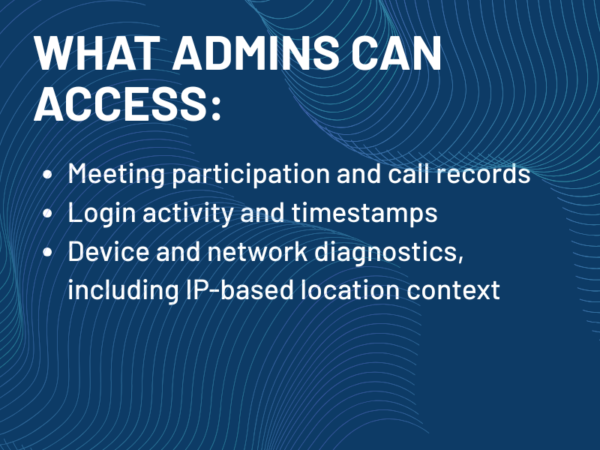
    Admin Access

    What admins CAN access

    • Meeting participation and call records
    • Login activity and timestamps
    • Device and network diagnostics, including IP-based location context
    What admins generally CANNOT do:

    • Track your real-time GPS location
    • Monitor your physical movement throughout the day
    • Access location data from personal devices without device management policies
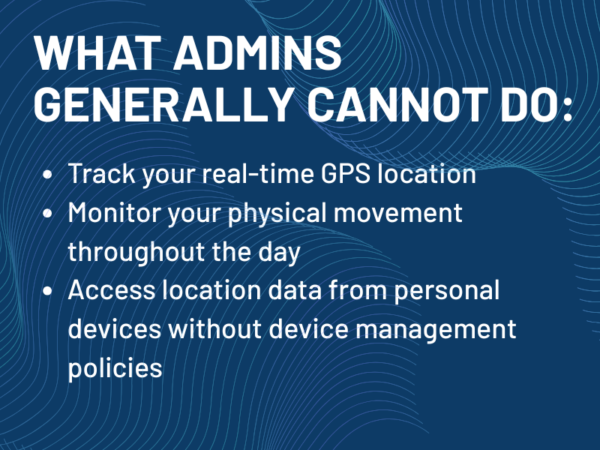
    That distinction is where most of the confusion around Microsoft Teams location tracking lives.

    What your employer can see in Teams

    What an employer can see depends on licensing, admin permissions, device management, security settings, and company policy. A small business using basic Teams settings will not have the same visibility as a large enterprise with Microsoft Purview, Microsoft Entra, Intune, conditional access, Teams Phone, and managed devices.

    In general, employers may be able to see:

    • Your Teams presence status
    • Meeting attendance and participation records
    • Call history and call quality data
    • Sign-in times and login history
    • IP address and general location context from sign-ins
    • Device details, such as operating system and browser
    • Whether a device is managed or compliant
    • Teams audit events, depending on logging and licensing
    • Work location information you have set or shared
    • Emergency location information tied to Teams Phone and emergency calling

    That sounds like a lot, and in enterprise environments, it can be. But it is still different from real-time GPS tracking.

    Your employer generally cannot use Teams to:

    • Watch your live physical location on a map
    • Track your movement throughout the day
    • See where you go when you step away from your desk
    • Pull GPS data from your personal phone without permission or management controls
    • Treat a yellow Teams status as proof that you are not working
    • Know what you are doing away from your device

    This is where the workplace trust issue starts. Employees often experience all of this as “Teams is tracking me.” IT teams usually see it as security, compliance, support, and operations data. Both reactions are understandable. The problem is when organizations never explain the difference.

    Teams Phone and emergency location

    Teams Phone adds another layer to the location conversation.

    Emergency calling requires accurate location information. If someone places an emergency call through Teams Phone, the system needs to help route that call properly and provide dispatchable location information where required. That is not surveillance. It is a safety and compliance function.

    In managed environments, IT administrators can configure emergency locations and dynamic emergency calling. That may involve mapping network elements such as wireless access points, Ethernet switch ports, switches, and subnets to physical locations. When the Teams client detects the network it is connected to, it can use that information to determine the appropriate emergency location.

    For example, a user connected to office Wi-Fi in Building A may be associated with one emergency location. A user connected to a different floor, subnet, or office network may be associated with another. If that user makes an emergency call, the location information can be sent along with the call depending on the organization’s configuration, carrier setup, and country or region.

    Remote work complicates this. Employees working from home may be prompted to confirm or update an emergency address. Teams may also rely on device location permissions to help detect when a user has moved to a new physical location.

    That is why Teams location prompts can feel surprising. An employee may see a request for location access and assume the company wants to monitor them. In many cases, the request is tied to emergency calling, network troubleshooting, or admin insight. But if the organization has not explained that, the employee is left to guess.

    And people rarely guess in the employer’s favor when privacy is involved.

    IP address and network-based location

    The most common form of location visibility is not GPS. It is network-based location.

    When you sign in to Microsoft 365, use Teams, connect through a virtual private network (VPN), or access company resources, your IP address may be logged. That IP address can be associated with a general location, such as a city, region, country, office network, or internet service provider.

    This is useful for security. If an employee normally signs in from Missouri and the account suddenly appears to sign in from another country, that may trigger an alert. A device connects from a known corporate network, that may help IT apply the right access policy. If a user reports call quality problems, network information can help diagnose the issue.

    But IP-based location is not the same as physical location.

    What an IP Address Gives Up

    An IP address may point to an internet provider’s network, a VPN exit point, a corporate data center, a cloud security provider, or a general geographic region. It may be accurate enough for risk detection, but it is not precise enough to say someone is sitting in a specific room at a specific moment.

    For AV and IT teams, network-based location becomes even more important in meeting spaces. Conference room systems, Teams Rooms devices, scheduling panels, occupancy sensors, and managed networks can all create signals about how spaces are being used. A room may show as occupied. A Teams Room device may show call quality data. A network may show that a device is connected in a specific building.

    That is operational visibility. It helps support rooms, troubleshoot meetings, and manage hybrid workspaces. But it also raises policy questions. Who can see that data? How long is it retained? Is it used for support, space planning, productivity measurement, or employee oversight?

    Those questions should not be answered after someone complains.

    Can Teams track your activity?

    Yes, but not in the way the phrase often implies.

    Teams can show activity signals. It can show whether you are available, away, busy, in a meeting, or presenting. Administrators may also have access to meeting participation, call data, audit logs, and usage reports depending on the Microsoft 365 setup.

    That does not mean Teams measures productivity.

    This is one of the most common mistakes organizations make. Presence is not performance. A green status does not prove someone is working effectively. A yellow status does not prove someone is slacking. A meeting attendance record does not prove contribution. A login timestamp does not tell the whole story of a workday.

    Teams can show signals about work. It cannot explain the quality of that work.

    Managers who treat Teams presence as a productivity tool create the exact behavior they say they do not want. Employees start managing the indicator instead of managing the work. That leads to mouse jigglers, unnecessary status changes, performative availability, and less trust on both sides.

    The technology is not the real problem. The interpretation is.

    What employers should explain clearly

    Organizations do not need to hide the fact that Microsoft 365 creates logs. They should explain it.

    A clear policy should tell employees:

    • What Teams data is visible
    • What Microsoft 365 audit and sign-in data is collected
    • Whether location permissions are used
    • Whether work location is self-reported or automatically detected
    • How Teams Phone emergency location works
    • Whether company-managed devices have different settings than personal devices
    • Who can access the data
    • Why the data is used
    • How long the data is retained
    • Whether the data is used for performance management

    That last point matters.

    There is a major difference between using Teams logs to investigate a compromised account and using Teams presence to judge whether someone worked hard enough. One is a security function. The other is a management choice.

    Employees deserve to know which one is happening.

    What employees should know

    If you are using Microsoft Teams at work, assume your activity inside the work environment is visible at some level. That does not mean someone is reading every message or watching every movement. It means work systems create records.

    The safest practical assumptions are:

    • Your presence status may be visible
    • Your meetings and calls may create records
    • Your work location may be visible if you set or share it
    • Your sign-ins may include IP address and general location data
    • Your device may report more information if it is company-managed
    • Teams Phone may use emergency location data
    • IT administrators may have access to audit and troubleshooting logs
    • Teams is not a live GPS tracker for your employer

    If you are using a personal device for work, pay attention to the permissions you grant. Location access, device management, and work profile settings matter. If your employer requires mobile device management to access company resources, that should come with a clear explanation of what the company can and cannot see.

    If it does not, ask.

    Why the Microsoft Teams location tracking myth exists

    The myth exists because hybrid work changed the meaning of visibility.

    In the office, managers used to rely on physical cues. They could see who was at a desk, who was in a meeting room, who had stepped away, and who seemed available. In hybrid work, those cues moved into software.

    The green dot became the new glance across the office.

    That is a problem because the green dot was never designed to carry that much meaning. Teams presence is a communication signal. It helps people know whether someone might be available. It is not a full picture of attention, effort, location, or output.

    At the same time, employees have become more aware of workplace monitoring tools. They know software can collect data. Know companies can review logs. They know remote work has made some managers anxious. So when Teams asks for location permission or shows an away status after inactivity, the reaction is predictable.

    “Are they tracking me?”

    The honest answer is more complicated than yes or no.

    No, Teams is not a live GPS tracker for managers. Yes, Teams and Microsoft 365 can produce location-related and activity-related data. And yes, employers should be transparent about how that data is used.

    Microsoft Teams location tracking FAQ

    Can Microsoft Teams track your location?

    Microsoft Teams does not track your live location in the way a GPS app does. It does not give your employer a real-time map of your movements. However, Teams can use location-related information for features such as work location, emergency calling, IT troubleshooting, and Microsoft 365 security logs.

    Can my employer see my location on Microsoft Teams?

    Your employer may be able to see general location-related information, depending on your organization’s settings. That may include work location you set in Teams or Outlook, IP-based sign-in location, emergency location information for Teams Phone, or device and network data used by IT. That is not the same as seeing your live physical location throughout the day.

    Does Teams track GPS location?

    Teams may request location permission from your device for specific features, including emergency calling and admin troubleshooting. But that does not mean your manager can open Teams and track your GPS location in real time. The exact behavior depends on device permissions, whether the device is managed by your organization, and your company’s Microsoft 365 policies.

    Can Teams show if I am working from home?

    Teams can show your work location if you set it, such as remote or in office. Microsoft 365 sign-in logs may also show general IP-based location context. But Teams does not automatically prove you are working from home unless your organization has other systems, network data, or device policies that support that conclusion.

    Can Microsoft Teams track your activity?

    Teams can show activity signals, including presence, meeting participation, calls, and status changes. Administrators may also have access to Teams audit logs and Microsoft 365 usage data. That activity data should not be treated as a complete measure of productivity.

    Can Teams detect where I am through my IP address?

    Microsoft 365 sign-in and audit data can include IP addresses. Those IP addresses may suggest a general location, such as a city, region, country, corporate network, or VPN endpoint. IP-based location is useful for security and troubleshooting, but it is not the same as precise physical tracking.

    Does Teams Phone use my location?

    Teams Phone can use emergency location information so emergency calls can be routed correctly. In managed environments, IT teams can configure network-based emergency location mapping using Wi-Fi access points, switch ports, switches, and subnets. Remote users may also be asked to confirm or update an emergency address.

    Can my employer track my personal phone through Teams?

    Not simply because Teams is installed. On a personal device, location access usually depends on operating system permissions, Teams app permissions, and whether you have enrolled the device in company management. If your employer requires device management for work access, they should clearly explain what data is collected and what is not.

    Is Microsoft Teams location tracking legal?

    That depends on the country, state, industry, device ownership, company policy, employee notice, and how the data is used. From a workplace trust standpoint, the better standard is transparency. Employees should be told what data is collected, why it is collected, who can access it, and whether it is used for performance management.

    The bottom line

    Microsoft Teams does not give your employer a live GPS feed of your day. But it does create visibility.

    Parts of that visibility is simple, such as presence and meeting activity. Some of it comes from the broader Microsoft 365 environment, such as sign-in logs, IP addresses, device details, and audit records. Others are tied to safety and compliance, such as Teams Phone emergency location.

    The mistake is pretending those are all the same thing.

    For employees, the practical answer is this: Teams is not secretly following you around, but work systems do create records about how and where you connect.

    For employers, the responsibility is just as clear. Do not leave employees to guess what the technology is doing. Explain it. Put it in policy. Train managers not to treat presence as productivity. Emergency location, security logging, and workplace analytics need to be understood before they become a trust problem.

    Teams is not tracking where you go.

    It is reflecting how your workplace has decided to manage visibility.

  • Why “Good Enough” AV Is Costing Public Sector Organizations More Than They Think

    Why “Good Enough” AV Is Costing Public Sector Organizations More Than They Think

    The Hidden Cost Behind “Good Enough”

    At first glance, “good enough” AV systems seem like a practical decision, especially for public sector organizations working within tight budgets and strict procurement frameworks. But what appears to be a cost-saving move often turns into a long-term financial and operational burden.

    Government agencies today are under increasing pressure to deliver seamless digital services, support hybrid collaboration, and improve citizen engagement. In this environment, audio-visual infrastructure is no longer a background utility, it’s a mission-critical component.

    The reality is simple: cutting corners on AV doesn’t eliminate costs, it redistributes them. Downtime, inefficiencies, and poor user experiences quietly accumulate, creating a hidden price tag that far exceeds the initial savings.

    Understanding “Good Enough” AV, and Why It’s a Risky Choice

    In many public sector environments, “good enough” AV refers to systems that meet basic functional requirements without considering long-term scalability, integration, or performance.

    These decisions are often shaped by procurement limitations, budget caps, and the need to justify upfront costs. On paper, the approach makes sense. In practice, it introduces risk.

    Typical Characteristics

    “Good enough” systems often include outdated hardware, minimal integration with existing IT infrastructure, and limited flexibility for future upgrades. They typically rely on reactive maintenance models, where issues are addressed only after they disrupt operations.

    This creates an ecosystem that is fragile rather than resilient, adequate for today, but unprepared for tomorrow.

    Why It Gets Approved

    The appeal is understandable. Lower upfront costs make these solutions easier to justify during budget reviews. Procurement processes tend to favor options that meet baseline requirements quickly, rather than those that deliver long-term value.

    However, this short-term thinking can lead to repeated investments, inefficiencies, and missed opportunities for modernization.

    The Real Cost: Inefficiency, Downtime, and Poor Experience

    The true cost of “good enough” AV becomes evident not at the point of purchase, but during daily use.

    Operational and Financial Impact

    Frequent system failures and inconsistent performance disrupt meetings, delay decision-making, and place additional strain on IT teams. Instead of focusing on strategic initiatives, IT resources are often diverted to troubleshooting recurring AV issues.

    Over time, maintenance costs rise, replacement cycles shorten, and the total financial impact grows significantly beyond the original investment.

    User and Service Impact

    Beyond the technical challenges, the human impact is equally important. Poor audio, unreliable video, and system glitches frustrate employees and hinder collaboration.

    In citizen-facing environments, these issues can directly affect service delivery. Whether it’s a public meeting, courtroom proceeding, or government briefing, unreliable AV systems undermine communication and erode trust.

    Looking Beyond Price: Total Cost of Ownership (TCO)

    To make informed AV decisions, public sector leaders must shift their focus from upfront cost to total cost of ownership (TCO).

    What TCO Includes

    TCO encompasses every stage of the AV lifecycle, from initial design and installation to ongoing maintenance, upgrades, and eventual replacement. It also includes indirect costs such as downtime, lost productivity, and user dissatisfaction.

    By evaluating these factors, organizations gain a clearer picture of the true investment required.

    Why “Cheap” Becomes Expensive

    Lower-cost systems often come with shorter lifespans, limited support, and reduced compatibility with evolving technologies. As a result, they require more frequent repairs and earlier replacement.

    What starts as a budget-friendly decision quickly turns into a cycle of reinvestment, ultimately costing more than a well-planned, scalable solution.

    Compliance, Security, and Procurement Challenges

    Public sector AV decisions are not just about performance, they must also meet strict compliance and security requirements while navigating complex procurement processes.

    Compliance and Security Risks

    Government organizations operate under stringent standards related to data protection, accessibility, and system security. AV systems must align with these requirements to ensure safe and reliable operations.

    Non-compliant systems introduce vulnerabilities that can lead to data breaches, legal consequences, and reputational damage. In a public-facing environment, even minor failures can have significant implications.

    Procurement Realities

    Procurement in the public sector is inherently complex. Lengthy approval cycles, rigid frameworks, and budget constraints often limit flexibility in decision-making.

    This makes it even more critical to choose solutions, and partners, with proven public sector experience. Vendors who understand these challenges can help navigate the process while delivering solutions that meet both compliance and performance needs.

    Why Modern, Scalable AV Solutions Matter

    As public sector organizations continue to evolve, the need for modern, scalable AV systems becomes increasingly clear.

    Supporting Modern Public Sector Needs

    Hybrid work environments, remote collaboration, and digital service delivery are now standard expectations. AV systems must support seamless communication across locations and platforms.

    Integration with IT infrastructure is also essential, enabling centralized management, monitoring, and control.

    Benefits of Modern AV

    Modern AV solutions offer improved reliability, reduced downtime, and enhanced user experiences. They are designed to scale with organizational needs, reducing the need for frequent replacements.

    In the long run, these systems deliver greater efficiency, lower operational costs, and better outcomes for both employees and citizens.

    What Public Sector Buyers Should Prioritize

    When evaluating AV solutions, public sector buyers should focus on long-term value rather than short-term savings.

    Reliability is critical, systems must perform consistently in mission-critical environments. Security and compliance should be built into the solution, not added as an afterthought.

    Scalability ensures that systems can grow alongside organizational needs, while ease of management reduces the burden on IT teams. Solutions that offer remote monitoring and managed services can further enhance efficiency and control.

    Decision Drivers for IT Leaders and Administrators

    For government IT leaders and administrators, AV decisions are driven by a balance of financial, operational, and strategic considerations.

    Staying within budget remains a priority, but there is increasing recognition that performance and reliability cannot be compromised. Long-term ROI is becoming a key factor, as organizations seek to maximize the value of their investments.

    At the same time, there is a growing emphasis on improving citizen experience. Reliable AV systems play a crucial role in delivering clear communication, efficient services, and positive public interactions.

    Reducing operational risk, whether through improved uptime, better security, or streamlined management, is also a major driver.

    Choosing the Right AV Partner

    Technology alone is not enough, the success of an AV deployment often depends on the expertise of the partner delivering it.

    Public sector organizations should look for providers with a proven track record in government environments. Experience with compliance requirements, procurement processes, and large-scale deployments is essential.

    End-to-end capabilities, from design and integration to ongoing support, ensure consistency and accountability throughout the project lifecycle.

    Strong references and case studies provide additional confidence, helping decision-makers choose partners who can deliver measurable results.

    Moving Beyond “Good Enough”

    “Good enough” AV may seem like a practical compromise, but in reality, it is often a costly one.

    As public sector organizations continue to modernize and expand digital services, the role of AV technology will only become more critical. Investing in reliable, scalable, and compliant solutions is not just a technical decision, it’s a strategic one.

    By moving beyond “good enough,” organizations can reduce long-term costs, improve operational efficiency, and deliver better outcomes for the communities they serve.

  • Stop Chasing Features. Start Solving Public Sector AV Challenges

    Stop Chasing Features. Start Solving Public Sector AV Challenges

    Walk into almost any public sector AV discussion today and you’ll hear the same pitch. More features. More capabilities. More innovation.

    But here’s the problem. None of that guarantees a project gets approved.

    In government environments, the gap between what AV technology can do and what actually gets deployed is wider than ever. Flashy features may dominate spec sheets, but they rarely survive budget reviews, procurement scrutiny, or real-world operational demands.

    For public sector buyers, the conversation isn’t about what’s new. It’s about what works.

    What Public Sector Buyers Actually Want

    Government IT directors and public administrators aren’t chasing trends. They’re managing responsibility at scale.

    Every decision is tied to public funding, accountability, and long-term impact. That means the latest AV technology often takes a back seat to solutions that are proven, reliable, and easy to justify.

    This is where many AV pitches fall apart. The industry still leans heavily on feature-first messaging, while buyers are focused on outcomes like improving citizen services, streamlining internal communication, and staying compliant with strict regulations.

    If the value isn’t clear, the answer is usually no.

    The Challenges No One Can Ignore

    Budgets Are Tight and Fixed

    Public sector budgets aren’t flexible. They’re planned years in advance, approved through layers of oversight, and expected to deliver maximum value.

    That puts pressure on every AV investment to be cost-effective and scalable. Overbuilt systems with underused features don’t just waste money, they create long-term inefficiencies.

    The smarter approach is designing systems that meet today’s needs while leaving room to grow, without inflating upfront costs.

    Procurement Is a Process, Not a Step

    Unlike corporate environments, government AV projects don’t move fast.

    RFPs, compliance checks, vendor qualifications, and approval cycles can stretch timelines significantly. Missing a requirement or misaligning with procurement standards can delay or even derail a project entirely.

    For AV integrators and manufacturers, understanding this process isn’t optional. It’s the difference between getting shortlisted and getting ignored.

    Scalability Is Mission-Critical

    Public sector AV isn’t built for a single room or a single use case. It’s built for entire departments, campuses, cities, and agencies.

    That means systems must scale seamlessly. What works in one council chamber should extend across multiple locations without creating complexity or inconsistency.

    Standardization is becoming just as important as innovation.

    What Actually Drives Decisions

    When it comes down to it, public sector AV decisions are driven by a few critical factors.

    Compliance is at the top of the list. Systems must meet government standards for security, accessibility, and interoperability. There’s no room for compromise here.

    Right behind that is proven performance. Decision-makers want to see real-world deployments, not just product demos. Case studies, references, and track records carry more weight than any feature list.

    And then there’s reliability. Systems must work every time, with minimal support overhead. Because in government environments, failure isn’t just inconvenient, it’s unacceptable.

    Shifting from Features to Solutions

    This is where the AV industry needs a reset.

    Instead of leading with specs, the focus needs to shift toward solving real problems.

    Think about what AV enables in the public sector. It powers city council meetings, supports emergency operations, enhances public communication, and connects departments across locations.

    These are outcome-driven use cases. And they require solutions designed around usability, reliability, and long-term value.

    Simplicity plays a bigger role than most vendors realize. Systems that are easy to operate reduce training time, minimize errors, and improve adoption across teams that may not have dedicated AV expertise.

    And then there’s total cost of ownership. Upfront pricing matters, but long-term costs around maintenance, upgrades, and scalability often carry more weight in the decision-making process.

    The New Role of AV Partners

    For integrators and manufacturers, this shift changes everything.

    Selling products isn’t enough anymore. Public sector buyers are looking for partners who understand their challenges and can guide them through complex decisions.

    That means aligning with procurement requirements, speaking the language of compliance, and delivering solutions that are backed by real-world success.

    It also means simplifying the conversation. Instead of overwhelming buyers with technical details, the focus should be on clarity, relevance, and measurable impact.

    Trust is built through transparency and consistency, not features.

    What Success Actually Looks Like

    When public sector AV is done right, the impact is clear.

    Meetings run more efficiently. Communication improves across departments. Citizens gain better access to information and services. And systems continue to perform reliably over time without constant intervention.

    These successes don’t come from having the most advanced technology. They come from having the right technology, implemented with a clear understanding of the environment it serves.

    On the flip side, feature-heavy deployments that ignore real-world needs often struggle with adoption, maintenance, and long-term value.

    Where the Industry Goes Next

    The public sector isn’t slowing down its investment in AV. If anything, demand is growing as governments continue to modernize infrastructure and improve digital services.

    But the expectations are changing.

    Buyers are looking for solutions that are practical, scalable, and compliant. They want technology that solves problems, not just showcases innovation.

    For the AV industry, that means rethinking how solutions are positioned, designed, and delivered.

    Because in the end, the projects that win won’t be the ones with the longest feature lists.

    They’ll be the ones that solve the biggest challenges.