Category: Article

  • Ensuring Seamless Streaming for Your News Broadcasts

    Ensuring Seamless Streaming for Your News Broadcasts

    In today’s nonstop news cycle, streaming isn’t a feature, it’s the frontline of storytelling. As audiences shift to connected platforms for breaking updates, the pressure on broadcasters to deliver smooth, uninterrupted coverage has never been higher. Every second matters. And in a landscape where competition for attention is intense, broadcast reliability becomes the real differentiator.

    For broadcast engineers and station managers, staying ahead of rapid technological change while ensuring consistent performance is the core challenge. When a stream freezes, buffers, or drops altogether, the audience doesn’t blame bandwidth, they blame the brand. That’s why mastering broadcast technology isn’t optional; it’s mission-critical.

    Reliability: The Core of Modern News Delivery

    The evolution from traditional RF and SDI infrastructure to hybrid, IP-first workflows has redefined what reliability means in broadcasting. With more than 80% of U.S. viewers now consuming live news through streaming and connected devices, expectations have changed.

    Audiences demand instant access, clear picture quality, and zero disruptions, even during peak traffic or breaking-news spikes. One misfire, and viewers move on quickly. Advertisers notice. Credibility takes a hit.

    Simply put: without broadcast reliability, even the strongest newsroom can lose the moment.

    What Powers a Seamless Stream

    Reliable streaming doesn’t begin at the encoder and end at the CDN, it’s an ecosystem. A high-performance workflow usually includes:

    • Encoders and decoders built for adaptive bitrate streaming
    • A strong, redundant network architecture capable of instantaneous failover
    • CDNs optimized for low latency and high traffic
    • AV over IP infrastructure that scales without compromising quality

    Broadcasters are increasingly adopting cloud playout to drive agility, support remote production, and ensure continuity during unexpected disruptions. Multi-path streaming and intelligent load balancing now sit at the center of modern broadcast technology strategies.

    These aren’t luxuries; they’re lifelines.

    The Shift From SDI to IP to Cloud, And What It Means for Newsrooms

    The move toward IP-based transmission, powered by standards like SMPTE ST 2110 and formats like NDI, is one of the most important transformations in broadcast history. It allows video, audio, and metadata to move across standard networks with the timing precision broadcasters expect.

    This opens the door to:

    • Remote production teams working from anywhere
    • Faster deployment of new workflows
    • Flexible routing and sharing of sources
    • Scalable architectures that grow with demand

    Layer on AI-driven monitoring, predictive maintenance, and edge processing, and you have a completely new era of smart broadcast infrastructure. Systems can now identify performance bottlenecks before they affect your live stream.

    The challenge isn’t the technology itself, it’s integrating it without breaking what works. Modular upgrades and hybrid models allow stations to move forward steadily, without risking the stream that’s live today.

    Future-Proofing With Smarter Investment

    Future-proofing a broadcast workflow isn’t about betting on the next big trend. It’s about investing in flexibility, modularity, and standards-driven design.

    Choosing systems that support open interoperability ensures you won’t be boxed in by proprietary platforms. Software-defined tools offer upgrades without hardware overhauls. Cloud-ready infrastructure gives newsrooms the freedom to scale instantly for big events or high-viewership spikes.

    A future-proof station isn’t the one with the newest gear, it’s the one that’s built to evolve.

    The Integrator Advantage: Why Partnership Matters

    With AV and IT more entwined than ever, integration partners are becoming essential in delivering broadcast reliability. They help bridge the gap between technology ambition and operational reality.

    Managed services, from 24/7 monitoring to proactive system updates, give broadcasters a safety net that reduces downtime and improves long-term stability. For teams already stretched thin, that support can be the difference between a flawless broadcast and a missed moment.

    When choosing partners, look for a track record of deploying mission-critical systems, a deep understanding of IP-based workflows, and a commitment to continuous improvement.

    Streaming Without Compromise

    News moves fast. Your stream needs to move faster, and more reliably. As the industry continues its rapid shift toward cloud-native, IP-first workflows, the broadcasters who succeed will be the ones who treat their streaming infrastructure as a living system, not a static setup.

    In a world where every frame shapes credibility, broadcast reliability isn’t just a goal, it’s your competitive edge.

    If your technology can’t keep up with your newsroom, your story might never reach the audience it’s meant for.

  • Building a Smarter UC Room Strategy

    Building a Smarter UC Room Strategy

    For IT managers and technology directors, designing a unified communications (UC) space often feels like walking a line between flexibility and control. Every room has its quirks. There are different microphones, displays, cameras, and control platforms. And all of these are expected to work seamlessly. Shure’s new Foundation System aims to simplify that balance by giving organizations a way to modernize meeting rooms without abandoning their existing AV investments.

    Bridging Old and New

    At its core, the Foundation System is a compute appliance and touch controller. It’s essentially the brain of the UC room kit. All of it is built around Shure’s established IntelliMix DSP platform. What makes it distinct is its ability to connect with a wide range of third-party devices.

    As Josh Blalock, Shure’s Director of UC Ecosystem and Engagement, explained, “It’s the same computer and touch panel you’d find in a complete room kit, but that’s all it is.”  The value comes when customers already have Shure audio in their environment. Whether that’s MXA arrays, ceiling mics, or 920 speakers.

    That approach provides a bridge for organizations that already have Shure gear installed but need to bring those spaces up to date with modern collaboration platforms and AI-driven meeting tools. Instead of forcing an all-or-nothing upgrade, the Foundation System lets teams mix existing audio with their choice of camera, display, or UC platform.

    For large campuses or enterprises managing dozens, or hundreds, of rooms, that flexibility translates into lower refresh costs and fewer vendor lock-ins.

    Simplifying Without Limiting

    Blalock emphasized that the Foundation System isn’t meant to replace the role of integrators or in-house AV teams, it’s about creating consistency and confidence for IT staff who may not specialize in DSP configuration.

    “End users don’t need to program a DSP,” he said. “They just need to understand why having it built in matters. It’s about ensuring intelligibility and reliability across every meeting room.”

    That built-in DSP, powered by Shure’s IntelliMix technology, means audio processing happens locally on the system, minimizing latency and ensuring a consistent experience across platforms. For organizations standardizing on Microsoft Teams Rooms, Zoom Rooms, or Google Meet, that predictability is key.

    By taking care of audio processing internally, Shure lets IT managers focus on managing the network and endpoints rather than fine-tuning audio paths or troubleshooting echo in individual rooms.

    Partnership with Microsoft MDEP

    Another piece of the Foundation System story ties into Microsoft’s MDEP (Microsoft Device Ecosystem Platform), a new Android-based framework for certified Teams Room solutions. Shure was among the first manufacturers to join the program, a move Blalock said was driven by customer demand for simplicity and security.

    “MDEP takes the guesswork out of Android,” he explained. “It puts the responsibility for updates, certification, and security squarely on Microsoft, something enterprise IT teams already trust. For Shure, that lets us focus on the hardware and user experience, knowing that the operating system and security are handled consistently.”

    That standardization matters in large deployments. As organizations look to unify their meeting room platforms, being able to manage firmware, updates, and compatibility across multiple locations simplifies administration and reduces risk.

    Starting from the Top Down

    While many UC manufacturers enter the market by targeting smaller “huddle rooms,” Shure has taken the opposite approach. The company’s strategy has been to start with the most complex environments and scale down from there. That means divisible rooms, auditoriums, and large lecture halls are the foundation and you can move down from there.

    “Most companies start at the small end with soundbars and work their way up,” Blalock said. “Shure began by solving for the biggest and most difficult spaces first. That means we’ve already mastered audio in the toughest environments, and now we’re filling in the rest of the portfolio to meet every room size.”

    For higher education and enterprise organizations, that “top-down” approach resonates. Large divisible spaces are often the hardest to standardize and the most visible when something goes wrong. Starting with those high-stakes rooms allows Shure to establish credibility at the complex end of the spectrum, then apply that expertise to smaller spaces where standardization is easier.

    Evolving the Role of the Integrator

    The conversation around simplicity inevitably leads to the question of where integrators fit in a world of plug-and-play systems. Blalock acknowledged that challenge but sees opportunity in new service models rather than a threat.

    “As systems become easier to install, the value shifts toward management, monitoring, and ongoing service,” he said. “Integrators are adapting by layering in managed services and support, and that’s something Shure continues to enable through our cloud management tools.”

    That alignment matters for IT leaders, too. Instead of treating integration as a one-time project, more organizations are adopting ongoing AV-as-a-service models that keep systems patched, monitored, and optimized long after installation.

    A Portfolio, Not a Pivot

    Perhaps the most important takeaway from Shure’s current UC strategy is that these new offerings aren’t meant to replace the company’s legacy products, they extend them.

    “When customers see new announcements from us,” Blalock said, “we want them to understand that these aren’t pivots. They’re additions to a powerful portfolio that continues to grow in different directions.”

    That continuity is crucial in an industry where technology refresh cycles are shortening but reliability expectations remain high. For organizations investing in UC infrastructure, knowing that new platforms build on proven technology can make the difference between testing a product and standardizing on it.

    Looking Ahead

    Shure’s Foundation System reflects a broader trend in unified communications: modularity and flexibility over monolithic “kits.” For IT and higher education decision-makers, it’s a model that fits the real-world reality of mixed environments, spaces that combine old and new, standardized platforms with unique user needs.

    By anchoring that approach in audio expertise and enterprise partnerships, Shure is positioning itself not just as another endpoint manufacturer, but as a strategic ally in simplifying how organizations communicate.

  • Extending Reality in Broadcast Production

    Extending Reality in Broadcast Production

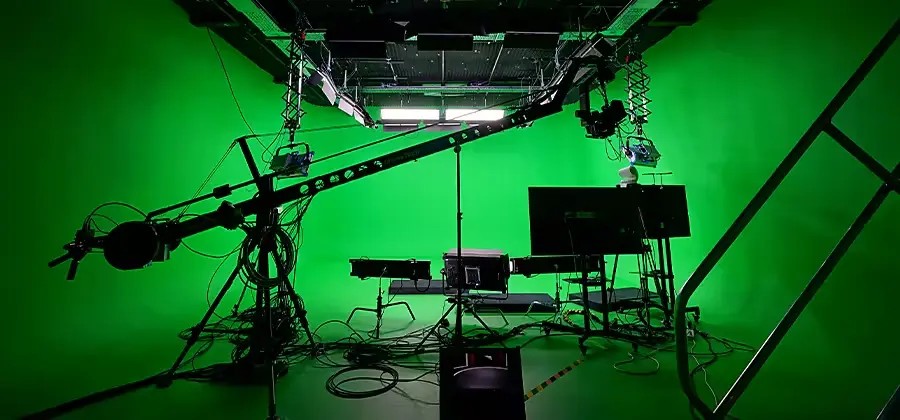
    Today’s broadcast video production environments are integrating real-time computing, robotics, and advanced display systems to enable visually creative capabilities that far surpass the traditional “green screen” of chroma key compositing. Camera operators and their subjects are no longer guided solely by written descriptions or strategically placed markers on a monochrome stage. Direct-view LED (DVLED) video wall systems are a key part of this innovative shift, providing expansive surfaces that can display detailed virtual environments visible to actors and optimized for direct camera capture. The supporting software and hardware that power and record this content ensure pixel-perfect accuracy, blurring the line between the virtual and the real.

    Chroma key stage configuration - Image credit: Adobe
    Chroma key stage configuration – Image credit: Adobe

    THE STAGE IS SET

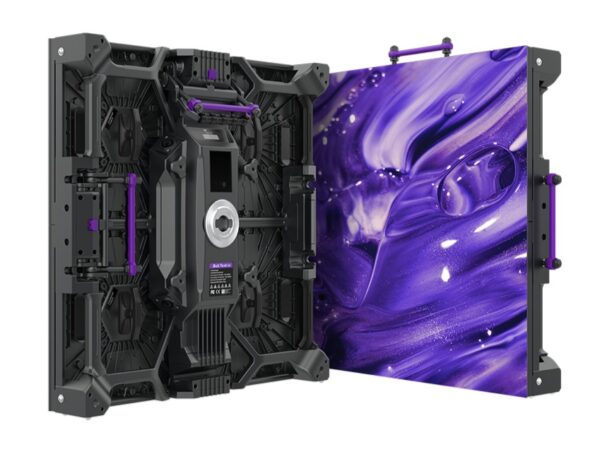
    The origins of direct-view LED, as eye-catching digital signage and high-end display systems, stem from its nearly unlimited scalability and durable, high-performance pixels. These features make it an excellent choice for use as a programmable background in an extended reality (XR) studio setup. DVLEDs in these configurations are composed of uniform panels covered with tiny RGB LEDs grouped into larger modules that seamlessly tile to create screens of any size, including flat and curved surfaces. For XR stage applications, DVLED displays feature production-friendly characteristics, including anti-reflective coatings, high pixel densities that minimize moiré, and camera-friendly refresh rates.

    BP2V2 DVLED display module - Image credit: Roe Visual
    BP2V2 DVLED display module – Image credit: Roe Visual

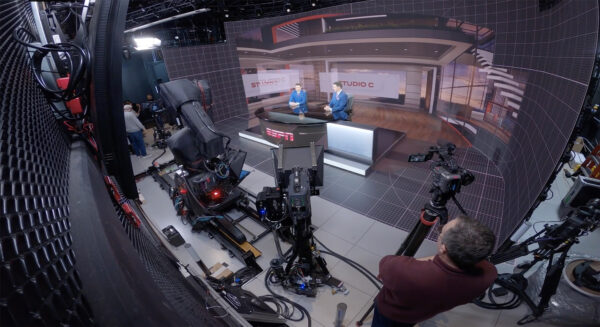
    XR stage design isn’t limited to using DVLEDs only as a digital background; floor and ceiling display surfaces are increasingly common, with the former engineered to withstand regular foot traffic. The ESPN Catalyst Stage, located at the company’s headquarters in Bristol, Connecticut, is an example of a dedicated immersive studio that features a wrap-around DVLED display with a floor element. The Catalyst Stage’s “LED volume” comprises approximately 11 million pixels covering a space measuring 30 feet wide, 15 feet tall, and 15 feet deep.

    ESPN Catalyst Stage - Image credit: ESPN
    ESPN Catalyst Stage – Image credit: ESPN

    MAKING IT HAPPEN

    DVLED’s excellent color reproduction and contrast make it an ideal display technology for XR applications. DVLED can also support high-speed refresh rates of up to 7,680 Hz – roughly 25 times faster than the game mode on the fastest consumer TVs. Precise synchronization of the DVLED’s pixels through a generator lock (genlock) signal, along with supporting software and hardware, is crucial for reducing visual glitches in live multi-camera productions and when integrating 3D rendered graphics created with software like Unreal Engine.

    Real-time 3D graphics in use on an XR stage - Image credit: Unreal Engine
    Real-time 3D graphics in use on an XR stage – Image credit: Unreal Engine

    GhostFrame is an example of a software toolset used to create workflows for XR stage productions. The GhostFrame software leverages the high refresh rates made possible by DVLED technology to enable content creators to capture a scene with multiple distinctly unique backgrounds in a single take, including chroma key elements that offer flexible replacement options for post-production. A GhostFrame-generated workflow with the precise timing of genlocked gear can also embed cues and content into the DVLED stage that are visible to performers or camera tracking systems, but will not appear in the captured footage.

    RED Phantom Track demonstration - Image credit: RED Digital Cinema
    RED Phantom Track demonstration – Image credit: RED Digital Cinema

    In-camera capabilities are keeping pace with the needs of XR studio production. Professional digital cameras, such as the 8K RED V-Raptor [X], offer genlock capabilities and the ability to record multiple tracks (in camera) simultaneously, each with a unique presentation on synchronized DVLED display. The V-Raptor’s global shutter and high-speed sensor also eliminate common motion artifacts when capturing the high dynamic range output of a DVLED video wall.

    RED V-Raptor [X] 8K camera - Image credit: RED Digital Cinema

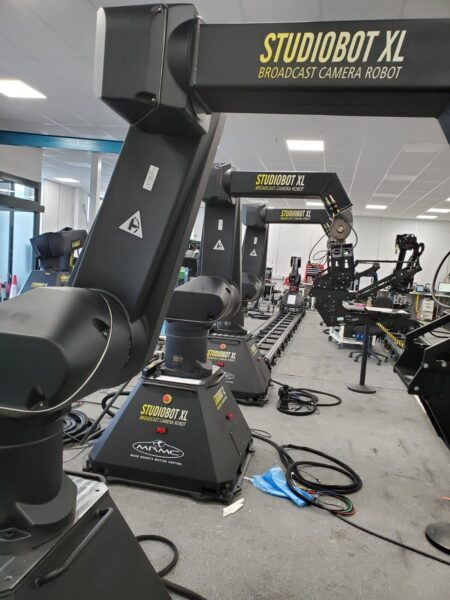
    The ability of a robotic camera to precisely follow motion on an XR stage has made it a crucial addition, enhancing efficiency and consistency in live capture settings. Pro-grade products, such as the Studiobot XL from Mark Roberts Motion Control, can be programmed for triggered automations, automatic tracking of actors or presenters, or operated manually using a joystick and control panel. Multiple robotic cameras working on an XR stage can be individually assigned home positions and safe zones, enhancing production efficiency and preventing collisions with studio equipment.

    Studiobot XL robotic camera - Image credit: MRMC
    Studiobot XL robotic camera – Image credit: MRMC

    For XR stages that use real-time 3D graphics, the accuracy of genlocked robotic cameras, along with parallax effects, allows for greater visual appeal as camera movements can be synchronized with the display output to improve the 3D effect of a rendered object or text.

    An Art Form
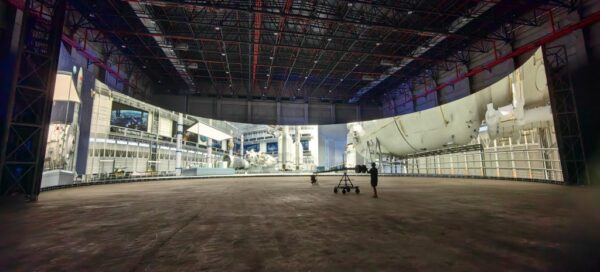
    There is a low-key arms race among XR stage developers to build the largest possible spaces. At the Versatile AI Virtual Film Base in Deqing, China, Absen and Versatile Media unveiled a virtual production volume in July 2025, featuring a 270-degree curved screen approximately 50 meters in diameter and 12 meters high. The roughly 1,700 square meters of DVLED display technology surrounding the stage space is equivalent in area to four standard basketball courts. At the time of its announcement, this DVLED display claimed the record for the highest pixel count on a single screen.

    Versatile AI Virtual Film Base - Image credit: Absen
    Versatile AI Virtual Film Base – Image credit: Absen

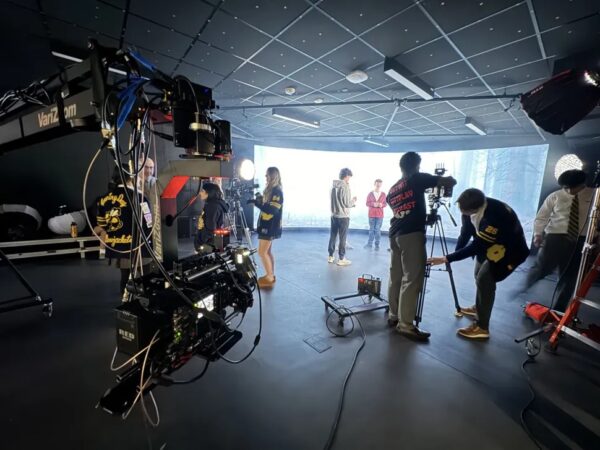
    Schools are also incorporating XR stage environments to support the training of the next generation of authors who blend digital media with live-action performances. The Detroit Country Day School partnered with Brompton Technology to create one of the first virtual production studios in a pre-college educational institution. The facility features a 26-foot-wide by 8-foot-tall INFiLED DBmk2 DVLED display configuration, providing a 1.9mm pixel pitch and running at a 4K resolution.

    XR stage at DCDS - Image credit: Brompton Technology
    XR stage at DCDS – Image credit: Brompton Technology

    Future Art

    Extended reality (XR) in broadcast or film production usually refers to the integration of real sets, DVLED video display surfaces, and 3D graphics, all visible to cameras and participants. XR is also a broad term that covers virtual reality (VR) and augmented reality (AR). The 2025 Venice Film Festival featured a Venice Immersive program that awarded an hour-long, free-roaming VR experience, which combined photogrammetry-captured elements, Gaussian splatting techniques, and actors shot on a chroma key stage, all integrated through custom-designed 3D editing software.

    The Clouds Are Two Thousand Meters Up - Image credit: Venice Immersive
    The Clouds Are Two Thousand Meters Up – Image credit: Venice Immersive

    DVLED display use in digitally enhanced productions will continue to grow because it offers flexible efficiency, appreciated by some creative artists and content creators. Other video producers I’ve spoken with prefer using authentic physical set designs for reasons including the interactive realism for actors, established workflows, and cost savings. The XR stage combines some of my favorite technologies, including brilliant pixels, video processing, and robotics. However, traditional techniques such as custom set building and green screen use remain valuable tools in the visual artist’s toolkit.

  • How AV Technology Shapes Trust

    How AV Technology Shapes Trust

    In a world where collaboration defines culture, technology is no longer just an operational tool. It’s a cultural signal. The systems we use to connect, share, collaborate, and create are shaping the values of trust, inclusion, and identity inside every organization. Yes, even yours.

    For decades, culture was built through physical proximity. The office was the center of collaboration and technology simply supported it. Today, it’s been flipped on its head. Our ability to collaborate defines how connected our culture feels. Regardless of whether that’s across time zones, meeting platforms, or digital spaces.

    When the tools work seamlessly, culture strengthens. When they don’t, trust erodes.

    AV and IT leaders now find themselves in a new role: stewards of company culture. The quality of the collaboration experience they design directly influences how teams perceive each other and how they perceive the company itself.

    The Culture We Build Through Technology

    Every meeting is a culture test. Who gets heard? Who feels like they matter? Can people share ideas without jumping through hoops?

    These aren’t just logistics questions. They are culture questions. Bad meeting tech quietly reinforces all the wrong things. Hierarchy. In-room privilege. Remote workers as second-class citizens. As Brad Hintze from Crestron said on a recent podcast “If you can’t bring someone remote into a meeting simply, you’re not going to do it. And then they’re excluded. That’s not a very collaborative culture”

    The other side of that coin is that good meeting tech does the opposite. It says you belong here. You’re seen. You are valued.

    The collaboration space has become where inclusion either lives or dies. And the tools we use are what make it real. Mics, cameras, interfaces, AI, all of these are crucial. These aren’t just tools. They’re the building blocks of culture itself.

    Trust is the New Uptime

    Once upon a time, IT success was measured in “uptime”. If the network stayed online, the job was done. Your bonus structure figured in uptime at some level. In the hybrid era, uptime is the baseline. The new metric is trust. Trust that the system will perform. Trust that meetings will start on time. That everyone can contribute equally.

    When users walk into a space and technology just works, that builds confidence. Over time, it becomes cultural muscle memory. People begin to expect consistency, fairness, and inclusion. Those expectations spill into the broader workplace.

    In that sense, every perfectly designed and deployed AV system is a small act of culture building.

    The Quiet Power of Design

    A great example of this shift comes from the Itoki Corporation in Tokyo. The office furniture and workspace design company reimagined its headquarters around a single principle: the way people works should mirror the culture they want to build.

    To make that possible, Itoki turned to Crestron to design an environment where technology disappears into the background. Collaboration takes center stage.

    The result is a space that feels effortless. In their “Decision Room” a fully integrated system features Crestron’s Automate VX camera tracking system. These cameras alongside ceiling microphone arras allows every participant to be seen and heard clearly. That means people in the room or remote are all equally important. Conversations flow naturally without anyone needing to manage the technology.

    In the room called the Studium collaboration is key. This space adapts from workshops to seminars to hybrid brainstorming sessions. Content sharing happens seamlessly, control is intuitive, and the experience is consistent.

    “At Itoki we design and create work environments that inspire human connection. Crestron’s collaboration technology aligns with our values of simplicity, flexibility, and human-centricity,” says Osamu Watanabe, General Manager, Itoki Corporation.

    What’s remarkable about Itoki’s approach isn’t the technology itself. It’s the intent behind it. Every technical decision serves a cultural one. That technology promotes openness, inclusion, and trust across teams. The AV system isn’t a background utility, it’s a reflection of organizational values.

    AI as Cultural Amplifier

    AI is changing the game. AI-powered AV systems don’t just automate. They amplify the human stuff that actually matters. Collaboration. Connections.

    Someone’s speaking? AI makes sure their voice carries the same weight as everyone else’s. Background noise drowning people out? Gone. Clarity improved. And friction removed.

    And it goes further. AI watches how people connect. Then it spots patterns. Those insights become a roadmap for better room design, smarter team dynamics, and real behavioral change.

    Here’s the thing. AI isn’t neutral. It’s a mirror that reflects whoever is holding it. Use it thoughtfully and it reinforces transparency and inclusion. Use it carelessly and it magnifies inequity at scale.

    The real challenge for AV and IT leaders is to make sure AI is a reflection of their values not just workflows.

    Designing for Culture

    Culture-first tech design isn’t about stacking up features. It’s actually about bringing down barriers. The best hybrid spaces all have the same things:

    Equity by default – Remote or in-room, everyone gets the same shot at contributing.

    Simplicity that disappears – The tech fades into the background. The humans take center stage.

    Consistency at scale – Huddle room to auditorium, people know exactly what they’re walking into.

    Data-informed empathy – Analytics improve the experience, not monitor behavior.

    When these all align, something shifts. Technology stops being a tool and becomes a statement. It says we value connection. We value clarity. We value trust. Quite frankly, we value you.

    AV and IT: The Culture Stewards

    As companies and organizations embrace hybrid permanence, the responsibility for culture now extends into the tech stack. AV and IT professionals are no longer just maintaining systems. They’re maintaining relationships.

    Their success will be measured not only by technical performance but by emotional resonance. Do your people feel connected? Do they feel included? Do they trust the spaces and systems that connect them?

    That is the future of collaboration and hybrid. It’s less about the gear in the room and more about the culture it enables. The companies that understand this aren’t just designing smarter workplaces. They are designing cultures of trust.

  • The Last Days of A.V. (A.V. 2025 A.D.)

    The Last Days of A.V. (A.V. 2025 A.D.)

    House of Worship (H.O.W) A/V is a prickly bed-fellow! Anyone who’s had the privilege, or dare I mention displeasure, of a large-scale H.O.W project knows the pitfalls and tribulations of dealing with clients intermixed with religion. And as person of deep and profound faith, it is difficult for even myself, as a professional and a person of faith, to separate or even manage the two in such situations. This becomes the A/V provider’s proverbial cross-to-bear.

    Nonetheless, I do not wish to digress into my own opinions and pontifications on religion and faith. Rather to focus on how we within our industry and within said spaces can be a valuable asset to these clients. While also making others aware of issues which are unique to this vertical, while concurrently showing how we as designers, engineers, technicians and integrators need to be more mindful of the client’s position as well.

    That is not to say houses of worship are all or exclusively bad, difficult, or problematic as clients and end-users. Nothing could be further from the truth, but we cannot address these issues if we do not discuss them openly, rationally and without discernment of?

    However, those of us familiar working in this space, have almost certainly experienced the heartache and/or avarice of communicating and closing on H.O.W projects at least a few times in our careers. From the initial stage of simply getting in the door to budgeting, from committees and councils to payment, and working around prayer and holiday schedules; one must contend with obstacles, situations and even individuals which are aberrant and singular to the House of Worship A/V space. One may find themselves confronted by obstacles not often contended with or found in run-of-the-mill A/V and IT projects. Oftentimes churches, synagogues, and mosques will look to procure contractor services, regardless of trade or expertise, from within their own religious or ethnoreligious groups. And this is usually one of the most irritating encumbrances we must overcome to get said “foot” in the proverbial door.

    Where faith and technology meet is a cross-roads of necessity and budget, versus function and desire. One might presuppose that the commonly found ego of a client, the concupiscible drive to “have the best” or better than the next person or parish, would not be a motivation in worship A/V. Nonetheless, it does occur, and when it does, it becomes the crucible of the A/V provider’s patience, becoming the true test of the aforementioned cross-to-bear. Frustration can arise quickly when confronted with convoluted and intricate negotiations often required when dealing with the hierarchies of any church, synagogue, or mosque. Particularly in regards to budgeting and costs.

    Now, let us delve into how we approach this delicate web of dancing dalliances with regards to the matter at hand.

    When in consultation or contract with houses of worship or their adjacent institutions, we usually find some common areas of contention. Here are some examples we will discuss:

    • Spending & Budget
    • Decision Making Structure
    • Homogeneous Vendor Selection
    • Project Execution Planning

    Spending & Budget

    Many faiths do collections during services as a means of generating funds for running and maintaining their organizations. From operating budgets to parochial schools and obvious construction costs, the need for funds is raised and provided by the parishioners and community at large. It is important to remember and at once be respectful, irrespective of one’s personal faith or positions, and to remember that this money is sacredly given and spent by the H.O.W in trust. That same trust with which the money was given, it is also entrusted to be spent. No religion is without its scandals or misappropriation sacrileges, which we are acutely aware of, unfortunately. However, the purse strings will be closely guarded, which is why too often religious organizations will defer to a homogeneous bidding and selection process. (We will be discussing this in more depth in its respective section further down.) With this expectation in mind, no matter how flawed it may be, when choosing an A/V contractor, in the hope they will receive more favorable terms, pricing or just relieve the worry that monies will be ill spent.

    This is a false pretense to be sure!

    However, in truth, those who have worked on H.O.W projects know too well the often found “have it make toast” approach clients will take. and this can certainly be true with religious institution projects. What do I mean? Imagine if you will a project in a large church where they need audio for a large sanctuary, plus added video displays like two large format projections. All to be tied into a control room or booth, which of course means a sound board, multiple computer tie in’s and possible broadcasting and recording integration. (Say hello to our favorite friend the multicastor and BNC!) Then there are the classrooms, resource rooms, add a smaller chapel, stage sound for live events and concerts or even lighting and stage automation. Now you have a client asking for a miracle…on a parish’s purse. They may want the holy trinity of premium A/V, simplicity and ease-of-use, however they want it on as small a budget as possible. Or even worse, they pull out the not-for-profit card and now you have to “make it make toast.”

    There can be a smugness to these meetings and negotiations, to be sure. But again, I must stress, managing expectations and understanding that the funds for any project are the hard-earned and sacrificially given dollars and cents of their faithful flock. To them and their faiths they are preeminently indentured and responsible to. So, in the end and so, by association, and if so lucky, by contract so are you!

    Decision Making Structure

    Herein lies the true test of your mental metal in working in union with the H.O.W clientele, the organizational hierarchy.

    No two customers are ever the same. Yet we cannot ignore some common traits in navigating the pitch, sale and closing quagmires that confront the A/V integration space. Often still seen as the least important or just the cherry on top of the project’s proverbial cake, nothing could be further from the truth. We touch just about every other vendor’s work at some point, from electrical to infrastructure to carpentry to plumbing in some cases. Scrambling for space on network switches and constantly reminding ever so gently of our power needs and fitting our cabling and/or equipment into spaces not properly designed to accommodate it; we will have to discuss and negotiate with those in charge.

    Also, I have found, in most cases, this can be trickier than normal when dealing with religious clients. There is often in place a hierarchy or council of sorts which, while well-intentioned, do not understand the needs of integrators or the cost/reasons for certain parameters and constraints. Have you ever tried explaining to an elder member of such a group why digital signage is not as sophomoric as hanging a TV (or as we know it a display!)? Of course! We all have. That doesn’t always mean that the work we do is misunderstood or undervalued, rather they have other concerns and priorities which take precedence in their decision making. Recall, this is a house of worship. There are charities, internal and external giving, operating budgets that do not come from for-profit sources (one should hope and pray!) As I have brought to your attention from the outset, the direction and intention of these places are in service of their respective faiths and Creator. You have young, old, families, clergy, and others with concurrent and contradicting ideologies and priorities intertwining and competing for importance and funds. Being innately aware while maintaining reverence for the priorities of these organizations can help, not only in closing business, but in cultivation of long-term relationships and overcoming our next hurdle to be discussed.

    Homogeneous Vendor Selection

    In this, chapter we need not be verbose in verse! For it is well known and documented that many companies and organizations prefer working with those they consider their ‘own’. There is no wrong or right in that decision or inclination, to be fair.

    I recall vividly a work trip to Silicon Valley sometime around 2016, was performing a site visit and maintenance for a Catholic School in Atherton. As I drove by the large estates and massive corporate compounds, I happened to pass by Moron Meeting Hall. And what I saw has stuck with me to this day. Every single one of the contractors in their lot, electrician, plumbing and even A/V were clearly marked and designated as being Moron as well! There was even a sign, quite large and easy to read in the parking lot which stated that NO SOLICITATION was allowed. This was clear indication and dare I say warning to all potential vendors to not bother approaching. Not in person certainly, but not by any other means either.

    That visual has stayed with me for years on end and it speaks to the myopic manner in which H.O.W’s will go about awarding contracts. It is the soul of the old adage ‘Cutting off your nose to spite your face’. Not only does such a policy and approach limit the quality of workmanship available to religious organizations, but even worse it can and does lead to exploitation. By both parties to be sure.

    Homogenous vendor/client environments allow those within to short-shrift each other with impunity, although not necessarily a guaranteed outcome, it can and does happen. When there is a lack of diversified vendors, each bringing their individual expertise and experience to the table the H.O.W is allowing poor craftsmanship and work product to be excused on account of ‘they’re one of us’ or price-grinding their vendors under the false guise of ‘taking one for the team’.

    Regardless of the incentives or devotions to one’s own faith, it is unprofessional, inappropriate and poor judgement to constrain the vendor/contractor pool to just those of your ethnic or religious affiliation. Discrimination has many faces and names, however it rears its foul ugly head all the same when given the chance to do so.

    Project Execution Planning

    In keeping with my own dictate to not be too verbose, a character flaw of my own to be sure, I will keep this last section brief.

    As with any commercial or corporate client, whether for profit or not, the organizational structure and decision-making apparatus can either be friend or foe. No two clients are ever the same, though common through-lines will present themselves within all clients. This is equally true with Houses of Worship and their Tree of Indecisiveness. Whereas one becomes accustomed to negotiating with IT managers, technical leads, an executive or two and possibly a flock of administrative flunkies, who are either totally checked-out or far too involved; H.O.W’s will have other personalities to contend with.

    Pastors, priests, rabbis, imams, nuns, deacons and all their co-religious cohorts will be decision makers. And how we as A/V integrators approach their elevated and revered positions in negotiations can be the difference between damnation and life AV-lasting! As professionals we know to set aside our personal opinions and beliefs to deliver the best work product we can and are allowed. However, we are all human, bringing our own biases, beliefs and boondoggles into our professional life. Whether want or intend to, be ever aware of these pitfalls and avoid letting the world and its vexations abundant interfere with being a steadfast proficient in your craft. We live and work in a hyperbolic and divisive world, which we cannot change. We must never succumb to the vile inclinations which prowl about the Earth seeking the ruin of our souls, nor of our closing a deal.

    Be vigilant, truthful, dedicated and sublime. Remember, it’s only a job. And for these clients and those decision-makers you are not designing and installing A/V. You are enabling them to worship and share in their faith. Be acutely focused in presenting solutions which serve that end and listen to them, even when you may not want to.

    In conclusion, the overarching message contained within is that just as we cannot see The Almighty Creator with our own eyes, worship A/V and the work needs to be equally invisible. A/V should blend into the background of a sanctuary, as to empower the process of worship without distracting from it. So to, when working in these spaces be aware, present and respectful of the faith practiced therein. This isn’t a commandment to remove your yarmulke or hijab, nor tuck in your cross, should you be working somewhere that it may offend or conflict with the client’s faith. Ever person has the right, God given in fact, to profess their faith or lack thereof as they so choose. However, we must also show discretion and proper adherence to the wants and requests of our clients. Whether that be not wearing shoes, where applicable, censorship in words and language or just simply asking preemptively what could be an issue before it manifests itself.

    In doing so, we strength not only the client relationship bond but also create a culture at-large of mutual understanding and respect that benefits all. The issues I raised, on the client side and the integrator side, are not meant to besmirch either party. Rather to highlight and shine a light on places where we all can possibly fall short of the grace we wish to be shown unto us and others. I myself have for years steered clear of working with clients of my respective faith for many of the reasons outlines within this article. And I have struggled to overcome those prejudices and have adopted my own guidelines for navigating this balmy storm.

    My general principle is to not work with H.O.W I attend or frequent, even having gone as far as to avoid my own faith’s projects altogether. Yet, in recent years I have turn around and been less apprehensive. While still refusing to do paid work for my own places of worship, I must concede that if we are impotent towards forgiveness professionally, we dare to become callous and unforgiving in our personal lives. So, I encourage us all, integrators and clients alike, to strive and work and persevere to work with, listen to and embrace one another. Faults and all, for the betterment of ourselves, our profession and our world.

  • Finish Strong: The AV Integrator’s End-of-Year Profitability Checklist

    Finish Strong: The AV Integrator’s End-of-Year Profitability Checklist

    I know, it’s only October. But if you own or run a business, the end of the year is basically now. The holiday lights will be up before you finish your next proposal, and suddenly it’ll be January, and you’ll be wondering where Q4 went.

    Integrators everywhere are sprinting toward the finish line, racing to wrap projects, send invoices, and close jobs before the holidays. But before you dive into the next installation or the office holiday party, take a breath and make sure all that busyness actually turned into profitability for your business.

    A few hours of focused year-end planning can mean the difference between starting 2026 in scramble mode or stepping into it with confidence, cash flow, and maybe even a few vacation days left over.

    Get Clear on Your Numbers

    Start with your financial foundation. Pull your P&L, job costing reports, and revenue by service category, and don’t just glance at them while your coffee’s brewing. Really dig in. Which services delivered the strongest margins? Where did expenses creep up? Which projects or clients were profitable, and which ones made you question your life choices?

    And while you’re in there, take a closer look at the odds and ends. Did you really spend $5K on paper this year? Time to call the Michael Scott Paper Company and negotiate a new deal. Check your credit cards and vendor accounts for discounts, rebates, and reward partnerships you might have missed. And don’t forget about manufacturer programs or funds. If you’ve got unused marketing dollars, rebates, or DMC funds sitting around, use them before they disappear on December 31.

    This isn’t just a numbers exercise, it’s your roadmap. Understanding where you made (and lost) money helps you focus next year’s efforts where they’ll actually pay off.

    Maximize Your Tax Advantages

    Taxes aren’t fun, but saving money absolutely is. Meet with your CPA early to talk about deductions and smart year-end moves like using Section 179 for that new van, investing in updated tools, or prepaying vendor invoices to lower your taxable income.

    It’s also a great time to invest in upgrades that make life easier for future you: a better project management system, staff training, new test equipment, or even a website refresh that finally loads before the next ice age.

    Think of it as putting your money to work twice, once as a tax deduction and again as an investment in next year’s sanity.

    Clean Up Cash Flow and Inventory

    Cash flow is king, but it’s amazing how many businesses treat it like a distant cousin they only see at trade shows. Make sure all invoices are out and collections are current before December 31. A personal phone call still beats an automated reminder every time.

    Revisit open proposals and pending jobs. Sometimes all it takes is a check-in or a small incentive to push something across the finish line.

    While you’re at it, do a little inventory therapy. Are there slow-moving or obsolete parts gathering dust in your warehouse? Sell them, return them, or use them for training. And please, return your outstanding RMAs. Early in my career, I watched a company go out of business with tens of thousands of dollars in boxed-up returns, labels printed, everything ready, that they just never shipped. For years. Don’t let that be you.

    While you’re cleaning up physical inventory, don’t forget your digital one. Update old brochures, remove outdated website copy, and make sure your brand materials reflect the kind of projects you actually want in 2026.

    And if you’re feeling brave, go find that box of loaner remotes, lost tools, and demo gear you swore you’d account for in June. Sometimes cleaning the warehouse literally pays.

    Audit Your ROI

    Once you’ve looked at what you earned, check what you spent to earn it. This is your “was it worth it?” moment.

    Audit everything: software subscriptions, tools, partnerships, trade shows, ads, trucks, you name it. Which ones actually helped you do more business or save time? Which ones just auto-renewed quietly in the background while no one noticed?

    If you’re still paying for that “free trial” estimating software from 2022, it’s time for an intervention.

    The goal isn’t to slash costs for the sake of it. It’s to double down on what drives results and ditch what doesn’t. ROI isn’t just about dollars. It’s about time, effort, and energy.

    Invest in Your Team

    Your team is your biggest asset, and they’ve been sprinting all year too. Beyond year-end reviews or bonuses, carve out time to actually talk to them. Ask what’s working, what isn’t, and what would make their jobs easier. Try the simple “Start, Stop, Continue” method:

    ● What should we start doing next year?

    ● What should we stop doing that makes no sense?

    ● What should we continue because it’s working?

    These conversations are pure gold. They reveal blind spots, boost morale, and spark new ideas.

    Also, do yourself a favor and check who still has PTO left. The last week of December is not the time to discover half your techs decided to use up vacation days. And as you look ahead, think about next year’s staffing needs. Do you need another service coordinator? Someone to handle social media? A project manager who actually likes paperwork? Plan and budget now instead of scrambling later.

    Refocus on the Customer Experience

    Happy customers are your best marketing team, and they work for free. Take a little time to gauge how clients feel about working with you. Read your reviews, send a quick survey, or just call a few people and ask, “Hey, how’d we do?”

    If you keep hearing the same pain points like delayed updates, confusing invoices, or that one tech who never calls before showing up, fix them now. And while you’re at it, ask for a referral. Most satisfied clients are happy to sing your praises, but they need a little nudge.

    Also, check that your online presence reflects your current work. If your last gallery photo features a plasma TV, it’s time for a refresh. Every great review and referral is free marketing that money can’t buy, but it only happens when you deliver an experience worth talking about.

    Plan for 2026 Now

    With all this data in hand, your numbers, your team, your customers, start planning next year before next year starts planning you. Set measurable goals you can actually track: revenue, profit, conversion rates, and maybe even a “we’ll take a vacation” goal.

    Keep it realistic. Check progress quarterly. Adjust when needed. The point isn’t perfection. It’s progress with intention.

    Running a small business can feel like a never-ending sprint, but sprinting without direction just makes you tired. Year-end planning gives you the map, not just the mileage.

    So before you close out 2025, take a little time to finish strong. Clean up your books, invest in your people, listen to your customers, and make next year’s version of you very, very thankful for the prep work you did today. Because profitability isn’t an accident. It’s built one smart, slightly caffeinated decision at a time.

  • Keeping Hospital AV Systems Secure

    Keeping Hospital AV Systems Secure

    When Sound and Vision Go Silent

    Picture this: a hospital’s surgical team is mid-operation when patient monitoring dashboards suddenly freeze. Telehealth sessions drop mid-call. Digital signage stops updating, and internal video networks go dark.

    It sounds like a technical glitch, but it’s not. It’s a ransomware attack.

    These incidents are becoming alarmingly common across the healthcare landscape. Ransomware doesn’t just lock files; it can cripple communication systems, including the Audio Visual (AV) technologies that have become essential to modern patient care.

    In today’s connected hospitals, AV systems power telemedicine, diagnostics, conferencing, and digital communication. When those systems fail, the silence can be dangerous. Safeguarding hospital AV infrastructure is no longer optional, it’s a vital part of protecting patients, data, and trust.

    The Rising Threat: Why Healthcare Is Under Siege

    Healthcare is now one of ransomware’s top targets, and the numbers prove it.

    According to Sophos’ State of Ransomware in Healthcare 2024 report, 67% of healthcare organizations were hit by ransomware last year, up from 60% in 2023. The average recovery cost reached $2.57 million, and 37% of affected hospitals took over a month to return to normal operations.

    Why such a high hit rate? Because healthcare data is incredibly valuable, and healthcare networks are increasingly connected. From telemedicine platforms and nurse-call systems to digital signage and AV-over-IP solutions, every device added to a hospital network expands the attack surface.

    In June 2024, for instance, a ransomware attack on Synnovis, a pathology service provider for multiple London hospital trusts, forced the cancellation of surgeries and delayed blood transfusions. That same year, the Change Healthcare attack in the U.S. disrupted billing and care systems nationwide, affecting nearly 100 million individuals and costing parent company UnitedHealth over $2.9 billion in recovery and operational losses.

    While AV systems weren’t the direct targets in these cases, they were collateral damage. When networks go dark, so do displays, conferencing systems, and telehealth tools, the very systems that keep modern care connected.

    AV Systems: The Hidden Weak Link in Hospital Cybersecurity

    In many hospitals, AV systems have evolved faster than the security policies that govern them. Historically managed separately from IT, AV environments often prioritize uptime and usability, not defense.

    But as these systems migrate to AV-over-IP and cloud platforms, they now share the same networks as electronic health records and diagnostic tools. That means a single unsecured AV endpoint, a codec, control processor, or conferencing bridge, could become a backdoor for attackers.

    Ransomware groups like LockBit, ALPHV/BlackCat, and Medusa increasingly exploit unpatched devices or weak credentials, both common pain points in unmanaged AV environments. In a recent analysis, CompuResearch noted that many AV devices still ship with default passwords, making them easy targets for automated scanning tools used by attackers.

    The takeaway? AV and IT can no longer operate in silos. The convergence of these systems demands unified security standards, continuous monitoring, and shared accountability.

    When Cyber Threats Disrupt Patient Care

    Ransomware’s impact goes far beyond servers and databases, it directly affects patient outcomes.

    When the DaVita dialysis network was attacked in 2025, it disrupted care for 2.7 million patients across the U.S. While clinical teams could continue core treatments, communication systems suffered, forcing staff into manual workarounds.

    In other cases, hospitals have reported losing access to telehealth feeds, real-time diagnostic visuals, and video conferencing platforms during ransomware incidents. Each communication breakdown slows diagnosis, delays treatment, and jeopardizes lives.

    For hospital leaders, this changes the security equation. Protecting AV systems is not just an IT requirement, it’s part of a hospital’s duty of care.

    Building a Cyber-Resilient AV Infrastructure

    Resilience starts at the design level. Hospitals must build AV systems with cybersecurity woven into every connection and configuration.

    That means regular firmware updates, encrypted AV signal paths, secure user authentication, and strict access control. It means enforcing network segmentation, so AV traffic doesn’t overlap with medical data or administrative systems.

    Equally important is choosing AV vendors and integrators who understand HIPAA compliance and network security. Secure-by-design solutions, with encrypted control protocols, detailed audit logs, and vulnerability management, should be the industry baseline.

    The Comparitech Healthcare Ransomware Report found that 293 ransomware attacks hit U.S. healthcare providers between January and September 2025, exposing over 7.4 million patient records. Most attacks exploited third-party service providers or unpatched networked devices. AV professionals, who integrate hardware and software from multiple vendors, must recognize that supply-chain vulnerabilities are their problem too.

    A cyber-resilient AV system isn’t built once; it’s maintained continuously.

    Collaborative Defense: IT and AV Must Work Together

    Hospital cybersecurity is strongest when IT and AV teams collaborate. Too often, each department maintains its own systems and standards, creating blind spots.

    The solution is shared governance. Joint monitoring tools, unified update schedules, and coordinated incident response plans ensure that a threat detected in one domain doesn’t spread to another.

    Both teams must adopt a zero-trust mindset: every device, user, and connection must be verified and monitored. The best AV systems are not only interoperable, they’re securely integrated.

    In this environment, collaboration is the new cybersecurity protocol.

    The Bigger Picture: Security Is the New Standard of Care

    Healthcare’s digital transformation depends on connected systems that enhance communication, efficiency, and patient experience. But every new connection adds exposure.

    Protecting AV systems isn’t about avoiding ransomware headlines, it’s about ensuring hospitals can communicate when it matters most. When displays go dark or telemedicine links fail, patient safety is at stake.

    In the age of ransomware, security is no longer a technical feature, it’s a clinical necessity.

    For AV and IT professionals shaping the future of healthcare, the mission is clear: build networks that are as safe as they are smart. Because when you protect the system, you protect the patient.

  • Budget Battles: How AV Partners Can Win Enterprise Investment Decision

    Budget Battles: How AV Partners Can Win Enterprise Investment Decision

    When AV integrators walk into budget meetings armed with technical specifications and equipment lists, they often walk out empty-handed. Today’s CIOs approach audiovisual investments through the same lens they use for enterprise software, cloud infrastructure, and cybersecurity initiatives: business outcomes, total cost of ownership, and strategic alignment.

    The organizations winning AV budget approvals in 2026 understand that successful conversations start with business problems, not technology solutions. They frame investments in terms of productivity gains, cost avoidance, and competitive advantage rather than pixel counts and audio clarity measurements.

    Reframing ROI for Executive Audiences

    CFOs and CIOs evaluate AV investments against alternative uses for the same budget dollars. A $500,000 conference room upgrade competes directly with ERP system enhancements, cybersecurity improvements, or additional software licenses that promise measurable productivity gains.

    The most successful budget presentations translate technical capabilities into financial impact. Instead of highlighting video quality, demonstrate how enhanced visual clarity reduces meeting duration by enabling faster decision-making. Rather than emphasizing advanced audio processing, quantify how improved speech intelligibility decreases follow-up meetings and clarification emails.

    Organizations that track these metrics consistently report compelling results. Companies implementing AI-enhanced meeting systems document 20-30% reductions in meeting duration when automated transcription and summary features eliminate note-taking delays. Advanced noise cancellation technologies measurably improve comprehension rates, leading to fewer repeated explanations and faster consensus building.

    The key lies in establishing baseline measurements before implementation and documenting improvements afterward. CIOs respond to partners who can commit to helping measure and report on these business outcomes, not just install equipment.

    Total Cost of Ownership Beyond Purchase Price

    Enterprise buyers evaluate technology investments across their entire lifecycle, including implementation costs, ongoing maintenance, training requirements, and eventual replacement expenses. AV systems that appear cost-effective initially may prove expensive when support, training, and management overhead are calculated.

    Operational expense models have gained traction with CIOs seeking predictable budget line items that align with broader IT service delivery approaches. Monthly or quarterly payments that include hardware, software, support, and refresh cycles eliminate budget surprises while ensuring systems remain current with evolving business needs.

    These models also address one of the most significant hidden costs in AV deployments: internal IT support requirements. Traditional capital purchases often transfer ongoing troubleshooting, user training, and system management responsibilities to internal teams already stretched across multiple technology priorities.

    Comprehensive service agreements that include proactive monitoring, remote management, and user support represent significant value to CIOs managing lean IT organizations. The ability to treat AV systems as managed services rather than capital assets aligns with broader enterprise technology trends.

    Risk Management and Business Continuity

    CIOs view technology investments through risk management frameworks that consider business continuity, security implications, and regulatory compliance requirements. AV systems that introduce security vulnerabilities or create single points of failure face scrutiny regardless of their functional capabilities.

    Enterprise-grade deployments must demonstrate integration with existing security frameworks, including network segmentation, access controls, and audit logging capabilities. Systems that require separate management interfaces or operate outside standard security protocols create ongoing compliance challenges.

    Business continuity planning has become particularly important as organizations depend increasingly on hybrid meeting capabilities for critical business processes. Backup systems, redundant connectivity, and failover procedures that seemed excessive in traditional conference room deployments now represent essential business requirements.

    Partners who can address these concerns proactively, demonstrating how proposed systems integrate with existing risk management frameworks, position themselves as strategic advisors rather than vendors seeking purchase orders.

    Competitive Advantage Through Technology Leadership

    Forward-thinking CIOs recognize that meeting and collaboration technology can provide competitive advantages in talent acquisition, client relationships, and operational efficiency. Organizations known for seamless hybrid meeting experiences attract better candidates and strengthen client relationships through superior interaction quality.

    This perspective shifts budget conversations from cost centers to revenue enablers. Advanced collaboration capabilities that improve client presentation experiences, enable more effective remote sales meetings, or enhance partner collaboration sessions generate measurable business value.

    The challenge for AV partners involves identifying and articulating these competitive advantages for specific industries and business models. A law firm implementing AI-enhanced meeting recording and transcription capabilities gains significant advantages in case documentation and client billing accuracy. A consulting organization with superior remote presentation capabilities can expand its geographic reach while maintaining client engagement levels.

    Implementation Strategy and Change Management

    CIOs approach technology deployments through structured project management methodologies that consider user adoption, training requirements, and change management processes. AV implementations that disrupt business operations or require extensive user retraining face resistance regardless of their technical merits.

    Successful budget presentations include detailed implementation timelines, user training plans, and strategies for minimizing business disruption during deployment. Partners who can demonstrate experience with enterprise change management processes and provide comprehensive user adoption support offer significant value beyond technical installation services.

    Phased rollout strategies that validate functionality and user acceptance before full deployment reduce implementation risks while providing opportunities to refine processes based on early feedback. These approaches appeal to CIOs managing multiple concurrent technology initiatives who cannot afford implementation failures that disrupt business operations.

    Measurable Outcomes and Performance Metrics

    Enterprise technology investments require ongoing performance measurement and optimization. CIOs expect partners who can establish baseline metrics, track improvements, and provide regular reporting on system performance and business impact.

    This expectation extends beyond technical performance metrics to include user satisfaction surveys, productivity measurements, and cost per meeting calculations. Organizations implementing comprehensive AV analytics platforms gain insights that support future investment decisions and demonstrate ongoing value to executive leadership.

    The most successful partnerships include quarterly business reviews that examine system utilization, identify optimization opportunities, and plan for evolving business requirements. These relationships transform AV partners from vendors into strategic advisors who contribute to broader business objectives.

    Building Long-Term Strategic Partnerships

    CIOs favor technology partners who demonstrate understanding of their broader business objectives and can adapt solutions to evolving requirements. The AV integrator who positions themselves as a long-term strategic partner, capable of supporting future technology initiatives and business growth, wins budget allocation over competitors focused solely on immediate project delivery.

    This approach requires deep understanding of client business models, growth plans, and technology strategies. Partners who invest in learning about their clients’ industries, competitive challenges, and strategic initiatives can frame AV investments within broader business transformation narratives that resonate with executive leadership.

    The 2026 budget cycle represents an opportunity for AV partners to demonstrate strategic value rather than technical competence. Success requires speaking the business language of outcomes, risk management, and competitive advantage rather than the technical language of specifications and features.

  • Faith Venue Display Tech

    Faith Venue Display Tech

    A compelling visual can significantly enhance audience engagement and help a presentation effectively convey its message or key details. Advertisers and educators have long recognized the importance of transforming information into eye-catching and memorable content that can be quickly absorbed. Similarly, faith-based organizations are increasingly adopting modern display systems as essential tools to make their messaging more accessible and impactful.

    Projection tech in a house of worship - Image credit: Digital Projection
    Projection tech in a house of worship – Image credit: Digital Projection

    One advantage of modern display hardware and content creation equipment is that it is now more accessible across all budget levels. Churches, synagogues, and temples can easily incorporate video equipment typically found in professional broadcast studios or concert arenas. Additionally, the relatively modest budget required for some video production and streaming options enables smaller congregations to achieve professional-looking results with ease. Whether participants are attending in person or online, high-quality video production enhances engagement, making it easier for the audience to connect with the presentation and allowing it to reach a wider audience.

    A Visual Reference

    Modern video production includes the integration of various source devices, including digital cameras and computer-generated content. Having a display that accurately represents the visual characteristics of the delivered material is crucial for a consistent and artistically faithful delivery. What separates a reference video display from everything else is its ability to provide a selectable video preset that enables a resulting picture that conforms to a target standard for luminance and color.

    Calman ColorChecker - Image credit: Portrait Displays
    Calman ColorChecker – Image credit: Portrait Displays

    Every piece of video we view, from broadcast television to streaming content, exists within well-defined colorimetry standards that display manufacturers can replicate with their hardware, providing, hopefully, an accurate visual reproduction. Reference-grade monitors typically offer a comprehensive array of picture quality controls, and some enable a calibration technician to directly program them with precisely-tuned adjustments that the user can select based on their workflow.

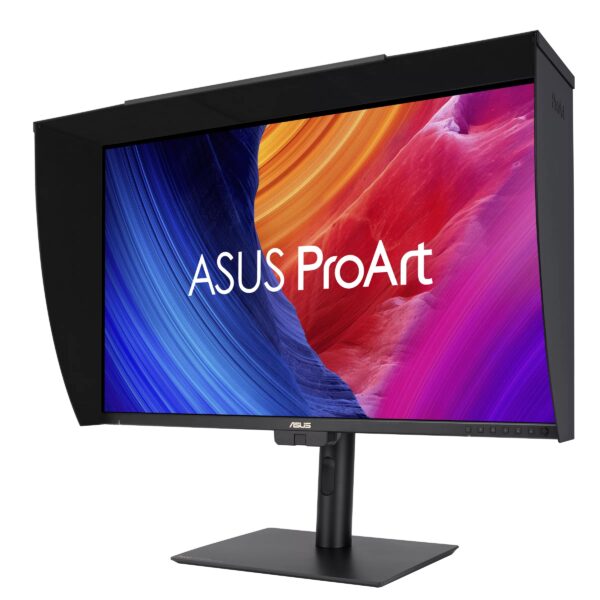
    Asus ProArt PA32UCE monitor - Image credit: Asus
    Asus ProArt PA32UCE monitor – Image credit: Asus

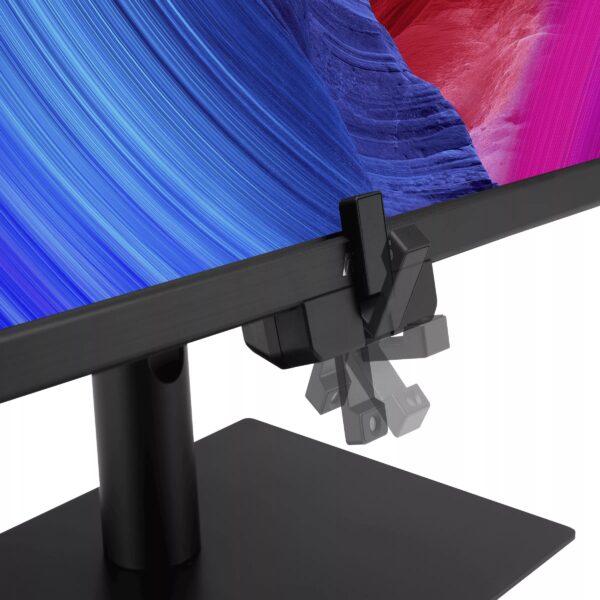
    The Asus ProArt PA32UCE 4K monitor ticks many checkboxes that video creators should look for when selecting a professional-grade display. This 31.5-inch viewable IPS LCD offers wide viewing angles and a precise factory calibration for excellent color accuracy right out of the box. A built-in motorized colorimeter can be activated to contact the screen and perform calibration checks and self-calibration as needed to keep image accuracy on target. The PA32UCE’s LED backlit screen can generate up to 600 nits of peak light output. An integrated backlight measurement system enables the display to compensate for variations in image quality during its warm-up process and throughout use. The PA32UCE’s screen features anti-glare and low-reflectivity treatments to minimize distracting artifacts. An included detachable monitor hood further reduces the interference of nearby light sources, especially in a production environment.

    Asus motorized flip colorimeter - Image credit: Asus
    Asus motorized flip colorimeter – Image credit: Asus

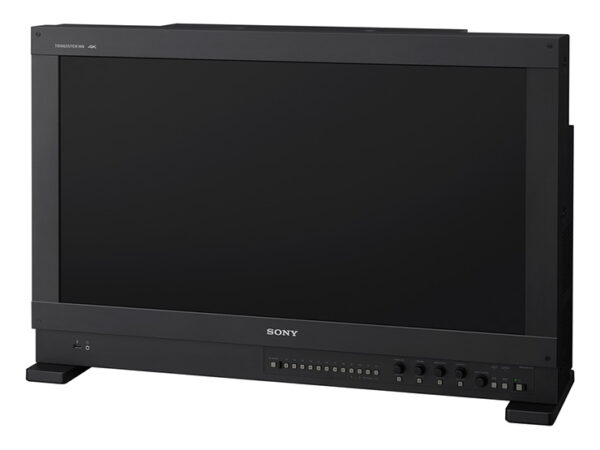
    If there is one reference display universally praised (and desired) by content creators worldwide, it would be the flagship Sony BVM-HX3110. The BVM-HX3110 is the company’s latest 4K reference monitor, featuring a “true 4K” screen resolution of 4,096 x 2,160 pixels and a dual LCD panel design – one layer handles local dimming of the LED backlight system, while the other controls color. The precise light management of this dual-layer LCD system enables the HX3110 to deliver up to 4,000 nits of peak brightness (measured on a 10% white HDR window) with practically no blooming artifacts. The Sony BVM-HX3110’s precise factory calibration also makes it an ideal tool for visual comparisons against other displays. Saying that a particular display compares well with identical source material displayed on a Sony pro monitor is high praise indeed.

    Sony BVM-HX3110 4K reference monitor - Image credit: Sony
    Sony BVM-HX3110 4K reference monitor – Image credit: Sony

    Audience Engagement

    Faith venues of all sizes can benefit from the addition of audience-facing displays. Strategically placed display systems can provide attendees with pertinent information, including scheduling reminders, related visuals to enhance the presenter’s audience engagement, and improved visibility for guests seated in larger spaces or those with visual impairments.

    LCD

    The humble liquid crystal display (LCD) is a compelling display technology due to its ability to produce detailed and bright imagery with good contrast, even in well-lit environments. LCDs are also relatively budget-friendly compared to other display types, and they are available in a wide range of screen sizes. While a consumer-oriented LCD television could find its way into use within a faith venue, commercial-grade panels are a better choice for improved durability, device control options, and signage-related features.

    The LG UP5Q-E Series LCD is an example of a commercial-grade flat-panel display that features UHD resolution (3,840 x 2,160 pixels), 500 nits of light output, and ADS/IPS LCD technology, which offers wider viewing angles without apparent image degradation compared to other LCD panel technologies, such as VA. Available in screen sizes ranging from 43 to 86 inches, the LG UP5Q-E Series can operate 24/7 and claims a 50,000-hour lifetime. The display features dust ingress protection and conformally coated circuit boards, which help resist humidity and potentially corrosive elements, such as salt air. The UP5Q’s outer casing is also certified to meet international fire safety standards related to resisting fire flame spread – a consideration for use in public spaces. I appreciate the UP5Q’s minimal bezel design, which features no prominent branding to distract from the screen’s content.

    LG UP5Q-E Series LCD - Image credit: LG
    LG UP5Q-E Series LCD – Image credit: LG

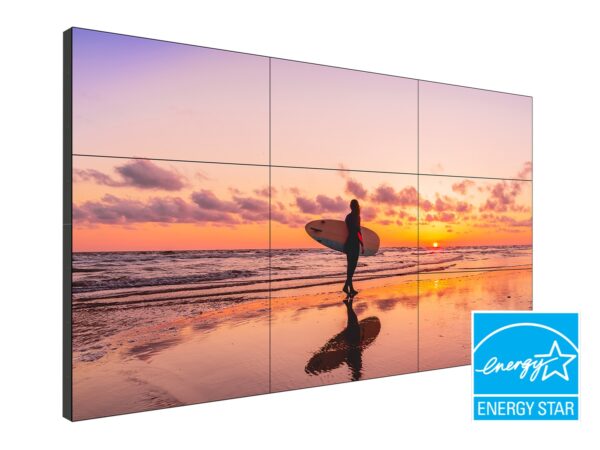
    The Planar VM55MX-M2 is an LCD well-optimized for video wall applications. The specs for the VM55MX include an IPS panel for wide viewing angles, 24/7 fanless operation, and a typical brightness of 700 nits, making it ideal for even brightly lit environments. My favorite feature of this Planar panel design is its uniform 0.44mm bezel width on all sides. This results in a tiled bezel width of 0.88mm, less than a millimeter wide, for a more seamless appearance. The VM55MX series scales up to a 10 x 10 panel video system, with optional mounts and trim pieces to assist with installation completion.

    Planar VM Series video wall - Image credit: Planar
    Planar VM Series video wall – Image credit: Planar

    As an effective and cost-saving alternative, I’m increasingly impressed with the quality of some consumer-grade large-format televisions. Available up to about 116 inches, some TVs in the 100-inch size range offer good picture brightness and contrast at street prices well under $2,000. The 98-inch TCL QM7K is an example of a large-format 4K TV that offers decent ambient light reflection handling, generating a well-contrasted and colorful picture that can sustain over 1,600 nits of light output. This kind of picture performance is ideal for bright room environments where any projector with a price tag of less than 5-figures looks washed out and dull.

    TCL 98-inch QM7K 4K TV - Image credit: TCL
    TCL 98-inch QM7K 4K TV – Image credit: TCL

    DVLED

    For venues that desire the most visual impact from a video wall system, direct-view LED (DVLED) technology delivers superb peak brightness, color saturation, and picture contrast with no practical screen size limitations beyond the budgetary. Modular in nature, DVLED displays consist of smaller, uniform LED-covered tiles supported by a backplane that also provides power and data. The greater the density of LEDs in each DVLED module, the greater the effective screen resolution for a given size. For example, a DVLED display featuring a 0.7mm pixel pitch, one of the smallest available today, can provide 4K UHD resolution at a screen size of approximately 130 inches. Increasing the pixel pitch to 0.9mm and maintaining the same 4K UHD resolution screen would result in a display approximately 160-ish inches in size.

    LG MAGNIT Pro (DVLED) module (LSAP007-N5) – Image credit: LG

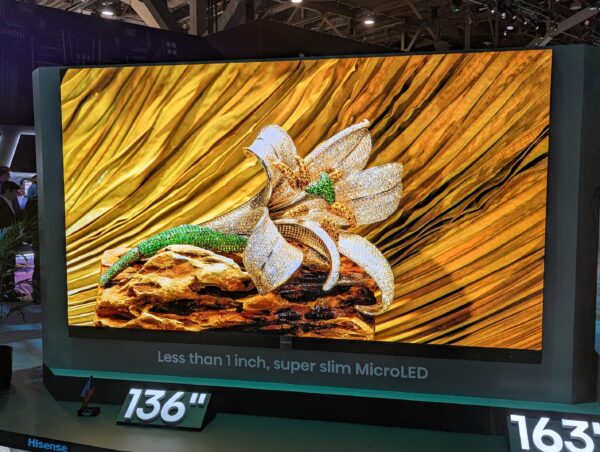
    DVLED displays from the likes of AWALL, Hisense, LG, and Samsung are readily available but still relatively expensive compared to other display technologies. The primary benefits of DVLED systems include OLED-like contrast with per-pixel light control and high brightness, without the risk of permanent image retention (i.e., burn-in). The engineering of most DVLED display systems enables them to withstand the wear and tear of being located in high-traffic environments, and they typically offer lifespan ratings of 100,000 hours.

    Hisense 136-inch 4K DVLED prototype - Image credit: Robert Heron

    Hisense 136-inch 4K DVLED prototype – Image credit: Robert HeronProjector tech

    The modern digital projector remains one of the most cost-effective means of providing a large-format display. Projectors are particularly well-suited for indoor spaces with some control over ambient lighting, which can help produce a well-contrasted image that offers a good viewing experience for the gathered congregation. For larger screen sizes or when room lighting results in a washed-out image, projector options with 3x or more the light output of standard designs are readily available without requiring an electrical upgrade.

    Faith venue projector configuration - Image credit: Digital Projection
    Faith venue projector configuration – Image credit: Digital Projection

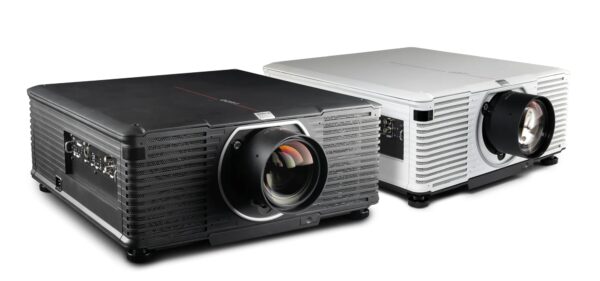
    The Barco I600 is a prime example of a feature-rich single-chip DLP projector with 4K resolution (3,840 x 2,400 pixels via pixel shifting), delivering up to 14,000 ISO lumens of light output from its low-maintenance laser-phosphor light engine, rated for 20,000 hours of use. The I600 can accommodate short and long throw distances with its wide assortment of available lens options. Installing an I600 is further eased with its relatively compact footprint, unrestricted orientation, and 14A power circuit requirement.

    Barco I600-4K15 projector - Image credit: Barco
    Barco I600-4K15 projector – Image credit: Barco

    A Digital Audience

    A faith venue’s use of display technology extends beyond simple signage, becoming a tool to aid in message delivery, guidance, and comprehension. As display options are available at practically every price point, the hardware options for driving live content production have reached a similar scope. Online content creators worldwide have led the way in leveraging low-cost tools to produce professional-looking content with minimal overhead.

    OBS Studio - Image credit: Robert Heron
    OBS Studio – Image credit: Robert Heron

    Even the smallest of congregations can experiment with capturing and streaming their services utilizing a free software platform like OBS Studio. Larger, more complex audio-visual productions in a house of worship can effectively deploy broadcast-grade gear, including dedicated video switchers and encoders. Companies like Blackmagic Design have been quick to scale their video products into more compact and affordable offerings that can produce similar results to their pro gear.

    Blackmagic Design ATEM Mini Pro - Image credit: Blackmagic Design
    Blackmagic Design ATEM Mini Pro – Image credit: Blackmagic Design

    The potential uses of display technology within a house of worship are as varied as the venues themselves. These technologies serve as a blank canvas, empowering individuals and organizations to meet the needs of their followers through creative use, and these same technologies make it easier to expand the reach of their messaging beyond its local presence.

  • AV over IP in Higher Education: From Hype to Higher Purpose

    AV over IP in Higher Education: From Hype to Higher Purpose

    For years, AV over IP (AVoIP) has been a polarizing subject in higher education. Some campus technology leaders felt like it was pushed before its time, marketed as the inevitable replacement to traditional switching and distribution even when it wasn’t ready for prime time. Others leaned in early, seeing it as a way to modernize operations, reduce costs, and position AV as a true IT-aligned service. Regardless of which side you are on you can’t deny that AV over IP in higher education is the standard today.

    However, the conversation has shifted. AVoIP is no longer an experiment or “flavor of the week.” In many higher education environments, it’s quickly becoming the default choice. Especially for new builds and major capital projects. The focus now is less about if institutions will move to AVoIP and more about how to deploy it sustainably and intelligently.

    Is AVoIP Being Forced?

    In recent years one of the strongest themes to emerge was the split perception of whether AVoIP is being “forced” on campuses. Some managers described a sense of fatigue, comparing the push for AVoIP to other hyped technologies like 8K video. This is where a tech is marketed aggressively but not immediately relevant to day-to-day needs. For these professionals, vendor-driven pressure overshadowed practical value in the early years.

    Others have framed the shift differently, calling themselves “positive disruptors.” For them, AVoIP wasn’t something imposed by manufacturers but a tool they actively championed to escape outdated, analog-bound systems. In some cases, they faced resistance at their institutions but eventually won over administrators that embraced the move wholesale.

    The reality is somewhere in between. While no one is being “forced” to adopt, campuses that want to stay current and competitive increasingly see AVoIP as the logical step forward.

    What Problems Does It Solve?

    For most, the appeal of AVoIP is less about buzzwords and more about solving practical, recurring problems in higher ed AV.

    • Replacing aging infrastructure. Legacy matrix switchers and HDBaseT backbones are hitting end of life. AVoIP offers a more flexible replacement without the massive expense of chassis upgrades.
    • Flexibility for complex use cases. Medical schools streaming surgeries to hundreds of students, or universities creating overflow spaces for popular lectures, need video to move seamlessly across rooms and floors. AVoIP enables that kind of distribution without dedicated cable runs.
    • Simplification and cost savings. Institutions want fewer cables, easier installations, and less reliance on custom programming. Many managers described plug-and-play troubleshooting and the ability to restore settings quickly without advanced coding knowledge.
    • Remote management. With small teams responsible for hundreds of classrooms, remote monitoring is no longer optional. AVoIP makes it easier to log into devices, identify issues, and even resolve them without dispatching staff.
    • Scalability. Whether adding an extra display in a lecture hall or scaling from a basic classroom to a HyFlex environment, AVoIP allows incremental growth. For budget-constrained public institutions, this flexibility is essential.

    AVoIP solves not just the what of video distribution but the how of support and sustainability in higher education.

    What Higher Ed Wants Next

    Even as adoption grows, campus leaders are vocal about what they want manufacturers to improve. First up is interoperability. The strongest demand is for a common standard across vendors. Higher ed decision-makers are tired of proprietary silos and want a Dante-like model for AV signals. Next up is troubleshooting help. Institutions want systems that provide clearer diagnostic information, even AI-assisted suggestions for resolving issues before they escalate.

    Colleges and universities also need unified management. This is driven from the increase of rooms to manage and a shrinking workforce. Instead of juggling multiple portals and control platforms, tech managers want more cohesive dashboards for monitoring, control, and updates. Finally, a secure system to ensure stability. Security remains a concern, particularly for managers with IT or cybersecurity backgrounds. Device-level standards for encryption and access are high on the wish list.

    Lessons from the Field

    One of the most consistent insights across institutions is the importance of cross-team collaboration. Successful deployments were those where AV and IT/networking teams partnered from the start. Involving manufacturer engineers early, providing network documentation, and aligning on multicast traffic needs all reduced the risk of disruption.

    On the flip side, there’s a significant risk of costly mistakes when communication breaks down. Misconfigured VLANs or underestimating bandwidth needs can lead to outages and finger-pointing between AV and IT. Higher ed institutions can’t afford to treat AV and IT as separate silos anymore. They are part of the same system.

    Training also emerged as a critical piece. Campuses need staff who can “speak both languages”. Those that are comfortable enough with network terminology to collaborate with IT, but grounded in AV use cases and workflows. This cultural alignment often determines whether AVoIP deployments thrive or stall.

    When It Fits and When It Doesn’t

    AVoIP isn’t the answer everywhere. For small, standalone classrooms or older buildings with limited infrastructure, the return on investment may not justify the added complexity. In those spaces, Zoom Rooms, BYOD kits, or even traditional point-to-point connections can be more cost-effective.

    Where AVoIP shines is in multipurpose, high-flexibility spaces: large lecture halls, auditoriums, and classrooms designed to scale with changing needs. The ability to add endpoints, reroute signals, and centralize monitoring delivers significant long-term value. Doing the ROI calculations of AV over IP in higher education is increasingly part of your job  as an IT or AV manager.

    AV over IP in Higher Education

    AV over IP in higher education is no longer just about keeping up with industry buzz. It’s about enabling campuses to scale, adapt, and sustain AV services with limited resources. The technology has matured, and its benefits align closely with higher ed’s current challenges. Getting the flexibility, remote management, and scalability for your campus is crucial to keeping up to date with AV technology.

    Success requires more than hardware. It depends on collaboration between AV and IT, a willingness from manufacturers to prioritize standards and interoperability, and a recognition that not every space requires the same solution.

    For higher ed decision-makers, AVoIP isn’t being “forced.” It’s being chosen. That’s because, when done right, it solves problems that no other approach can address as effectively.