Category: Features

  • School Safety Technology: Inside the Summer Summit

    School Safety Technology: Inside the Summer Summit

    The Partner Alliance for Safer Schools (PASS) started over 10 years ago. This year, PASS joined the Safe and Sound Schools organization for its Summer Summit. Those two days in North Carolina delivered a clear lesson. Technology can be a piece of the answer for safer schools, but not all of it. Even so, as AVNation is a technology publication, our main focus in covering this event was school safety technology. We came away with a whole lot more.

    PASS in action

    One of the biggest things PASS does is the Safety and Security Guidelines for K-12 schools. They are now on their seventh edition. It’s a checklist outlining safety guidelines in classrooms, foyers, and hallways. There are four tiers to the guidelines. As Chuck Wilson, Chair, PASS, said, “Tier four isn’t necessarily better than tier one. It depends on your school’s needs.”

    Volunteers from PASS held four PASS in action sessions during the two days. Safe and Sound Schools and PASS held the Summer Summit at West Cabarrus High School in Concord, North Carolina. That detail mattered. Hosting the event in an actual school made the PASS in action sessions possible.

    Technology tour

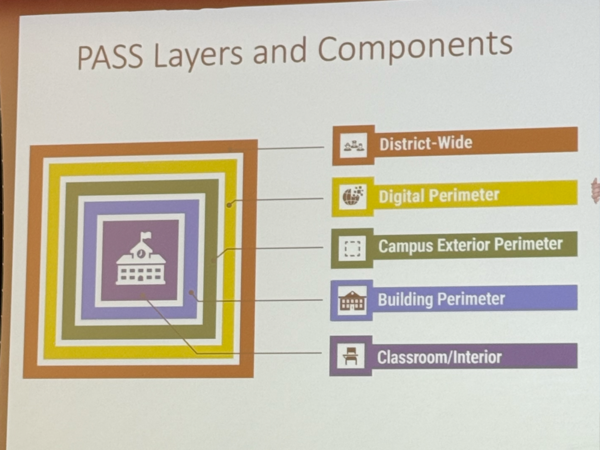
    Each PASS in action tour split participants into four separate areas to experience. This included classroom interior, foyer and entry safety, camera systems, and communication systems. The PASS Layers and Components framework names five areas of protection. They are District-Wide, Digital Perimeter, Campus Exterior Perimeter, Building Perimeter, and Classroom and Interior.

    PASS Layers
    PASS Layers

    Each guide walked through the PASS guidelines and assessed the school’s systems. They pointed out the differences between Tier 1 and Tier 4. Some of the systems at West Cabarrus were well within Tier 4. Others sat on a spectrum between Tier 1 and Tier 4.

    What made this tour valuable was the practical application. It gave people who understood the technology, but not the school safety applications, working knowledge. They could take that knowledge back to their school, organization, or integration firm.

    Keynotes on safety

    Sessions both days highlighted various areas of safety. Topics ranged from early detection of at-risk students to cybersecurity of the school system. Thursday kicked off with Michele Gay, co-founder of Safe and Sound Schools. Gay relayed her experience as a mother who lost her child in the Sandy Hook shooting.

    Gay walked through the day’s events and highlighted areas to address. Yes, these included technical considerations. One aspect involves the ability of young or disabled students to lock doors from inside. This requires door hardware with large, easily adjusted handles. But she also discussed the shooter.

    She didn’t name him specifically. Instead, she discussed what people around him could have done in the lead-up to that fateful day. This was more of a warning-sign discussion. The people in that person’s life could reach out, assess warning signs, and get them help.

    Shooting avoided

    That talk teed up the Friday morning keynote by Molly B. Hudgens. The title of Hudgens’s talk was “Saving Sycamore: The School Shooting that Never Happened.” In 2016, Hudgens was a middle school counselor who talked a student out of going through with a school shooting.

    Hudgens had spent almost 20 years researching school shootings and developing red-flag warning systems. That day, her years of preparation faced the ultimate test. She has since written a book about that day. She now talks about how to notice warning signs in troubled students.

    PASS and beyond

    One thing Gay discussed about Safe and Sound Schools was its various pillars. These include mental health, wellness, community, law and policy, and, of course, safety and security. PASS and the AV industry fit squarely into the safety and security pillar.

    Manufacturers have developed advanced systems. From gunshot detection to AI-enabled cameras, these systems go further than anything available even two years ago. But technology is only one piece of the answer. It’s gratifying to see AV play a part in something as meaningful as keeping our kids safe.

  • China’s Cheaper Sphere-Style LED Venues, Explained

    China’s Cheaper Sphere-Style LED Venues, Explained

    Two lower-cost, sphere-inspired venues in China raise questions about scale, novelty and what large-format LED can now do elsewhere.

    Las Vegas is not the only place building spherical, immersive LED venues anymore. Two China-based projects now offer a smaller, cheaper version of the idea.

    Two venues in China have built sphere-style LED architecture. According to figures discussed on a recent AVWeek episode, the projects cost roughly a tenth of the Sphere’s price tag. Host Tim Albright called the specific number in initial coverage clickbait. He said the figures still need independent confirmation.

    Still, the panel agreed the underlying trend is real. Large-format curved LED and acoustically transparent displays are now within reach of smaller developers. AVNation panelists Jennifer Weaver of AVIXA, Heather Sidorowitz of Southtown AV and Lex Evans of Epiphan discussed what that access means for the wider industry. Titles for all three are pending confirmation.

    What the two venues actually are

    Details on the two venues are still emerging. One is described as located in China’s Hubei region; the exact venue name requires confirmation. The other is a Shanghai project called “Starry Sky” near the city’s West Bund district, according to the panel.

    Both venues are smaller than the Las Vegas Sphere and purpose-built for regional cultural programming rather than mass-market entertainment.

    That distinction matters. The panel’s discussion centered on what cheaper, smaller sphere-style venues mean for the wider industry. It did not focus on direct competition with the flagship Las Vegas venue.

    Cheaper spheres, cautious optimism

    Jennifer Weaver offered a mixed reaction. She had not yet seen a show inside the original Sphere. She planned to attend that week.

    Weaver doubted the world needs identical spheres everywhere.

    “Massive replicas of the Vegas sphere all over the place? Probably not,” Weaver said.

    She compared the idea to the giant guitar-shaped hotel at Florida’s Hard Rock in Fort Lauderdale. Once a similar structure exists closer to home, she said, some of that landmark’s draw fades.

    Weaver saw a possible upside for smaller cities without major tourism draws. A scaled-down sphere, she said, could bring new cultural programming and tourism revenue to places that would otherwise be overlooked.

    “It’s a baby sphere to me,” she said.

    A competitive market could push innovation

    Lex Evans, Account Executive at Epiphan, welcomed the competition. She compared the sphere market to the smartphone industry. In her view, limited U.S. competition has left buyers with fewer, pricier choices than shoppers overseas get.

    “I’m excited because this feels like the phone market, where a few companies have monopolized America,” Evans said. “Everyone else is leagues ahead with cheaper, cooler phones. I’m hoping for some competition so we’re not fully monopolized by the world of spheres.”

    Evans also referenced additional venues in the works. These include one in Abu Dhabi and a possible Washington, D.C.-area site, raised separately by other panelists.

    Heather’s closing take: proof of concept, not a verdict

    Heather Sidorowitz, President at Southtown AV, had the panel’s final word. She sees value in both the original Sphere and its cheaper imitators, for different reasons.

    “I think one proves it’s possible and the other proves it can scale,” Sidorowitz said.

    She likened the pattern to Top Golf venues or Disney World locations, which multiply once a concept proves itself. Not everyone will travel to the original; smaller regional versions can still capture real demand.

    The bottom line

    None of the panelists expect the cheaper Chinese venues to hurt attendance at the original Sphere. Instead, the discussion pointed to a familiar industry pattern. A flagship technology proves what’s possible. Lower-cost versions determine how far it eventually spreads.

  • Cisco Adds Native Zoom Rooms Support to Its Endpoints | AVNation

    Cisco Adds Native Zoom Rooms Support to Its Endpoints | AVNation

    Cisco is done betting that customers will choose WebEx just because they already own Cisco hardware. In September, the company will launch Devices for Zoom Rooms, according to Cisco. The program puts a certified, native Zoom Rooms experience on select Cisco endpoints, including the Desk Pro G2, Room Bar, Bar Pro, Board Pro G3 and RoomKit.

    That is a meaningful shift from where Cisco stood before. Customers who wanted a Cisco room with Zoom software have had to rely on standard SIP interoperability, a workaround that required extra integration work on the back end. The new program replaces that patchwork with a fully certified experience built into the hardware itself.

    Cisco is not stopping at Zoom. The company is also deepening its Microsoft Teams Rooms integration, adding dedicated device management channels inside Control Hub and folding Copilot into its agentic tools, according to Cisco. Taken together, the moves signal a clear message: the meeting platform a customer picks, whether Teams, Zoom or WebEx, should not determine whether that customer gets a modernized Cisco room.

    What it means for entrenched Cisco shops

    Pearl Technology Executive Vice President Jeremy Caldera has spent years installing and supporting Cisco rooms for integration clients, and he called the announcement a genuine surprise. Cisco has long been known as a proprietary-first vendor, he said, and this represents a real shift in that posture.

    “Cisco’s been the king of proprietary for how long?” Caldera said. “There’s still those clients who are wholly ingrained in the world of Cisco, but they’re still needing Teams rooms and Zoom rooms.”

    Caldera does not expect the announcement to pull new customers into the Cisco ecosystem. Buyers who have already standardized on other hardware platforms are unlikely to switch because of this update alone, he said. However, he sees a clear winner in the deal: organizations already committed to Cisco hardware who previously had to maintain separate SIP-based workarounds to support Zoom or Teams rooms. Those customers no longer need that extra layer, and some had been quietly evaluating other manufacturers because of the added cost and complexity. This update removes that pressure point entirely.

    The practical effect, Caldera said, is retention rather than expansion. Cisco protects the customers it already has instead of winning converts from Crestron, HP or other platforms. For AV integrators managing mixed environments, that still matters. Fewer custom SIP integrations mean less maintenance overhead and fewer points of failure in rooms that are already in production.

    Listen to AVWeek 776

    Why this lands differently in higher education

    The higher education vertical offers a useful test case, because AV and IT are unusually intertwined there. Britt Yenser, AV Manager at Northampton Community College and an active member of the Higher Education Technology Managers Alliance (HETMA), said the Cisco-Zoom news speaks directly to a dynamic her sector already lives with daily.

    “We say across the industry that AV is IT, but that is extremely true in higher ed,” Yenser said. “We are housed within the IT department. The more that we can communicate clearly with the other IT partners and meet them where they are, the more successful we can be.”

    Cisco carries particular weight in higher education IT departments, where campus networking decisions are often made independently of the AV team and Cisco is frequently the default standard. Zoom and Google Meet, meanwhile, are common conferencing choices in that same environment. Before this announcement, an AV team wanting to standardize on Cisco hardware for a Zoom-based campus faced the same integration burden Caldera described. Now, that team can stay inside a hardware platform its IT department already trusts and supports, without a secondary integration layer.

    That alignment matters beyond convenience. When AV and IT can standardize on shared hardware, the two departments have one less point of friction in a relationship that already requires constant coordination. A tech manager fighting for network resources or endpoint budget has an easier case to make when the AV hardware sitting on that network is the same brand IT already manages everywhere else.

    The bigger picture for buyers

    For corporate IT and AV decision-makers weighing a Cisco purchase, the calculus has changed only for a specific group: organizations already leaning toward Cisco hardware who need platform flexibility on the software side. For that buyer, procurement got simpler. Fewer vendors, fewer support contracts and fewer integration points reduce total cost of ownership over the life of the equipment.

    For buyers who have not yet standardized on any single hardware platform, this announcement alone probably will not tip the decision. Platform interoperability is one of several factors in a room standardization decision, alongside cost, existing infrastructure and IT department preference. But it does remove one argument against Cisco that competitors could previously use: the idea that choosing Cisco meant locking into WebEx.

    Cisco’s September launch will be worth watching closely, particularly for how the certified Zoom experience compares to native Zoom hardware from Zoom’s own certified partners. AVNation will continue to track how the rollout performs once it reaches customers.

  • AV Technology vs. Consumer Electronics: What Changes at Work

    AV Technology vs. Consumer Electronics: What Changes at Work

    A facilities manager walks into a big-box electronics store, buys a 65-inch television for $600, and mounts it in a conference room over the weekend. Eighteen months later, the panel is dead, the warranty covered parts but not the loaner unit the business needed to keep the room running, and nobody can find a replacement with the same input configuration because the model was discontinued two product cycles ago. The room sits unusable for eleven days while a new display gets sourced and remounted.

    This isn’t a hypothetical edge case. It’s the most common way organizations discover, the expensive way, that AV technology and consumer electronics are not the same category of product wearing different price tags. They’re built to different specifications. Sold through different supply chains. Designed to fail on different timelines. The people who inherit AV responsibility without an AV background rarely find that out until something breaks.

    The differences aren’t cosmetic, and they aren’t really about price, either, though price is where most people first notice something’s off. They come down to five things a commercial AV deployment has to account for that a living room television never does: how long the thing runs, whether it talks to anything else, how many of them you have to manage, how long you can get parts, and what it actually costs when the room goes down.

    Use Case: built to run, not built to watch a movie

    Consumer displays are engineered around a use case of roughly four to six hours a day, and manufacturers design the panel, the backlight, and the cooling accordingly. The kind of displays rated for signage and conference room use are built for 16 to 24 hours of continuous operation. Often with active cooling and components chosen for thermal stability rather than peak brightness in a showroom.

    Run a consumer panel on a commercial schedule, and the failure mode isn’t dramatic. It’s gradual. Image retention, backlight degradation, and a shortened lifespan that shows up as a support ticket eighteen months in rather than an obvious defect on day one. That’s the trap. The television works fine when you buy it. The mismatch only shows up on a timeline that makes it hard to trace back to the purchasing decision.

    Integration: a room is a system, not a collection of boxes

    A home theater is a display, a soundbar, and a streaming box, each with its own remote, each operated by one household that already knows how it works. A conference room is a display, a camera, a microphone array, a control processor, a scheduling panel outside the door, and a room-booking system. All of which have to agree on what’s happening at the same time, operated by someone who has never seen the room before and needs it to just work.

    This is where consumer gear breaks down structurally rather than mechanically. Consumer electronics assume a single point of control and a single point of failure that a person can walk over and fix. Commercial AV assumes centralized control, remote diagnostics, and a system that can be managed across dozens of rooms by someone who is not physically standing in any of them. AV-over-IP exists specifically to solve a problem consumer electronics was never asked to solve: getting video, audio, and control signals across a building’s network reliably, at scale, without a technician touching every room by hand.

    AV Technology scale changes the math entirely

    One room with one bad HDMI cable is an inconvenience. Fifty rooms with the same intermittent issue is a support queue that never empties. Integrators who manage multi-room deployments for a living will point to the same pattern. The products that survive at scale are the ones with remote monitoring, predictable firmware update cycles, and centralized management built in from the start, not bolted on after the fact.

    Consumer electronics were never designed to be centrally managed because they were never expected to exist in multiples under one roof. A facility with 40 huddle rooms running consumer-grade displays doesn’t have 40 minor problems. It has one large, invisible problem that surfaces as 40 separate support tickets, none of which look related to each other until someone finally maps them.

    Parts availability and the support lifecycle

    Consumer electronics manufacturers refresh product lines annually and stop supporting discontinued models within a few years, because the assumption is that the customer will simply buy a new one. Commercial AV manufacturers build around a longer service life on purpose, with parts availability, firmware support, and compatible replacement units often guaranteed for five to seven years or more, because the assumption is that the customer cannot simply buy a new one without a procurement cycle, a budget approval, and a reinstall.

    This is the part that doesn’t show up on a spec sheet at purchase time and only becomes visible when something fails. A commercial display that costs more upfront than a consumer equivalent is, in practice, buying a longer window in which a broken unit can be matched, repaired, or swapped without redesigning the room around whatever happens to be on shelves that year.

    What downtime actually costs

    The number that gets missed in the buying decision is the cost of the room being unusable, not the cost of the equipment. A conference room that’s down for a week and a half doesn’t just cost the price of a new display. It costs every meeting that had to be relocated, rescheduled, or run without the technology it needed, multiplied by however many people were in each of those meetings. That math almost never favors the cheaper, harder-to-replace option once it actually fails.

    None of this means consumer electronics have no place in a business. A small office with one conference room and modest usage may never hit the duty cycle, integration, or scale thresholds where the distinction matters. The mistake isn’t buying consumer gear. It’s buying it without knowing which of these five factors you’re trading away, and finding out only after the room goes dark.

    Why it Matters to You

    The question worth asking before any AV purchase isn’t “can I get this cheaper at a box store.” It’s “what happens in this room when this specific piece of gear fails, and how long can I afford for that to take.” That question has a different answer for a living room and a conference room, even when the box on the shelf looks the same.

  • Microsoft Teams Presence: What IT Admins Can Configure

    Microsoft Teams Presence: What IT Admins Can Configure

    The help desk ticket arrives like clockwork. A user insists they are actively working, yet Microsoft Teams shows them as Away. Their manager noticed. Now it is your problem. You open the Teams Admin Center, expecting a timeout slider or a policy toggle. Once that happens, it’s time to look under messaging policies, meeting policies, and app permission policies. And nothing that controls this. This is where Microsoft Teams presence settings admin comes into play.

    That experience is not a configuration gap you missed. It is by design. And understanding exactly why it works that way is the difference between spending hours chasing a setting that does not exist and spending five minutes writing a clear explanation to send to your users.

    Teams presence is a three-layer system. Microsoft’s automation sits at the top. Users occupy the middle. Admins control the least. This article maps each layer precisely, so IT teams can stop troubleshooting what Microsoft does not allow them to touch.

    How Microsoft Determines Status Automatically

    Microsoft controls the core presence engine. Users and admins work within whatever that engine calculates. Understanding what triggers automatic status changes explains why most help desk tickets about Away status cannot be resolved through policy.

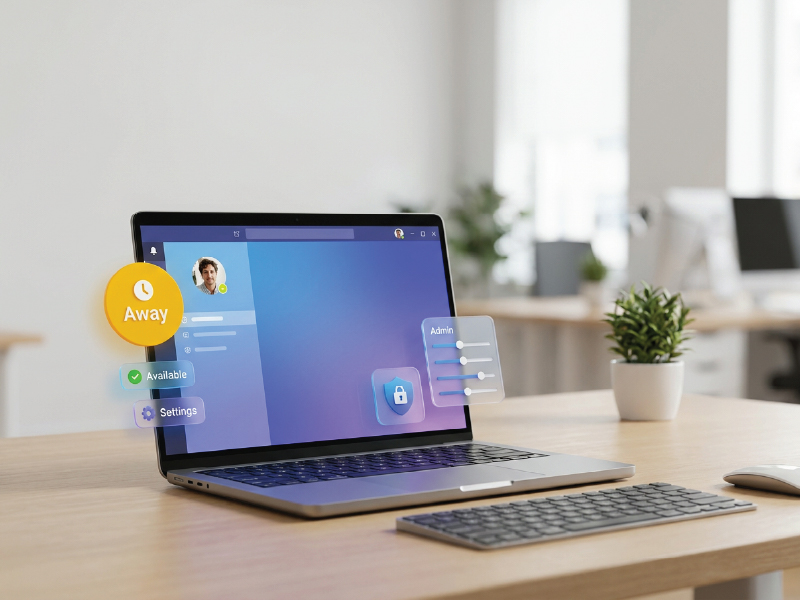
    On a desktop or laptop, Teams sets a user’s status to Away after a few minutes of inactivity. It also triggers Away when the computer locks. When the device enters sleep mode, Teams shifts that user to Offline. None of these thresholds are adjustable through the Teams Admin Center or PowerShell.

    Mobile devices follow different rules. The Teams app moves a user to Away whenever the app drops to the background. After 24 hours of inactivity on mobile, Teams marks that user as Offline. Again, these are platform-level behaviors that Microsoft controls.

    Multi-device presence adds another layer of complexity. When a user runs Teams on a laptop and a mobile phone simultaneously, the most recently active device determines their displayed status. A user who closes their laptop and picks up their phone transitions from whatever the laptop showed to whatever the phone calculates. Presence follows activity, not intention.

    Read more: teams location tracking

    Apps and Calendars

    Calendar integration adds further automation that admins cannot disable. When Teams connects to Outlook, it reads calendar events and adjusts presence accordingly. A calendar block shows the user as In a meeting during that window. Out of Office automatic replies trigger the Out of Office presence indicator. Users enrolled in Microsoft Viva Insights can schedule focus time, which triggers a Focusing status and silences all notifications for that block. Calendar integration is always on when Teams is paired with Outlook. Admins cannot turn it off.

    App states generate their own automatic statuses. A user presenting their screen automatically shows as Presenting. A user in a Teams call shows as In a call. These system-generated states sit above user-configured statuses in the priority hierarchy. Microsoft defines that hierarchy as: Available, Busy, In a meeting, In a call, Do Not Disturb, Be right back, Away, Offline. A less available status cannot override a more available one unless the user is in a call or meeting.

    What Users Can Control

    Users have meaningful control over their presence, but that control operates within Microsoft’s calculated baseline. Understanding this distinction helps admins set accurate expectations.

    Users can manually select any status that is less available than their system-calculated state. If Teams calculates Available, they can choose Busy, Away, or Appear offline. They cannot manually set Available if the system calculates something less available, except when they are in a call or meeting, in which case any manual status selection persists for the duration.

    Manual status settings persist according to type. Appear offline holds indefinitely. Busy and Do Not Disturb reset after one day. Any other manually set status resets after seven days. Users can also set a custom duration through the status menu, choosing from preset intervals or a specific date and time. When the duration expires, Teams returns to the automatically calculated status.

    Do Not Disturb offers user-level customization that admins should know about. Users can build a priority access list under Settings and then Privacy. People on that list can send banner notifications and calls through regardless of Do Not Disturb. Users can also control whether Teams enters Do Not Disturb automatically during screen sharing, though this defaults to on. Admins cannot manage either of these settings through policy.

    Users can set status messages, which display below their name to anyone who views their profile. These accept plain text and can be set to expire automatically. Status messages are editorial, not functional, and they do not affect routing or notification behavior.

    What IT Admins Can Actually Configure

    The admin control surface for Teams presence is narrow. That is not a criticism of IT teams who expected more. It reflects a deliberate Microsoft architectural choice to centralize the presence engine. Here is what admins can genuinely change.

    External presence visibility. By default, any Teams user in any organization can see your users’ presence. Admins can restrict this through external access policies in the Teams Admin Center. These policies control which external organizations can initiate chat and calls, and they affect whether external users can see your presence at all. You can allow all external organizations, restrict to specific trusted domains, or block all external presence sharing.

    Privacy mode. Privacy mode is a tenant-wide setting that prevents your organization’s presence from being shared outside your tenant, regardless of external access settings. It is managed through the Microsoft Teams PowerShell Module only. There is no toggle for it in the Teams Admin Center. This is a technical-layer control.

    To enable privacy mode, run the following command in the Teams PowerShell Module:

    Set-CsPrivacyConfiguration -Identity global -EnablePrivacyMode $True

    To disable it:

    Set-CsPrivacyConfiguration -Identity global -EnablePrivacyMode $False

    Microsoft notes that changes to privacy mode can take several hours to propagate across the tenant. Plan accordingly before using this setting in response to a time-sensitive incident.

    Additional Settings

    Upgrade mode policy and Outlook presence. When a user account’s upgrade mode policy is set to TeamsOnly, Outlook reads presence data from Teams. If it is not set to TeamsOnly, Outlook talks to Skype for Business instead. This matters in hybrid environments and during migrations. Admins control upgrade mode through the Teams Admin Center under Teams upgrade settings. Getting this wrong causes Outlook to display stale or incorrect presence data, which often generates help desk tickets that look like a Teams problem but are actually a coexistence configuration issue.

    Call queue routing. Teams call queues can use presence to route inbound calls. Agents set to Away or Offline do not receive routed calls. Admins configure this behavior when setting up the call queue itself. It is not a presence policy per se, but it is a meaningful way that admin-controlled infrastructure responds to presence state.

    What Admins Cannot Control

    This section carries more practical value than the one above. Knowing what you cannot configure stops you from spending time looking for a control that does not exist. More importantly, it gives you the language to close help desk tickets accurately.

    Idle timeout thresholds are not configurable. There is no Teams Admin Center setting and no PowerShell cmdlet that lets you change when Teams transitions a user from Available to Away. The few-minutes threshold Microsoft uses is hardcoded into the platform. If your organization runs extended workflows where users monitor screens without interacting with their computers, those users will show as Away. No admin policy fixes this. The fix is a workaround at the device level, not a Teams configuration.

    Calendar integration cannot be disabled. When Teams runs alongside Outlook, the calendar-to-presence connection is always active. Admins cannot disconnect it through any current Teams policy. If a user’s calendar shows a three-hour external meeting block, Teams will show them as In a meeting for three hours regardless of their actual activity. This creates a known class of presence inaccuracies that users experience as a bug but that Teams is functioning correctly.

    Do Not Disturb and Breakthrough are always enabled. In Skype for Business, admins could configure whether DND was available and whether Breakthrough exceptions were permitted. Teams removes both of those controls. DND is always available to users. The Breakthrough priority access list is always available. Microsoft’s documentation explicitly notes that the ability to customize these settings through admin policy is not currently supported.

    Advanced Microsoft Teams presence settings admin

    The Away Since indicator is always enabled in hybrid environments. When an organization runs both Teams and Skype for Business, the Last Seen or Away since timestamp is always displayed for users. Admins cannot suppress it. If your organization is in a hybrid state, users will see exactly how long colleagues have been Away. This surfaces information some organizations would prefer to control. Currently, they cannot.

    There is no per-user or per-group presence granularity. Admins cannot set different presence behavior for executives, part-time staff, contractors, or any other user segment. The external access and privacy mode settings apply at the tenant level. There are no presence-specific policies assignable to individual users or security groups through the Teams Admin Center.

    That last point tends to surprise IT teams who are accustomed to the policy granularity Teams provides in other areas. Meeting policies, messaging policies, and app permission policies all support per-user and group-based assignment. Presence does not. The gap is real, it is documented, and it has persisted across multiple product cycles.

    The Admin’s Real Job Here: Communication, Not Configuration

    Here is the uncomfortable truth about Teams presence administration. The most effective thing most IT admins can do is write a clear document explaining how presence works and distribute it to their users. That is not a failure of technical skill. It is an accurate read of what the platform provides.

    Users who understand that Away triggers automatically after a few minutes of inactivity are less likely to file a help desk ticket when it happens. Users who understand that calendar blocks override their manual status will stop trying to set themselves as Available when Teams keeps correcting them. User education is not a workaround. In this case, it is the solution.

    Microsoft Teams presence settings admin steps

    A few concrete steps produce the most return:

    • Build a one-page internal reference that maps each automatic trigger to the status it produces. Include the multi-device logic. Publish it on your intranet.
    • Train users on the duration feature. Most users do not know they can set Do Not Disturb for exactly 90 minutes and have Teams reset it automatically. That feature eliminates a significant category of manual status complaints.
    • When a presence complaint comes in, ask first whether the user had a calendar block, a locked screen, or a mobile device in the background. These three triggers account for the majority of Away status confusion.
    • Use the priority access list as a management communication. If leadership wants to be reachable through DND, have those users build their priority access lists. Do not promise an admin policy solution that does not exist.
    • For organizations with real external presence concerns, engage privacy mode through PowerShell. It is the one lever with meaningful organizational impact.

    Microsoft’s presence architecture reflects a specific product philosophy: the system should know where you are based on your actual activity, not based on what you told it an hour ago. That philosophy produces accurate presence data most of the time. It also produces the Away status that users complain about when they step away from their keyboard to attend a whiteboard session three feet from their desk.

    Admins cannot change that tradeoff. They can help their organizations understand it.

  • The ROI Problem in Retail AV Investments

    The ROI Problem in Retail AV Investments

    Retail’s Measurement Gap Is an AV Problem

    Retailers are investing heavily in immersive displays, digital signage networks, interactive kiosks, smart shelves, and AI-powered customer engagement platforms. The logic behind these investments is easy to understand. As e-commerce continues to reshape consumer expectations, physical stores are under increasing pressure to offer experiences that cannot be replicated through a website or mobile app. The store is no longer just a place to complete a transaction. It has become a brand touchpoint, a fulfillment center, a media channel, and a data collection environment all at once.

    Yet despite growing investments in retail audiovisual technology, many organizations still struggle to answer a deceptively simple question: Did the technology actually deliver business value?

    That question matters more than ever. Global technology spending is expected to reach $4.9 trillion in 2025, according to Forrester, driven by investments in software, cybersecurity, AI, and digital transformation initiatives. Retailers are participating in that broader technology expansion, but capital budgets remain under scrutiny, particularly as economic uncertainty continues to pressure margins.

    The challenge is that many retail AV projects are still approved based on aesthetics, competitive pressure, vendor promises, or a fear of falling behind industry trends. While those factors may influence purchasing decisions, they do little to help retailers justify investments after deployment. The real challenge is no longer implementing technology. It is establishing a framework that can connect technology investments to measurable business outcomes.

    For AV integrators, IT leaders, consultants, and manufacturers, this represents a significant shift in thinking. The conversation must move beyond display resolution, hardware specifications, and deployment costs. The organizations creating the most value from retail AV systems are increasingly focused on customer behavior, operational efficiency, business intelligence, and long-term strategic outcomes.

    “The biggest risk in retail AV isn’t choosing the wrong technology. It’s failing to define success before deployment.”

    Why Traditional ROI Models Fail in Retail AV

    Retail AV outcomes rarely fit neatly into traditional cost-versus-revenue calculations. Unlike manufacturing equipment or warehouse automation systems, customer-facing technologies often influence behavior indirectly. Their value is real, but it can be difficult to isolate and quantify.

    The Attribution Challenge

    One of the most persistent obstacles in measuring retail AV ROI is attribution. Modern customer journeys are increasingly fragmented across physical and digital channels. A customer may discover a product through social media, research it online, encounter promotional content on an in-store display, receive a loyalty program offer, and complete the purchase days later through an app.

    In that environment, assigning revenue credit to a single technology touchpoint becomes nearly impossible.

    This challenge is compounded by seasonal fluctuations, promotional campaigns, inventory availability, pricing strategies, and local market conditions. Marketing teams often evaluate customer engagement metrics, while operations teams focus on store performance and IT departments prioritize reliability and uptime. Each stakeholder may be measuring success differently, making it difficult to establish a unified ROI framework.

    The result is a common scenario across retail environments: technology is perceived as valuable, but its impact remains difficult to prove.

    The Hidden Costs of Ownership

    The ROI conversation often becomes even more complicated when retailers fail to account for the full cost of ownership.

    A digital signage deployment involves far more than displays and media players. Ongoing content development, software licensing, cybersecurity protections, network upgrades, cloud services, device monitoring, maintenance programs, and staff training all contribute to operational costs throughout the lifecycle of the system.

    These expenses can significantly alter ROI calculations if they are not considered from the outset. In many cases, organizations underestimate the resources required to maintain content freshness, ensure security compliance, and support long-term scalability.

    For IT leaders, cybersecurity is becoming a particularly important consideration. Every connected endpoint introduces potential risk. Retail AV systems increasingly operate as part of broader enterprise networks, requiring the same security controls and governance standards applied to other critical technology assets.

    Expert Insight: ROI calculations should include the entire technology ecosystem, not just the display hardware.

    Defining the Metrics That Actually Matter

    If traditional ROI calculations fall short, retailers need a different measurement framework. The most effective organizations are shifting their focus from technology metrics to business metrics.

    Historically, many AV projects have been evaluated using indicators such as screen impressions, device uptime, content playback statistics, or deployment scale. While those measurements provide operational visibility, they offer limited insight into business performance.

    A display viewed by thousands of customers may create little value if it fails to influence behavior. Conversely, a targeted deployment with modest audience reach may generate meaningful business outcomes if it improves conversion rates or increases customer engagement.

    Successful retail AV strategies increasingly align measurement with specific business objectives. Customer dwell time, basket size, loyalty program participation, conversion rates, queue reduction, employee productivity, and customer satisfaction scores often provide a clearer picture of value creation than technology-centric metrics.

    From Vanity Metrics to Business Metrics

    The distinction between activity and impact is becoming increasingly important.

    Screen impressions measure exposure. Customer actions measure influence.

    Device uptime measures availability. Employee efficiency measures operational value.

    Audience reach measures visibility. Revenue contribution measures business performance.

    Retailers that successfully connect AV investments to meaningful business outcomes are often those that establish baseline metrics before deployment and continuously measure changes after implementation.

    Consider a retailer deploying digital signage to promote seasonal merchandise. Measuring the number of impressions generated by the content provides useful operational data. However, measuring whether the campaign increased conversion rates, boosted basket size, or improved promotional sell-through rates provides insight into actual business impact.

    That distinction separates successful ROI programs from technology deployments that struggle to demonstrate value.

    Data Integration Is the Missing Link

    One of the most overlooked barriers to measuring retail AV ROI is the inability to connect AV-generated data with broader business intelligence initiatives.

    Modern retail environments generate enormous volumes of information. Point-of-sale systems, customer relationship management platforms, loyalty programs, inventory management tools, workforce management applications, and analytics platforms all produce valuable insights. Yet AV systems frequently operate within their own isolated environments.

    The consequences are significant.

    A retailer may know that customers engaged with a promotional display but lack the ability to determine whether those interactions influenced purchasing behavior. Marketing teams may see campaign performance metrics without visibility into in-store engagement data. Operations teams may identify traffic patterns but struggle to correlate them with content performance.

    These data silos create a measurement problem.

    As retailers pursue unified commerce strategies, interoperability is becoming increasingly important. Open APIs, shared data standards, and integration capabilities are emerging as critical purchasing criteria. Organizations want technologies that contribute to a broader ecosystem rather than creating additional operational complexity.

    Research across the retail sector increasingly highlights the importance of unified commerce platforms capable of connecting customer interactions across channels. The same principle applies to AV. The more connected a system becomes, the easier it is to demonstrate business value.

    “Disconnected systems don’t just create technical complexity. They obscure business value.”

    AI, Analytics, and Retail Media Networks Are Reshaping the ROI Conversation

    The role of retail AV is expanding beyond communication and engagement. Increasingly, it is becoming part of a broader data and analytics strategy.

    Artificial intelligence is accelerating this transformation. AI-powered content management systems can dynamically adjust messaging based on audience demographics, inventory levels, weather conditions, traffic patterns, or purchasing trends. Advanced analytics platforms can help retailers understand customer engagement and optimize content performance in near real time.

    This shift fundamentally changes the ROI conversation. Instead of evaluating AV solely as a customer-facing expense, organizations can begin measuring its contribution to operational intelligence and business decision-making.

    Retail media networks represent another important development. What was once viewed as a digital signage investment is increasingly being evaluated as advertising infrastructure.

    According to eMarketer, retail media continues to be one of the fastest-growing advertising segments, with retail media ad spending projected to maintain a compound annual growth rate of more than 17% through 2028. Nielsen reports that U.S. retail media spending is expected to reach approximately $60 billion in 2025 and could approach $100 billion by 2028.

    For retailers, this creates opportunities to monetize in-store displays through brand partnerships and sponsored content. In-store digital media is increasingly viewed as part of a broader retail media strategy rather than simply a customer experience initiative.

    However, the opportunities created by AI and analytics come with responsibilities. Privacy regulations, cybersecurity requirements, data governance frameworks, and ethical AI considerations must all be incorporated into deployment strategies. Retailers seeking to leverage audience measurement and personalization technologies must balance innovation with consumer trust.

    Building a Cross-Functional Business Case for Retail AV

    One reason retail AV projects often struggle to demonstrate ROI is that different stakeholders define success differently.

    Store managers typically prioritize operational efficiency and customer flow. Marketing teams focus on engagement and brand perception. IT leaders evaluate security, interoperability, and support requirements. Facilities teams are often concerned with maintenance, scalability, and long-term operational costs.

    Without alignment, even successful deployments can face criticism because stakeholders are measuring different outcomes.

    Building a stronger business case requires a cross-functional approach that begins before technology selection. Organizations should define business objectives, establish baseline metrics, identify data sources, conduct pilot deployments where appropriate, and continuously optimize performance after implementation.

    This process helps ensure that AV investments support broader organizational goals rather than isolated departmental priorities.

    The procurement landscape is also evolving. Many retailers are exploring AV-as-a-Service models, subscription-based platforms, and managed service agreements that shift conversations away from capital expenditures and toward long-term operational outcomes. These models place greater emphasis on measurable performance and continuous optimization, reinforcing the importance of robust ROI frameworks.

    For integrators and manufacturers, this evolution presents an opportunity to move beyond hardware discussions and become strategic partners in business transformation initiatives.

    The Future of Retail AV ROI: Measuring Experience as a Business Asset

    The definition of ROI in retail is expanding.

    Historically, organizations focused primarily on immediate revenue impact. Increasingly, retailers are recognizing that customer experience itself is a measurable business asset. Customer lifetime value, brand affinity, employee retention, first-party data acquisition, sustainability initiatives, and omnichannel engagement all contribute to long-term business performance.

    Many of these indicators are influenced by AV technology even when they cannot be directly tied to a single transaction.

    This broader perspective aligns with a larger shift occurring across enterprise technology. Organizations are increasingly evaluating technology investments based on their ability to generate insights, improve operational agility, and strengthen customer relationships.

    Retail AV systems are becoming part of that conversation. Rather than functioning solely as communication tools, they are evolving into platforms that generate data, support decision-making, and contribute to enterprise digital transformation initiatives.

    The retailers that gain the greatest advantage will be those that stop viewing AV as a collection of displays and endpoints and start treating it as part of an integrated business intelligence strategy.

    “The next generation of retail AV leaders won’t ask whether technology pays for itself. They’ll ask how quickly insights can improve the customer experience.”

    The question facing the industry is no longer whether retail AV creates value. The more important question is whether retailers have the measurement frameworks, integration strategies, and organizational alignment needed to recognize that value when it appears.

    FAQs

    How do retailers calculate ROI for digital signage?

    Retailers should combine revenue metrics with customer engagement data, operational efficiency measurements, and loyalty indicators to create a more complete ROI model.

    What metrics are most important for retail AV investments?

    Customer dwell time, conversion rates, basket size, queue reduction, customer satisfaction, employee productivity, and system reliability are among the most valuable metrics.

    How can retailers connect AV systems to business outcomes?

    Integrating AV platforms with POS systems, CRM applications, loyalty programs, and analytics tools helps retailers understand how technology influences customer behavior and business performance.

    What role does AI play in retail AV ROI?

    AI can improve content relevance, automate optimization, enable predictive maintenance, support audience measurement, and generate actionable insights from customer interactions.

    What are the biggest challenges in proving retail AV ROI?

    The most common challenges include fragmented data, unclear success metrics, hidden operational costs, attribution difficulties, and limited integration between technology platforms.

  • ADI Global Distribution Is About to Become Its Own Company

    ADI Global Distribution Is About to Become Its Own Company

    Resideo Technologies plans to spin off ADI Global Distribution as an independent public company. The separation is expected to close in the second half of 2026. For AV integrators and end users who rely on ADI’s distribution network, the change is worth understanding now.

    ADI Global Distribution (ADI) has long operated as the wholesale distribution arm of Resideo Technologies (NYSE: REZI). That structure is ending. Resideo announced in July 2025 its intention to spin off ADI as a separate, publicly traded company. The separation is on track to complete in the second half of 2026.

    For AV and IT professionals, ADI is not a background player. The distributor carries more than 500,000 professionally installed products across security, fire, audio-visual, access control, smart living, and data communications. It also owns and distributes several brands that are fixtures on commercial AV job sites, including Control4, OvrC, Araknis Networks, and WattBox.

    Why the split is happening

    Resideo operates two distinct businesses. Its Products and Solutions segment manufactures residential controls and sensing devices under brands like Honeywell Home and First Alert. ADI, meanwhile, is a global wholesale distributor with a footprint and customer base that extend well beyond residential. The two businesses serve different markets and require different strategies.

    Jay Geldmacher, Resideo’s president and CEO, described the separation as “the next, most natural step,” allowing each business to pursue its own path without compromise. Geldmacher plans to retire upon completion of the separation. Rob Aarnes, currently president of ADI, will lead the independent company.

    In the 12 months ending March 29, 2025, ADI reported net revenue of $4.5 billion. Its adjusted EBITDA margin for that period was 7.5%. Those numbers reflect a business operating at meaningful scale as a standalone entity.

    What this means for AV and IT end users

    ADI serves the commercial AV market through its direct sales channels, branch network, and online platform. Its exclusive brands give it particular relevance for integrators speccing Control4 automation systems, OvrC remote management tools, or Araknis network infrastructure. Those relationships sit inside ADI, not Resideo.

    The separation does not alter ADI’s product portfolio, supplier relationships, or exclusive brand agreements. ADI’s leadership team stays in place. The change is structural: ADI will answer to its own board and shareholders rather than operating as a segment inside a larger manufacturer.

    That structural independence can cut both ways. On the positive side, ADI gains direct access to capital markets and can pursue acquisitions without competing for resources with a manufacturing parent. On the other side, it takes on the full obligations of a public company, including quarterly earnings pressure and investor scrutiny that were previously shared across Resideo.

    What to watch

    The spin-off still requires several steps. Resideo must file a Form 10 registration statement with the U.S. Securities and Exchange Commission (SEC), complete financing arrangements, and secure additional regulatory approvals. The separation does not require shareholder approval.

    Resideo has not confirmed the exact completion date beyond “second half of 2026.” AV integrators and IT procurement teams with ADI distribution agreements or active Control4 or OvrC deployments should monitor the transition for any changes to account terms, support structures, or brand program details as the new company takes shape.

    Resideo’s full announcement is available at investor.resideo.com.

  • InfoComm 2026 Recap: Where the Pro AV Industry Is Heading

    InfoComm 2026 Recap: Where the Pro AV Industry Is Heading

    InfoComm 2026 is in the books. The show drew 28,132 verified attendees and 807 exhibitors, according to AVIXA. That is slightly below 2025’s more than 31,000 attendees. However, a broader look at the past five years tells a clearer story: InfoComm has settled into life as a roughly 30,000-attendee show.

    One number stands out. AVIXA reported that 37% of this year’s verified attendees were end users. That figure is up from 2025. For a show that started as a trade channel event, that shift matters.

    The technology on the floor reflected where the industry is heading. Specifically, it pointed toward simpler control, maturing display markets, and the move to software-first. Here is what caught our attention.

    E Ink Goes Big

    E Ink made its InfoComm debut this year, and the booth was worth the stop. The company showed multiple color ePaper platforms, including E Ink Marquee, Spectra 6, Kaleido 3, and Prism 3. A 75-inch tiled Spectra 6 display was a centerpiece of the exhibit.

    ePaper is not a new technology. But large-format, full-color ePaper for professional signage is still relatively early. The value proposition is simple: the display consumes power only when the content changes. For lobbies, wayfinding, and corporate communications, that is a meaningful operational advantage. The Kaleido 3 platform supports faster refresh rates and partial updates, which opens up more dynamic use cases without abandoning the low-power architecture.

    For facilities and IT managers thinking about digital signage, E Ink is worth watching. It will not replace every LED wall. However, it offers a genuinely different option for environments where always-on brightness is not required.

    https://www.instagram.com/reel/DZxeruSFPNg/?utm_source=ig_web_copy_link&igsh=MzRlODBiNWFlZA==

    Control Gets More Interesting

    Two companies on the floor signaled the same shift: the AV control market is moving away from proprietary ecosystems.

    Biamp introduced Workplace Control, a new control platform that brings together intelligent controllers, touch interfaces, and room management into a unified system. The platform targets enterprise-scale deployments and integrates with Biamp’s existing Tesira and Parlé product families. It represents Biamp’s clearest statement yet that control is now a core part of its business, not an add-on.

    Meanwhile, Visionary Solutions took a different angle. The company introduced We-Cosystem, built on the open-source Node-RED platform. The pitch is interoperability: instead of locking customers into a vendor-controlled framework, We-Cosystem lets users tap into existing code and integrate across a wider range of technologies. For IT managers who have spent years untangling proprietary system dependencies, that argument lands.

    Both approaches solve the same underlying problem. Managing AV systems at enterprise scale requires control infrastructure that works the way IT infrastructure works: visible, manageable, and not held hostage to a single vendor.

    Wireless Dante Arrives

    Aurora Multimedia announced a new architecture that brings Dante and AES67 audio networking over Wi-Fi. According to Aurora, no company has previously achieved this with a full microphone and speaker system. The RXT-4DW SmartSpeak earned a Best of Show nomination at this year’s show.

    Dante, developed by Audinate, has become the standard for professional networked audio over wired Ethernet. Extending that capability to enterprise Wi-Fi infrastructure is a significant step. It opens possibilities for flexible deployments that wired-only architectures simply cannot support. Think conference spaces that need audio distribution without cable runs, or temporary event setups that need to connect to an existing Dante network.

    The important caveat is that Wi-Fi audio introduces latency and reliability variables that wired Ethernet does not. Aurora plans to demonstrate the technology in real conditions, and the industry will be watching closely. Nevertheless, the announcement changes the conversation about what a Dante network can look like.

    dvLED Grows Up

    The direct-view LED display market, known in the industry as dvLED, reached a clear milestone at InfoComm 2026. It is no longer a specialty product. It is a mainstream category, and established display brands want in.

    Epson made the most visible statement. The projector company introduced its first dvLED line, the LE-C1 Series, at InfoComm. The lineup uses chip-on-board (COB) technology and comes in 135-inch and 162-inch Full HD models, plus a 135-inch 4K model. According to Epson, the LE-C1 is operating system-free, which reduces maintenance and security vulnerabilities. U.S. availability is planned for summer 2026.

    Sony pushed further into the category with the Crystal LED UNIFY, a 135-inch all-in-one dvLED display aimed at corporate boardrooms and higher education. The UNIFY ships as five pre-assembled panels and a control unit. Two people can complete installation in approximately one hour, with no electrical work required. Sony expects to price the UNIFY at $55,000, well below comparable modular configurations. Availability is planned for early 2027.

    Planar introduced the Cobra Series, powered by two proprietary technologies: EverPixel and TruMicro. EverPixel incorporates pixel-level redundancy directly into the display, meaning the panel can maintain image quality even if individual pixels fail. TruMicro uses LEDs as small as 20 micrometers to approach true MicroLED performance. The Cobra Series is available in 0.6, 0.7, 0.9, and 1.2 mm pixel pitches, targeting premium indoor applications. Planar CEO Sidney Rittenberg described the Cobra Series as the industry’s first ultra-fine pitch LED platform with pixel-level redundancy.

    Taken together, these announcements tell a clear story. The dvLED market has matured to the point where a projector company, a consumer electronics giant, and a display specialist are each making their own bet on the category. Competition is increasing, prices are dropping, and all-in-one options are replacing the complex modular configurations that required a specialist to install and calibrate.

    What It Means for You

    InfoComm 2026 was not a single-theme show. However, a consistent direction ran through the technology on the floor: the industry is removing friction.

    Wireless Dante removes the cable. All-in-one dvLED removes the specialized installer. Open control platforms remove the proprietary lock-in. E Ink removes the power draw. Biamp Workplace removes the reactive support model and replaces it with proactive management.

    For IT and facilities managers, these developments mean that AV is getting closer to the way the rest of enterprise technology works. Systems are becoming more manageable, more visible, and less dependent on specialized knowledge to operate. That is a meaningful shift, and InfoComm 2026 made it clear that the industry intends to keep moving in that direction.

    We have video from the show floor covering many of these products and conversations. Check AVNation.tv for the full coverage.

  • Modern Work at Crestron Masters 2026

    Modern Work at Crestron Masters 2026

    For the first time stateside, Crestron’s Modern Work event is a hands-on product training program, not a conference. Here’s what IT and AV managers will actually learn in San Antonio.

    I was in Madrid last May when Modern Work at Crestron Masters ran alongside the main Crestron Masters event in the training format it’s now bringing to the U.S. What struck me wasn’t just the curriculum. It was the range of people who had made the trip. I spoke with a technology director from Mastercard in New York. I talked to two professionals from U.S.-based higher education institutions who had flown to Spain specifically for this event. The fact that end users were making that trip to attend a Crestron training program said something about what the event had become and what it offers to the people who manage and operate these environments rather than build them.

    In November 2026, that same format comes to the United States for the first time. Modern Work at Crestron Masters runs November 10 and 11 at the JW Marriott San Antonio Hill Country in Texas, with an optional third day on November 12. Registration is open now, with early bird pricing available through June 30.

    What changed

    The distinction between this event and what Crestron ran in the U.S. in 2024 is worth spelling out. The earlier American version was adjacent to Crestron Masters. More of a thought leadership event, in the words of Chris Sgroe, who heads the Crestron training program. What’s coming to San Antonio is training in the direct sense: structured sessions built around specific new products, with instruction designed for the full range of people who design, deploy, and manage these systems.

    Sgroe describes the approach as role-based. The curriculum covers enough product depth for designers who need to spec the newest technology into upcoming projects, for technical staff who need to understand how new products fit alongside what’s already installed, and for IT and AV managers who need to understand what they’re going to find in the boardroom and how to support it.

    That breadth matters. Manufacturer training events tend to skew toward integrators and certified programmers. The main Crestron Masters program is built exactly for that audience. Modern Work is specifically designed for the people in roles who don’t live in the Crestron platform every day but are accountable for the rooms that run on it. That’s a different value proposition, and the curriculum reflects it.

    The curriculum

    The two-day core program covers Crestron’s current workplace technology portfolio through six structured sessions.

    Day one opens with a keynote framing the direction of smarter spaces, then moves directly into product content. A session on network infrastructure and deployments covers how NETGEAR AV networking and Crestron’s XiO Cloud operations management platform work together. A pairing that reflects where enterprise AV management has moved. Centralized device management, remote provisioning, and ongoing monitoring are now baseline expectations in most enterprise environments, and the session treats them as such rather than as advanced topics. The day closes with a session on DM NVX distribution and routing essentials, covering the fundamentals of AV-over-IP (AVoIP) with Crestron’s DM NVX technology and the latest updates to the platform’s capabilities and flexibility.

    Day two covers four sessions. The morning opens with DM NAX intelligent audio and Sennheiser integration. Just how network-based, Power over Ethernet (PoE)-powered audio solutions operate within a Crestron environment and scale alongside video and collaboration systems. The pairing of DM NAX and Sennheiser shows up often enough in enterprise deployments that dedicating a full session to how they work together is a practical call. From there, the program moves to AirMedia: Crestron’s wireless presentation technology, covering bring-your-own-device (BYOD) content sharing and how AirMedia fits within broader AVoIP and unified communications setups.

    AI Video

    The afternoon addresses intelligent video. Specifically Crestron 1 Beyond cameras and automated switching, covering how those solutions scale from small huddle rooms to larger meeting spaces while delivering consistent, platform-compatible video performance. The day closes with a session on Collab Compute and how AV, video, audio, and control connect with leading UC platforms across different room types.

    Collab Compute is worth singling out. It’s Crestron’s compute platform for running collaboration software inside Crestron-controlled environments. One of the more direct answers the company has offered to the question that comes up in nearly every enterprise AV conversation: how do AV control and UC platforms actually coexist in the same room, and who owns the support relationship when something goes wrong? The Masters session treats Collab Compute as the integration layer it’s positioned to be, rather than as a standalone product announcement.

    The optional third day on November 12 is a technical showcase featuring Crestron’s technology partners. It functions as a working demonstration of the integrations covered in the first two days and includes the Crestron Masters closing ceremony.

    The certification

    Completing the two-day core program earns the Crestron Modern Workplace Certification 2026. For those who attended last year in Madrid and earned the 2025 version, the 2026 credential is the update. Staying current on a platform that has changed meaningfully in twelve months. For first-time attendees, it’s the entry point to Crestron’s broader certification path: completing Modern Work certification opens access to the Certified Technical Architect (CTA) courses through the Crestron Technical Institute learning portal, which is the prerequisite for attending the main Crestron Masters program.

    The event also carries 6.0 AVIXA RUs applicable to CTS, CTS-D, and ANP certifications. For anyone managing renewal, two days in San Antonio covers meaningful ground toward that requirement.

    Who should go

    The clearest case for attendance is someone responsible for Crestron-based environments. Spaces like conference rooms, collaboration spaces, campus-wide deployments. As well as those whose day-to-day work doesn’t involve deep time in the platform. The sessions are structured to give that person an accurate picture of what the current product generation looks like, how the pieces connect, and what questions to bring back to their integrator or internal technical team.

    There’s also a strong case for designers and consultants who are specifying Crestron products for the first time, or who are returning to the platform after a product generation or two. The curriculum is built around current products, not retrospective capability reviews, and hands-on training on DM NVX, DM NAX, AirMedia, and 1 Beyond in a structured environment is worth considerably more than a manufacturer demo at a trade show.

    For IT and AV managers specifically, the network infrastructure session and the collaboration integrations session are the most directly useful. The XiO Cloud content addresses day-to-day operational management. The work that happens well after installation. The Collab Compute session addresses the integration question that surfaces in nearly every enterprise environment where AV control and UC platforms share the same room.

    Logistics

    Modern Work at Crestron Masters runs November 10 and 11, 2026, at the JW Marriott San Antonio Hill Country, 23808 Resort Pkwy, San Antonio, TX 78261. Both days run 9 a.m. to 7:30 p.m. CT and include breakfast, lunch, breaks, and dinner. The optional Day 3 runs 9 a.m. to 5 p.m. CT.

    Registration is $499 for the two-day core program. The Day 3 add-on is an additional $150. Hotel accommodations are not included; Crestron has a preferred rate at the JW Marriott available through the event’s booking link on the registration page. Early bird pricing runs through June 30. Registration is currently seeing some of the highest volume Crestron has recorded for this event. AVNation readers have access to a 50 percent discount on registration. Use code MW50-TA at checkout.

    Register and view the full schedule at Crestron’s Modern Work at Crestron Masters page.

  • AI-Enabled Conference Rooms: What Almo Pro AV’s Sales Data Tells

    AI-Enabled Conference Rooms: What Almo Pro AV’s Sales Data Tells

    Dan Smith has spent a lot of time in meeting rooms lately. Not his own. But everyone else’s. The Executive Vice President at Almo Pro AV traveled to New York City recently for six back-to-back company meetings. In five of those six stops, the meeting room technology was outdated. The sixth impressed him. That gap, Smith says, tells you everything about where the industry stands right now.

    Almo Pro AV distributes professional AV equipment across the United States. Smith sees buying patterns across thousands of end users. I sat down with him ahead of InfoComm 2026 to talk about what those patterns are telling us. The takeaways are worth your time if you manage conference rooms, classrooms, or any shared technology space.

    Audio-only is gone. Video first is the new normal.

    Smith opened with a point that sounds simple but carries real weight. “I can’t recall being on an audio-only conference call for maybe two years,” he told me. That is not a hybrid-workforce story. It is a behavior-change story, and he thinks the distinction matters enormously.

    Hybrid work gets all the press. However, Smith argues the real driver is simpler: people stopped calling and started meeting on video. Everything on his calendar from internal reviews, vendor calls, customer meetings runs on video if it is not in person. Consequently, the rooms that used to support audio-only calls now need to support video. Many of them still do not.

    That shift is changing how procurement decisions get made. Smith laid out a useful framework. Refresh projects, remodels, and new builds each have different dynamics. In a refresh, organizations often replicate what they have because consistency across networked rooms matters more than perfection in any single one. New builds are different. There, buyers want video and they want it AI-enabled from day one.

    Two megatrends are driving conference room investment.

    Smith named two forces shaping the market right now. First, organizations are moving from audio-only to video collaboration. Second, they are moving from standard video to AI-enabled video conferencing. He sees both playing out simultaneously, which makes this moment unusually active for AV procurement.

    On the AI side, Smith pointed to a Microsoft statistic he cites often. According to Microsoft, fewer than 10 percent of meeting rooms are AI-enabled today. That number gives you a sense of the runway. Smith says Almo Pro AV’s own internal culture shifted noticeably in the past year. His team now uses AI-generated transcripts and action-item summaries as a standard part of every meeting. A year ago, they rarely used the feature at all.

    The platform pull here is Microsoft Teams Rooms (MTR). Smith says MTR has emerged as the dominant force in enterprise video collaboration. The reason is straightforward: Microsoft bundled Teams with its Office suite, and most enterprise organizations already pay for the Office suite. Zoom had an early lead during COVID because it was free and easy. However, Smith sees MTR winning the enterprise over time through integration and licensing.

    For IT and AV managers, this has a direct implication. When Smith’s team looks at new room builds, buyers increasingly require two things from every component: MTR certification and AI enablement. Cameras, microphones, and control systems that lack either of those qualifications are harder to specify. The standard is moving.

    Cameras are the hardware story right now.

    Smith said something I found revealing: Almo Pro AV’s camera sales are outpacing its growth in video overall. That means cameras are pulling ahead of the broader category. The reason is AI at the edge. That’s the intelligence built directly into the camera hardware rather than handled by the room controller or the cloud.

    Specifically, buyers want cameras that can isolate and track individual speakers automatically, support multiple camera inputs in a single room, and integrate AI-driven framing without requiring manual pan-tilt-zoom (PTZ) control. Those capabilities used to live in expensive, custom-integrated systems. Now they ship in off-the-shelf PTZ cameras at accessible price points.

    Smith’s framing is useful here. The software platform handles transcription, summaries, and meeting intelligence. The hardware at the edge handles the in-room experience: who is visible, how they sound, and whether remote participants can follow the conversation. Both layers need to work well. Neither covers for the other.

    Display sizing: the 115-inch moment.

    The flat panel versus projector debate has a new variable. Smith shared a data point that surprised even him: 110- and 115-inch LCD displays are selling at five times the rate Almo Pro AV expected. They anticipated modest demand. Instead, those sizes are moving fast.

    The reason is straightforward when you think about it. The installed base of projection screens skews heavily toward 120-inch diagonal. A 115-inch flat panel comes close enough to that footprint. Moreover, it delivers better brightness, better image definition, and no lamp maintenance. For rooms already wired for projection, the total cost of switching to a 115-inch display is increasingly competitive.

    Smith said Almo is buying up 115-inch panels from every manufacturer it can find. “We’re at hundreds a month right now,” he told me. That is a meaningful volume signal from a major distributor.

    K-12 and higher ed: different problems, different answers.

    The education market splits cleanly in Smith’s analysis. K-12 schools are still buying laser-based projectors at surprisingly high volume. The infrastructure math is simple. Many K-12 classrooms already have a ceiling mount, power, signal cable, and a wall screen. Replacing an aging projector with a newer laser unit requires none of that infrastructure to change. Compare that to a flat panel retrofit: new power runs, new cable, a wall mount, and often a display too small to fill the room adequately. The projector wins.

    Higher ed behaves differently. Budgets are larger. Classrooms are larger. Smith sees more LED and high-lumen projection in auditoriums, and more large-format LCD displays in standard classrooms. He also sees multi-display configurations gaining ground. Two or three screens per room rather than one.

    On LED specifically, the all-in-one market is performing better than Smith expected. Almo Pro AV tracks all-in-one and custom LED installs as separate revenue categories. Smith expected custom modular LED to scale faster. Instead, the all-in-ones are selling at extraordinary rates. He said the revenue split runs roughly 50/50, sometimes 60/40 in favor of all-in-ones. LED revenue has roughly doubled year over year.

    The market is running ahead of expectations.

    I asked Smith for his outlook on the second half of 2026. He was honest about the uncertainty. Issues like tariffs, geopolitical instability, month-to-month unpredictability. However, he offered a concrete data point to anchor the optimism. Almo Pro AV’s business is running 12 percent above internal projections for the year. That is not a small margin.

    Furthermore, the refresh opportunity is real. Smith’s New York City week illustrated it starkly. Five of six companies he visited had outdated room technology. They all knew it. They all said they needed to upgrade. The demand is there. The question is timing and budget authorization, not whether the need exists.

    His advice to IT and AV managers: start with one fully AI-enabled room. Not the whole portfolio. One room. Use it long enough to understand what AI-enabled conferencing actually does for your team. Then bring your leadership or your end users in and show them. Smith’s argument is that the value becomes obvious once you experience it. The productivity gains from AI-generated transcripts and action items are concrete and immediate.

    The bottom line

    Smith’s view of the market is grounded in distribution data, not aspiration. The conference room is changing faster now than at any point in the past 18 months, he says. The two requirements driving new builds are not going away. Those are MTR certification and AI enablement. Display sizing is shifting toward the 115-inch sweet spot. Camera intelligence is moving to the edge. And the refresh pipeline is deep.

    If your rooms are still running audio-only infrastructure you are already behind where your peers are heading. The good news is that the technology to catch up is available, the pricing is accessible, and the business case is straightforward. Start with one room. The rest tends to follow.